TL;DR:
- Novice producers should start modular with a basic set to grow effectively.
- Essential equipment for audio is a computer, DAW, audio interface and good headphones.
- Good acoustics and proper planning are more important than expensive gear in achieving good results.
Many novice producers, musicians and video editors begin their studio adventure with a full shopping cart and an empty feeling afterwards. They buy expensive microphones before they know how to record a track at all, or invest in monitor speakers while their room sounds like a bathroom. The result: lots of money spent, few results achieved. Instead, the smartest approach is to start modular, build a solid foundation and then grow. In this article you will learn which gear you really need as a beginner, which order makes sense and which mistakes you should avoid.
Table of contents
- What is essential? Your basic studio mapped out
- Step by step: Here’s how to put together your studio
- Common mistakes and how to avoid them
- Adapting to your workflow: Audio, video and edge cases
- Our vision: why less is more in the studio
- Starting with certainty? This is what i4studio offers
- Frequently asked questions about studio gear for beginners
Key Insights
| Item | Details |
|---|---|
| Simple foundation works | With a modest set-up, you can get started professionally without unnecessary costs. |
| Acoustics are crucial | Even with simple materials, a well-appointed space provides a reliable mix. |
| Expand incrementally | Focus on the core first and then hone your studio as your workflow and ambitions grow. |
| Customization per workflow | Look critically at your usage (audio, video, live recording) and tailor your choices accordingly. |
What is essential? Your basic studio mapped out
Now that the problem is clear, let’s take a step-by-step look at the minimum set-up to get started right away. Whether you’re producing music, recording or editing video, there’s always a core set of equipment you need first.
For audio, there is a clear basic order. The basic music studio equipment consists of four components: a computer or laptop, a DAW (Digital Audio Workstation, the software you use to record and mix), an audio interface (the device that connects your microphone or instrument to your computer) and closed headphones. Only then do you expand with a microphone or monitor speakers, depending on what you’re doing. This is also exactly what Berklee recommends: a simple core chain is more than enough for most beginners to get started.
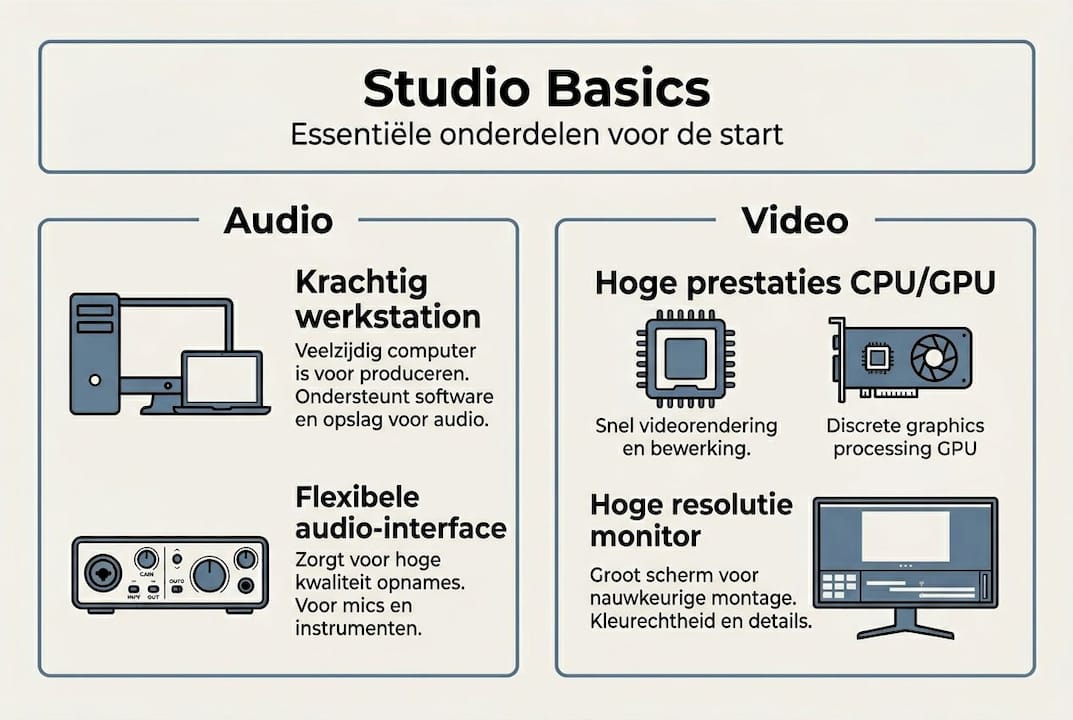
For video editing, the priorities are slightly different. Here it’s all about processing power. The video editing basics are a fast computer with sufficient RAM (at least 16 GB), ample storage (preferably a fast SSD), a good monitor with color accuracy and editing software. External recording equipment is only relevant later.
| Part | Audio starter | Video starter |
|---|---|---|
| Computer | Laptop or desktop | Powerful desktop or laptop |
| Software | DAW (e.g., Reaper, GarageBand) | Premiere Pro, DaVinci Resolve |
| Interface | Audio interface required | Not directly required |
| Monitoring | Closed headphones | Color-accurate screen |
| Recording | Later: microphone | Later: camera/capture card |
What can you skip as a starter? External preamps, hardware synthesizers, expensive studio furniture and extensive plugin libraries are not necessary in the early days. Many DAWs come with useful stock plugins with which you can achieve fine results.
“For beginning creators, a simple core chain is often enough: computer, DAW, audio interface and a good pair of closed-back headphones. Only then do you expand with microphone or monitor speakers.” Berklee College of Music
Also check out video editing essentials if you want to know what hardware video editors use most often. The overlap with audio production is greater than you think, especially on the computer front.
Step by step: Here’s how to put together your studio
After the overview, here is the concrete roadmap to confidently put together your studio. The order is not arbitrary; each step builds on the previous one.
- Computer or laptop: This is your foundation. Without stable computing power, nothing works well. Choose a machine with at least 16 GB of RAM and a fast processor for audio, and more for video.
- DAW and stock plugins: Install your DAW and get to know it well before buying external plugins. GarageBand is free for Mac users. Reaper is affordable and powerful for Windows.
- Audio interface: This is the bridge between your instruments or microphone and your computer. A reliable audio interface for beginners gives you low latency (the delay between playing and hearing) and a stable connection. Focusrite Scarlett and PreSonus AudioBox are popular choices.
- Closed-back headphones: Closed-back headphones isolate ambient noise and are ideal for recording and initial mixing. Consider models such as the Audio-Technica ATH-M50x.
- Microphone or monitor speakers: Only when you have mastered the above steps does it make sense to expand. A condenser microphone for vocals or a dynamic microphone for instruments only then adds real value.
Practical advice: choose a stable interface first for low latency and reliable recording, then monitoring and acoustics. Use your DAW-stock plugins whenever possible to speed up your workflow and learn to understand how sound works.
Pro-tip: Buy your first interface second-hand. Brands like Focusrite and Behringer hold their value well and can be found second-hand in excellent condition. That way you save budget for the step after that.
The studio decorating step by step guide on our website will help you through each stage of the build-out, from initial purchase to full-fledged workspace.
Common mistakes and how to avoid them
With the right basics and logical steps, it is just as important to know where things often go wrong. Beginners make the same mistakes all the time, and fortunately they are easy to avoid.
The most common beginner’s mistakes:
- Investing too early in expensive microphones while the interface or acoustics are not yet in place
- Buying monitor speakers for an untreated room, misjudging the sound
- Purchasing dozens of plugins without knowing your DAW’s stock plugins
- Buying a cheap computer that crashes on larger projects
- Forgetting that cables, tripod and pop filter also cost money
The biggest pitfall is the appeal of expensive gear. A new microphone sounds great in a demo, but in your untreated bedroom it sounds exactly the same as a cheaper version. Monitoring and acoustics are measurably more important than investing in expensive equipment too early. A poorly set-up room makes even good speakers unreliable.
“The space is your biggest tool. Treat that first, then your monitoring.” Advice every beginning producer should hear.
The solution is simple: start with home studio decorating tips before you make any big purchases. Cheap acoustic panels, a rug and curtains can already make a big difference in how your room sounds.
Pro-tip: Take a test recording in your room before buying gear. Clap your hands and listen to the echo. Do you hear a lot of reverberation? If so, acoustic treatment is your first investment, not a new microphone.
Which investments pay off later? External preamps, hardware compressors and high-end converters are for advanced producers. As a beginner, you hardly notice the difference. Rather invest those euros in studio acoustics optimization or in courses and tutorials.
Adapting to your workflow: Audio, video and edge cases
Every work style requires sometimes just different choices. How do you align your setup with what you really do?
A beat producer who works entirely in the box (that is, with software only, without live recordings) hardly needs a microphone. His priority is a powerful computer, a good audio interface, a creative workflow for MIDI controllers and reliable headphones. A singer-songwriter, on the other hand, does need a microphone, but can go for a long time without monitor speakers.
Video editors working with 4K or 8K have higher demands on their systems. Sample-heavy workflows and 4K/8K video require different scale, depending on priorities around monitors, latency and storage. Here, a fast GPU and lots of RAM is not a luxury but a necessity.
| User type | Priority 1 | Priority 2 | Priority 3 |
|---|---|---|---|
| Beatproducer | Powerful computer | Headphones | MIDI controller |
| Singer-songwriter | Audio interface | Microphone | Headphones |
| Video Editor | CPU/GPU power | Large screen | Fast storage |
| Hybrid creator | Computer + interface | Headphones | Camera or microphone |
Hybrid creators, people who create both audio and video, would do well to start with equipment that supports both workflows. A powerful computer is essential for both. Good headphones work for audio as well as for reviewing video audio.
Also, check out the studio setup audio/video page for specific recommendations by type of workspace. Each workflow has its own logic, and it pays to have that clear before you buy anything.
- Virtual manufacturing: Focus on computer and software, interface optional
- Live recording: Interface and microphone are core, acoustics are crucial
- Video editing: screen and processing power take center stage
- Podcasting: Interface, microphone and headphones form the basis
Our vision: why less is more in the studio
Now that we’ve covered the approach, I want to share an honest take on something we see time and again with beginners who come to us for advice.
The myth that more gear leads directly to better results is persistent. But in our experience, the opposite is true: those who learn to work with limitations develop their own sound and workflow faster. A producer who masters one good set of headphones, a simple interface and the stock plugins of his DAW makes better music than someone who gets lost in an arsenal of gear.
Focusing on creativity in simple studio conditions yields more than chasing the perfect setup. The best studio is the one you actually work in. Grow your gear with your skills, not the other way around. Invest smartly, learn thoroughly and only expand when you know what you’re missing.
Starting with certainty? This is what i4studio offers
Those who really want to get started now can immediately get more out of the right choices. At i4studio, we help beginning producers, musicians and video editors put together a setup that fits their workflow and budget.

Whether you’re looking for a complete starter kit that’s ready to use right away, or want advice on a good studio laptop or PC that fits your production needs, we’ll think with you. No unnecessary upsells, no confusing choices. Just honest advice and products that fit what you need as a beginner.
Frequently asked questions about studio gear for beginners
What is the minimum setup for home recording?
The minimum setup consists of a computer, DAW, audio interface, and closed-back headphones. You add a microphone later if you actually need it for your workflow, as Berklee points out.
Are monitor speakers essential for beginners?
No, good headphones are sufficient initially. Only invest in monitor speakers later, because a poorly set up room makes even good speakers unreliable.
Is an external preamp necessary for audio recordings?
Not for beginners. Most audio interfaces have built-in preamps that are fine for initial professional results. External preamps are only relevant when you really reach the limits of your current setup, as Berklee explains.
What is the minimum computer I need for audio and video?
For audio, a stable computer with at least 16 GB of RAM is sufficient. For video, the system places higher demands on CPU, GPU and display, depending on the resolution you work with.
How important is studio acoustics for beginners?
Acoustics determine whether what you hear is reliable. Even with basic gear, a well-treated room delivers better results immediately because monitoring and acoustics are measurably more important than expensive equipment.
Recommendation
- What do you need for a home studio? Find out here!
- Home Studio Setup Tips: Complete Guide To A Professional Studio At Home – https://i4studio.nl/
- Purchasing Studio Equipment: A Practical Guide For Professionals And Creatives – https://i4studio.nl/
- Essential music recording equipment for your home studio