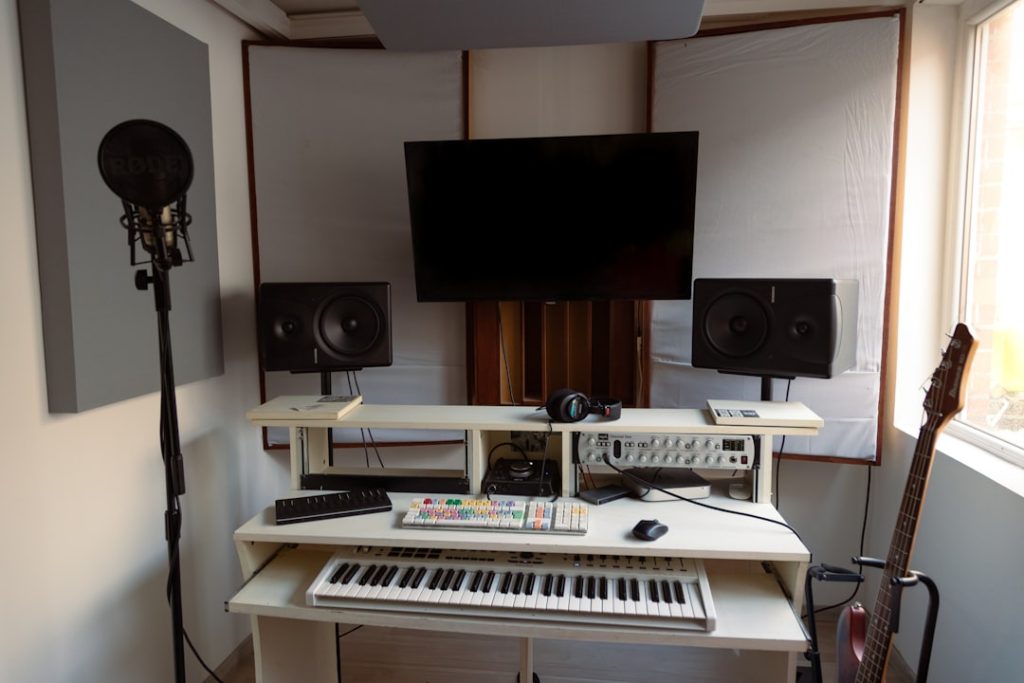
Properly designed studio acoustics transform a room from an unpredictable sound trap to a reliable, creative workspace. For audio professionals, musicians and content creators, acoustics are often the difference between a mix that gets lost and one that sounds clear and professional. This article guides readers step by step through practical principles, measurement methods and smart solutions – from budget-friendly DIY options to professional recommendations and integration with hardware such as the audio and video PCs I4studio provides.
Why setup studio acoustics is essential
Spaces react to sound: every sound is reflected, absorbed or diffused. Without conscious arrangement, a soundscape is created with coloring, standing waves and unnatural bass build-up. For those who mix or record, that means decisions about balance, reverb and EQ are made based on a misleading reference.
Thoughtful setup ensures that monitors, speech and instruments sound true to the room. That saves hours in the mix, prevents revisions and ensures that final products translate consistently to other listening environments – from headphones to club and radio. In addition, good acoustics contribute to a more pleasant workplace: less listening fatigue and more productive hours.
Basics of acoustics in studio design
Absorption, diffusion and isolation: what’s the difference?
Three key concepts are indispensable in design studio acoustics:
- Absorption reduces reflections and reverberation by converting sound energy (often into heat). Typical materials include mineral wool and acoustic foam panels.
- Diffusion disperses sound waves so that reflections are less centered and colorful. Diffusers are often wooden or plastic elements with irregular surfaces (e.g., QRD or skyline diffusers).
- Insulation (or soundproofing) prevents sound from going outside or coming in from outside. This requires building modifications: solid walls, decoupling, lead, and proper sealing of gaps.
Standing waves and modal response
In small to medium-sized studios, standing waves (moods) often dominate low frequencies. These occur when certain wavelengths resonate between parallel walls. The result is areas with excessive bass and areas with almost no bass. Targeted placement of bass traps and smart choice of listening position significantly reduces these problems.
Space analysis: measuring before treating
Visual inspection and listening test
A first step in setup studio acoustics is a simple listening session: play a reference track that is well known, then listen for unnatural bass, dull midrange or harsh treble. Next, one looks at the room: are walls parallel, is there a lot of glass, hard floors or a lot of furniture?
Measuring with software and mic
For precise decisions, measurement usually suffices better than listening alone. Many audio professionals use Room EQ Wizard (REW) in conjunction with a measurement microphone (e.g., Umik-1). This combination delivers:
- Frequency response of the listening position
- RT60 (reverberation time) by frequency band
- Impulse response and waterfall plots that show where resonances sit
Measuring helps to prioritize: sometimes one or two strategically placed bass traps is more effective than covering every wall with absorption panels.
Practical steps for setup studio acoustics
Step 1: Listening position and speaker placement
Proper basic design immediately improves the reference. Some clear rules:
- Place the speakers and listening position in an equidistant triangle (monitors form an equilateral triangle with the listening position).
- Put the tweeters at ear level when seated – this is crucial for high frequencies.
- Avoid placing the monitors directly against a wall; ideally they should be slightly (10-50 cm) from the rear wall and with slight toe-in (facing the listener).
- Maintain symmetry: asymmetry creates uneven reflections and an unbalanced stereo image.
Step 2: Handle initial reflection points
One of the most cost-effective steps in setup studio acoustics is to address the initial reflection points. These occur where sound from the monitors first hits the walls, floor or ceiling before it reaches the ears.
- Use the mirror method: someone holds a mirror to the wall; if one can see the speaker in the mirror from the listening position, that is an initial reflection point.
- Place absorbent panels (50-100 mm mineral wool or high-quality foam) there to reduce direct reflections.
Step 3: Bassstraps and low frequency management
Bass traps are crucial in almost any studio. Some practical advice:
- Start in the corners; that is where low frequency energy accumulates the most. Large corner bass traps (at least 100-200 mm thick with high density) are effective.
- Consider floor-to-ceiling corners as well as wall corners behind monitors and in the middle tunnels of the room.
- For extremely low frequencies, one can opt for “membrane absorbers” or tuned traps specifically tuned to problematic modal frequencies.
Step 4: Diffusion for vibrancy
Too much absorption makes a room fatally dry; diffusion brings back life without adding echoes. Guidelines:
- Use diffusers at the rear of the control room to maintain natural spaciousness.
- Combine absorption and diffusion: front reflection points mostly absorption, back space diffusion.
Step 5: Ceiling and floor treatment
The ceiling is an often overlooked source of reflections. A cloud panel above the listening position reduces vertical reflections and improves stereo imaging. Floors: hard floors can cause reflections – a carpet between monitors and listening position often helps well.
Materials and construction: what works and why
Comparison of commonly used materials
- Mineral wool / Rockwool: excellent performance per euro for mid and high frequencies; also available in high densities for bass traps.
- Acoustic foam: easy to fit and aesthetic, but less effective below ~200-300 Hz unless very thick.
- Wood diffusers (QRD, skyline): disperse energy without much absorption, ideal in back rooms.
- Mass loaded vinyl (MLV): used for insulation and soundproofing between spaces.
- Membrane / panel absorbers: good for addressing narrow, low-frequency problems.
Safety and fire rating
When choosing materials, one should always consider fire safety and ventilation. Mineral wool is often fire resistant, while many foams are not unless specially treated. Ventilation and respiratory safety during installation (rock wool dust) deserve attention – use gloves and a dust mask during installation.
DIY vs. professional solutions
Not everyone has budget or space for extensive DIY. Fortunately, clever DIY solutions offer great value:
- Homemade panel frames filled with rockwool and finished with fabric offer excellent performance for limited cost.
- Made-diffusers made of plywood or MDF can achieve much of the desired effect if designed properly.
- Modular, mobile panels are ideal for flexible setups or for those working in rental housing.
On the other hand, for broadcast studios and professional control rooms, hiring acoustic specialists is often faster and more effective. I4studio can offer advice and complete solutions in these cases, including supplying custom monitor calibration systems and professional mounting materials.
Integration with hardware: monitors, interfaces and high-performance computers
Acoustics and hardware work together. Even the best monitors sound bad in an untreated room, and an excellent room gets the most out of high-quality equipment.
Monitoring and listening strategy
Choose monitors that fit the room size. Large, powerful speakers in a small room cause excessive low pressure. Active nearfields are popular because they have less room interaction. Key points:
- Monitor stands or isolation pads reduce vibration transmission to furniture and floor.
- Use of a subwoofer requires careful matching (phase, crossover) and positioning; measure after placement.
Audio interfaces and signal chain
A reliable audio interface with low latency is essential. Place audio interfaces and converters where cables do not run in parallel with larger power cables to minimize noise. I4studio supplies and configures high-performance audio and video PCs specifically optimized for DAW workloads – that makes real-time monitoring and plugin-heavy sessions more stable.
Computers and performance
A well-built workstation reduces crashes and audio dropouts. Some recommendations for integration with setup studio acoustics:
- House the computer in a place where it will not cause unwanted reflections or resonances (for example, not on a hollow rack next to the monitors).
- Use quiet cooling or place the PC in a soundproof case if the fan is noise-distracting.
- I4studio offers custom systems tailored to audio production: low latency, fast storage (NVMe), and redundancy options for backup of projects.
Practical examples of setup studio acoustics
Small bedroom studio (project space)
Problems: strong modal problems, limited space, glass windows.
Approach:
- Listening position 38% of chamber length (a good starting position against modal peaks).
- Bass traps in all corners, at least 100 mm thick panels.
- Initial reflection panels on walls and ceiling cloud above listening position.
- Mobile diffuser or diffusion at the back wall if excessive dullness occurs.
Professional control room
Problems: consistent translation to other spaces, minimal coloration, broadcast requirements.
Approach:
- Complete separation of recording studio and control room with soundproofing.
- Calibrated monitor setup, along with measurement software (REW) and hardware calibration as needed.
- Combination of tuned bass traps, wideband absorption and professional diffusion.
- I4studio can provide complete hardware solutions including real-time DSP room simulators or room-correction software integrated with their systems.
Measuring and fine-tuning: from coarse to fine
Iterative measurement and adaptation
After any major change, it is wise to measure again. A typical workflow:
- Measure the situation in advance (frequency response, waterfall).
- Perform basic treatments (bass traps, first reflection panels).
- Measure again and identify remaining spikes/dips.
- Point out specific problems with targeted solutions (tuned absorbers or placement adjustments).
- Listen with reference material and do fine-tuning on monitor positioning and DSP settings if necessary.
Room correction and EQ
Automatic room-correction tools can help, but they do not replace proper physical treatment. One uses EQ to compensate for minor irregularities, not as a replacement for poor acoustics. In most cases, it is better to eliminate physical problems and apply only minimal, musical EQ in the monitorchain.
Budget and planning
Good design studio acoustics need not cost a fortune, but planning is essential. Some budget categories:
- Low budget (€100-€1,000): DIY panels, carpet, monitor insulation, measurement microphone and REW.
- Midsize (€1,000-€5,000): professional panels, corner traps, ceiling clouds, stands.
- Pro (€5,000+): custom bass traps, building insulation, high-quality diffusers, acoustic advice and installation.
For those investing in studio hardware such as monitors and workstations, a vendor such as I4studio can offer bundles that combine both the audiovisual hardware and advice on acoustic set-up – which is often more efficient and reliable than buying separately.
Common mistakes and how to avoid them
- Cover everything with foam: that reduces reverberation but creates a lifeless space and exacerbates bass problems.
- No measurement: treating based on assumptions often leads to over- or under-treatment.
- Unsymmetrical arrangement: creates a fractured stereo image and strange frequency response.
- Neglect isolation: noise pollution to neighbors can still make projects impossible, especially in late sessions.
Maintenance and long-term optimization
Acoustical solutions require relatively little maintenance, but some concerns remain relevant:
- Check assemblies and fasteners annually.
- Keep dust away from absorbent materials (dust can affect absorption).
- Re-measure periodically as the space changes (furniture, new equipment).
How I4studio can help with studio acoustics design
I4studio offers not only high-performance audio and video PCs and equipment, but also advice and products for setup studio acoustics. There are advantages for professionals who want to tackle hardware and acoustics at the same time:
- Personalized workstation configurations that guarantee low latency during monitoring and recording.
- Advice on which monitors and interfaces best combine with the specifications of the room.
- Supply of measurement microphones, calibration software and acoustic panels or mounting solutions.
- Support in setting up complete control rooms or mobile solutions for broadcast and location recording.
By combining hardware, software and acoustic consulting, I4studio helps customers achieve better results faster – without a long search for compatible solutions.
Checklist for successful setup studio acoustics
- Measure the current situation (use REW and measurement mic).
- Position monitors and listening area symmetrically and according to the triangle rule.
- Treat first reflection points with absorbent panels.
- Place bass traps in corners for layer management.
- Use diffusion at the back of the room to maintain vibrancy.
- Provide insulation if necessary (soundproofing to outside / from outside).
- Calibrate monitors and measure again; fine-tune with minimal EQ.
- Maintain and re-evaluate after changes.
Conclusion
Smart setup studio acoustics combines geometry, knowledge of materials and practical placement. Whether it’s a compact home studio or a professional control room, good acoustics is an investment that pays off immediately in better mixes, fewer revisions and a more pleasant workplace. Start measuring, solve the biggest problems first (bass and first reflections) and build a balanced space step by step. For those who want to combine hardware and acoustics, I4studio offers practical solutions and tailored advice to make the technical side of recording and production run smoothly.
Frequently Asked Questions
How much acoustic treatment does a small room need?
It depends on usage and room characteristics. For recording and mixing in a small room, minimal bass traps in the corners and absorption at first reflection points are recommended. Measure beforehand to make targeted choices – often 20-30% wall coverage already provides noticeable improvement.
Is acoustic foam enough to solve bass problems?
No, standard foam is usually only effective for higher frequencies. For low frequencies, thick, dense bass traps or tuned membrane absorbers are needed. Rockwool or fiberglass in corner arrangements often works best for wider band absorption.
Should one always use diffusion?
Not always. Diffusion is useful in larger control rooms or at the back of a room to maintain life and spaciousness after direct reflections have been addressed with absorption. In small rooms, too much diffusion can reduce overall control – balance is important.
Can room correction software replace physical treatment?
Software helps refine the frequency response and compensates for small deviations, but it cannot eliminate physical reflections and standing waves. Room correction is an adjunct, not a substitute for proper physical treatment.
What is the fastest improvement for a hobbyist with limited budget?
Start by moving monitors and listening position to a better position, add a large carpet and make or buy a few corner bass traps. Measuring with a simple measurement mic and REW provides quick insight so that further investments can be targeted.