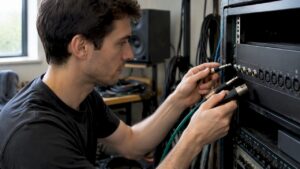
A good home studio often doesn’t start with the most expensive microphone, but with choosing the right room and a clear goal. These home studio setup tips help the creator step by step: from acoustics and equipment to computer configuration and workflow. The content is aimed at musicians, producers and content creators who want a reliable, high-performance setup – whether one is starting out with small recordings or needs professional equipment for mixing and video editing.
Why a plan is essential
Before buying equipment or pulling cables, the home studio deserves a plan. Without a clear purpose, money is often spent on items that are barely used later. A short plan helps determine priorities: recording (vocal & instrument), mixing/mastering, podcasting, or video production with heavy rendering. Choosing something specific avoids divided investments and ensures that the space and system are set up efficiently from the start.
Step 1: Choose the right space
The choice of room is the foundation of any studio success. Not every room is ideal, but with smart adjustments, almost any room can become usable.
Which rooms work best?
- A medium-sized rectangular room is often the most predictable.
- Height matters: very low ceilings cause annoying standing waves.
- Avoiding parallel walls helps reduce flutter echo.
- Rooms with windows can be fine, but far hinder by treating window curtains and reflective surfaces.
Sound insulation versus acoustic treatment
The difference between isolation and treatment is sometimes confused. Sound insulation (soundproofing) prevents sound from entering or leaving the room. Acoustic treatment changes how sound behaves within the room. For most home studios, treatment first is more important: monitors hear well, recordings become clear, and interpretation of sound becomes more reliable.
- Insulation: required if one wants to limit sound to the outside (drumming, live recordings) or lives in an apartment. This often includes heavy doors, solid walls and double glazing.
- Treatment: bass traps, absorbers and diffusers that reduce reflections and low-frequency problems.
Practical tips for room selection
- Choose a room that is as least symmetrically burdened by furniture as possible. Irregular furnishings help break up sound.
- Avoid rooms with many hard parallel surfaces without treatment.
- Try to place the listening position at least 30% of the room length from the front wall – this prevents direct standing wave positions near the walls.
Step 2: Basic acoustics – make it measurable
A few simple investments in acoustics pay off quickly in better mixing decisions and clearer recordings. One must first measure: a simple breath test or smartphone app for room analysis can already provide insight.
Key elements of acoustic treatment
- Bass traps in the corners reduce low-frequency accumulation.
- First reflection panels at the listening position prevent early reflections that disrupt stereo imaging and clarity.
- Diffusers behind the listening position provide a spacious, natural sound without muffling everything.
- Rugs and curtains help dampen higher frequencies without making the room dead.
DIY or professional solutions?
For beginners, homemade panels and inexpensive bass traps are often a good start; it’s budget-friendly and teaches a lot about acoustics. For serious mixing and mastering environments, professional treatment is recommended – this involves precisely placed diffusers and custom absorbers. I4studio offers both off-the-shelf and custom acoustic solutions, plus advice on the best position and materials.
Step 3: Monitors and monitoring environment
Monitors define how one judges the mix work. Good monitor placement and a neutral environment make a world of difference.
Monitor placement
- Form an equilateral triangle between the two monitors and the listening position.
- Monitors at ear level, tweeter facing the ears.
- Avoid direct reflections from desk and walls; monitor stands and isolation pads help.
Which monitors to choose?
Choose monitors based on space and genre. Small nearfields (5-7 inch woofer) are ideal for smaller rooms; larger monitors for larger spaces. Combine with a subwoofer if necessary, but only if implemented correctly – misaligned subs can make low frequencies worse.
Step 4: Microphones, preamps and signal chain
The microphone determines the character of a recording, but a bad signal chain or poor gain structure kills even the best capsule design. Here’s an overview for different purposes.
Common microphone types and their applications
- Condenser for vocals and detailed instruments (better sensitive dynamics).
- Dynamic like the SM57/SM58 are robust for amps and live drum overhead feel.
- Ribbon for warm, natural sound in guitars and vocals, but often more fragile.
Preamps and gain structure
- Choose preamps with clean gain and low noise, especially with weak sources.
- Use PADs and high-pass filters when necessary to avoid clipping.
- Avoid double gain: don’t put excessive trim in both DAW and hardware.
Practical example configuration
- Microphone → microphone cable (XLR) → mic preamp / audio interface input → AD conversion → DAW.
- For instruments without a mic: active DI → interface or preamp.
Step 5: Audio interface and connectivity
The audio interface is the bridge between analog and digital. That choice affects latency, number of inputs/outputs, and sound quality.
What to look for when choosing an interface
- Number of inputs/outputs depending on workflow (solo recording vs live band tracking).
- Connectivity: USB-C, Thunderbolt or PCIe – Thunderbolt offers lower latency and often better performance at higher track counts.
- Converters and preamp quality for “sonic signature”.
- ASIO or Core Audio support for stable drivers on respective systems.
For content creators who also do a lot of video rendering work, a fast Thunderbolt interface and a high-performance workstation can make a big difference. I4studio supplies audio/video rendering and broadcast computers that work seamlessly with professional interfaces and offers advice on optimal combinations.
Step 6: The right computer and storage
For many home studios, the computer is the bottleneck. Fast CPU, sufficient RAM, and fast storage ensure that plugins and tracks run smoothly. In addition, for video editing, a powerful GPU and fast I/O are essential.
Specifications per usage scenario
- Recording and light mixing: Quad-core CPU, 16-32 GB RAM, NVMe SSD for OS and projects.
- Large sessions and heavy plugin usage: 8-16 cores, 32-64 GB RAM (or more), multiple NVMe SSDs, possibly RAID for projects.
- Video editing & rendering: powerful multicore CPU + dedicated GPU (CUDA/ROCm/Metal depending on apps), fast SSDs and lots of RAM.
Practical performance tips
- Use an NVMe SSD for OS and active projects, and a larger SSD/HDD for archive/backups.
- Consider a dedicated audio workstation for critical tasks; shared systems can cause interference and stability issues.
- I4studio builds and delivers custom audio/video workstations with optimized cooling and power solutions for 24/7 reliability.
Step 7: DAW, plugins and workflow
The DAW is the central hub. The choice depends on habits, desired features and compatibility with hardware.
Popular DAWs and tips
- Pro Tools: industry standard for audio post and recording professionals.
- Cubase / Nuendo: strong for MIDI and extended audio workflows.
- Logic Pro: comprehensive and cost-effective for Mac users.
- Ableton Live: ideal for electronic music and live performances.
- Reaper: lightweight, powerful and affordable – highly configurable.
Workflow tips: set up templates, manage plugin lists, and maintain a consistent sample-rate/punch-in policy. Also use version control for projects (e.g., saved iterations) and document stems and routings.
Step 8: Latency, sample rates and buffer settings
Latency is the delay between input and monitoring. For singing or live instruments, low latency is important; for mixing, higher buffers can be used.
- When recording: set buffer to 64-128 samples (depending on interface and CPU).
- During mix: increase buffer to 512-2048 samples to reduce CPU latency.
- Use direct monitoring of the interface as needed to ensure real-time monitoring without latency.
Step 9: Backup strategy and archiving
A degeneration or loss of data can devastate projects. A layered backup strategy protects against hardware failure, human error and theft.
- 3-2-1 rule: 3 copies, on 2 different media, 1 offsite (cloud or remote location).
- Use automatic backup processes (e.g. Time Machine, Acronis, or cloud sync for projects).
- Keep voice and session files as separate archives, and document plugin versions and settings.
Step 10: Ergonomics, workflow and creative space
Working for long periods of time requires a comfortable, organized workspace. Ergonomics increases creativity and prevents injuries.
- Workstation: adjustable chair, monitors at proper height, and a desk where equipment is logically placed.
- Cable management: reduce clutter and risk of error with labels and cable trays.
- Lighting: soft, dimmable lighting and task lighting at recording areas.
- Create zones: a recording “corner” and a mixing/render “corner” create mental separation of tasks.
Budget guide: what to buy first?
Below is a practical prioritization depending on budget and goals.
Entry level (€1,000-€2,000)
- Audio interface 2 in/2 out with good converters
- 1 good condenser microphone (for vocals/instruments)
- Nearfield monitors or high-quality studio headphones
- Basic acoustic treatment (1-2 bassstraps + first reflection panels)
- Reliable laptop or desktop with NVMe SSD
Pro-sumer level (€2,000-€6,000)
- Interface 8+ in/out with better preamps
- More microphones (dynamic, ribbon, condenser)
- Monitor set with subwoofer and professional stands
- More complete acoustic treatment and diffusers
- Desktop workstation with multicore CPU, 32+ GB RAM
Professional (>€6,000)
- Rackgear: preamps, compressors, AD converters
- Full insulation and room-in-room solutions if needed
- High-end monitors and calibration (with measuring microphone)
- Dedicated audio/video rendering server with RAID and redundant power supply
Practical examples and case studies
A singer-songwriter who records primarily at home invested first in a good condenser, a reliable interface and bass straps; mix work he did initially on high-quality headphones. A small post-production studio focused first on monitor calibration and a workstation from I4studio with extra cores for real-time voice and video rendering – that paid off by making renders faster and requiring fewer manual CF transitions.
Common mistakes and how to avoid them
- Gambling on gear: many people buy expensive tools without testing how they sound in their own space. Listen and measure first.
- Neglect acoustics: even expensive monitors sound bad in an untreated room.
- No backups: one hard drive can fail; setting up automatic systems avoids drama.
- Over-optimize: too many plugins during recording cause latency and stability issues – keep it simple during tracking.
How I4studio can help
I4studio combines expertise in audio, video and broadcast computing with practical experience in studio acoustics. For those who want to accelerate time-to-market or need a reliable workstation solution, I4studio offers:
- Custom-built audio/video workstations optimized for DAW and rendering tasks.
- Advice on interface and monitor selection appropriate to space and use.
- Acoustical solutions: from initial analyses to installation of traps and diffusers.
- Support integration and workflow optimization so that systems run stably during intensive projects.
Checklist: A fully set up home studio
- Space chosen and measured (basic measurement performed)
- Acoustic treatment implemented at first reflections and corners
- Monitors and listening position correctly placed
- Audio interface with stable drivers installed
- Microphones and preamps connected and tested
- Computer configured with SSD, sufficient RAM and optimized settings
- DAW templates and backups set up
- Cable management and ergonomics organized
- Documentation of project settings and plugin licenses maintained
Creative tips for getting the most out of the studio
- Preserve “demo time”: experiment without pressure and save one session purely for sound design.
- Use reference tracks and regularly compare your mix to commercial tracks to check neutrality.
- Work in short, focused blocks – fatigue affects mix decisions more than people think.
- Take advantage of “A/B” versions of mixes: alternative routings or plugin choices can yield surprising improvements.
Common questions about home studios
Frequently Asked Questions
Which room is best for a home studio?
A rectangular room of average size with ceilings that are not too low is often most suitable. It is important that the listening position is not exactly in the center of the room. With acoustic treatment, almost any room can be made usable.
Is acoustic treatment really necessary?
Yes – without treatment, monitoring and mixing becomes unreliable. Even simple bass straps and first reflection panels give a big improvement. Acoustic treatment is often more effective than buying more expensive monitors right away.
Which interface is recommended for beginners?
An interface with 2 in/2 out and good preamps and converters is sufficient for most beginners. Choose an interface with stable drivers (ASIO for Windows, Core Audio for Mac) and connections that fit future plans (e.g., additional ADAT inputs for expansion).
How important is the computer for audio and video?
Crucial. For audio, CPU and RAM are important; for video, so is the GPU and fast I/O. NVMe SSDs speed up project loads and reduce streaming problems. For intensive workflows, a custom-built workstation adds value – like the one I4studio provides.
Can DIY solutions suffice for acoustics?
Absolutely. Many effective absorbers and bass traps are easy to make yourself. For critical listening environments or when aesthetics and maximum effectiveness are required, professional treatment is recommended.
Conclusion
A successful home studio is created by sensible priorities: first get the space and acoustics right, then the right monitoring and recording tools, and finally a stable computer and backup infrastructure. With the right setup, you avoid costly mistakes and build an efficient workflow where creative ideas can flow freely.
The home studio setup tips in this guide are a practical roadmap for those who want to produce serious sound – from singer-songwriters to audio professionals and videographers. For those who want to combine hardware and workstations with professional advice, I4studio offers customized systems and guidance that closely match real studio requirements.
With a clear plan, correct acoustics, reliable equipment and a properly configured computer, one is ready to achieve consistent, professional results – just at home.