TL;DR:
- MIDI separates performance data from sound, allowing you to accurately edit afterwards.
- Correct MIDI routing and channel settings prevent problems and increase workflow efficiency.
- MIDI 1.0 remains suitable for most studios, while MIDI 2.0 offers more expression and automatic setup.
Imagine: you recorded a perfect piano performance, but afterwards the instrument doesn’t sound right. With MIDI, you don’t have to play again. You simply swap out the instrument, adjust the velocity or transpose the entire recording with no loss of quality. MIDI separates performance from sound, giving you as a producer a flexibility that simply doesn’t exist with audio. In this article, you’ll discover exactly what MIDI is, how to set up connections and routing correctly, what MIDI 2.0 means for you, and the pitfalls best avoided for optimal studio production.
Table of contents
- What is MIDI and why is it essential in the studio?
- MIDI connections and routing: USB, DIN and channels
- MIDI 1.0 vs. 2.0: What are the differences, and what does this mean for your studio?
- Common mistakes and how to optimally set up MIDI in your studio
- The real difference: What average studio users overlook about MIDI integration
- Getting more out of your studio? Discover proven solutions
- Frequently Asked Questions
Key Insights
| Item | Details |
|---|---|
| MIDI is performance data | With MIDI, you can capture music performance data and modify each instrument later, without re-recording. |
| Connections and channels | Proper connections and channel selection are crucial for optimal workflow and signal strength in the studio. |
| MIDI 2.0 is additional. | MIDI 2.0 offers higher resolution, but MIDI 1.0 remains usable and compatible for most studios. |
| Avoid pitfalls. | Watch for channel mismatches and micro-latency, especially with lots of hardware or virtual MIDI routing. |
What is MIDI and why is it essential in the studio?
MIDI stands for Musical Instrument Digital Interface. It is a communication protocol that has been the standard in music production since 1983. What makes MIDI so powerful is that it sends no audio, only performance data. That sounds technical, but it simply means this: MIDI tells an instrument what to play, not what it sounds like.
That separation between performance and sound is exactly what makes MIDI so valuable to producers. You can completely edit a MIDI recording afterwards without replaying a single note. Think correcting timing, adjusting dynamics or completely replacing a synthesizer with an orchestral string track.
MIDI sends different types of data:
- Note on/off: When a note begins and ends
- Velocity: How hard a key is struck (0 to 127)
- Pitch bend: pitch variations outside the fixed notes
- Control Change (CC): Parameters such as volume, modulation or filter frequency.
- Program Change: changing presets or patches on an instrument
For producers, this means that studio equipment allows you to fully automate, edit and experiment without destructive changes. Your DAW stores all MIDI data as editable information, not recorded sound.
MIDI is the backbone of any modern studio workflow. It gives you the freedom to put off creative decisions until the moment they really matter.
An understanding of MIDI basics is therefore not a luxury, but a basic requirement for any serious producer. Whether you work with hardware synthesizers, software plug-ins or a combination of both, MIDI connects everything into one coherent system.
MIDI connections and routing: USB, DIN and channels
Now that you know what MIDI does, the next step is: how do you connect everything correctly? There are two common connection types, and each has its own advantages and disadvantages.
| Connection | Advantages | Disadvantages |
|---|---|---|
| USB-MIDI | Plug-and-play, no additional interface required, power supply via USB | Micro-latency at chains, limited cable length |
| 5-pin DIN (classic MIDI) | Stable, proven technology, long cables possible | Requires MIDI interface or hardware with DIN ports |
The classic 5-pin DIN connector has three ports:
- MIDI In: Receives data from another device
- MIDI Out: Sends data to another device
- MIDI Thru: Passes the received signal to the next device (unchanged).
The Thru port is useful for daisy-chaining, linking multiple devices in sequence. But note that each additional device in the chain adds a small delay and weakens the signal slightly.
A few basic principles apply to routing in a modern studio. MIDI connections support 16 channels per connection, which means you can control up to 16 different devices or instruments through a single connection. Each device listens only to its own channel, so there is no signal confusion.
For complex setups with lots of hardware, we recommend working with a MIDI patchbay or an audio interface with multiple MIDI ports. This gives you full control over routing without complicated chains.
Also see the MIDI routing explanation for more details on signal distribution in larger setups.
Pro-tip: Give each MIDI device in your studio a fixed channel and make a note of it somewhere. That way you avoid confusion when opening old projects and don’t have to reconfigure every time. Preferably use channel 10 only for drums, as many hardware reserves this channel for percussion by default.
A good DAW setup starts with clear MIDI routing. Take the time to set this up properly once and you’ll save yourself a lot of frustration later.
MIDI 1.0 vs. 2.0: What are the differences, and what does this mean for your studio?
MIDI 1.0 has been the standard for more than 40 years and still works extremely well for most productions. But MIDI 2.0 brings some significant improvements that make all the difference for certain users.
MIDI 2.0 offers higher resolution and bidirectional communication, meaning that devices can automatically exchange and set up each other’s capabilities. This is called “Profiles” and greatly simplifies the setup of complex systems.
| Feature | MIDI 1.0 | MIDI 2.0 |
|---|---|---|
| Resolution velocity | 7-bit (0-127) | 16-bit (0-65535) |
| Communication direction | One-way | Bidirectional |
| Per-note controllers | Not Possible | Possible |
| Automatic setup (Profiles) | No | Yes |
| Backwards compatible | N/A. | Yes, with MIDI 1.0 |
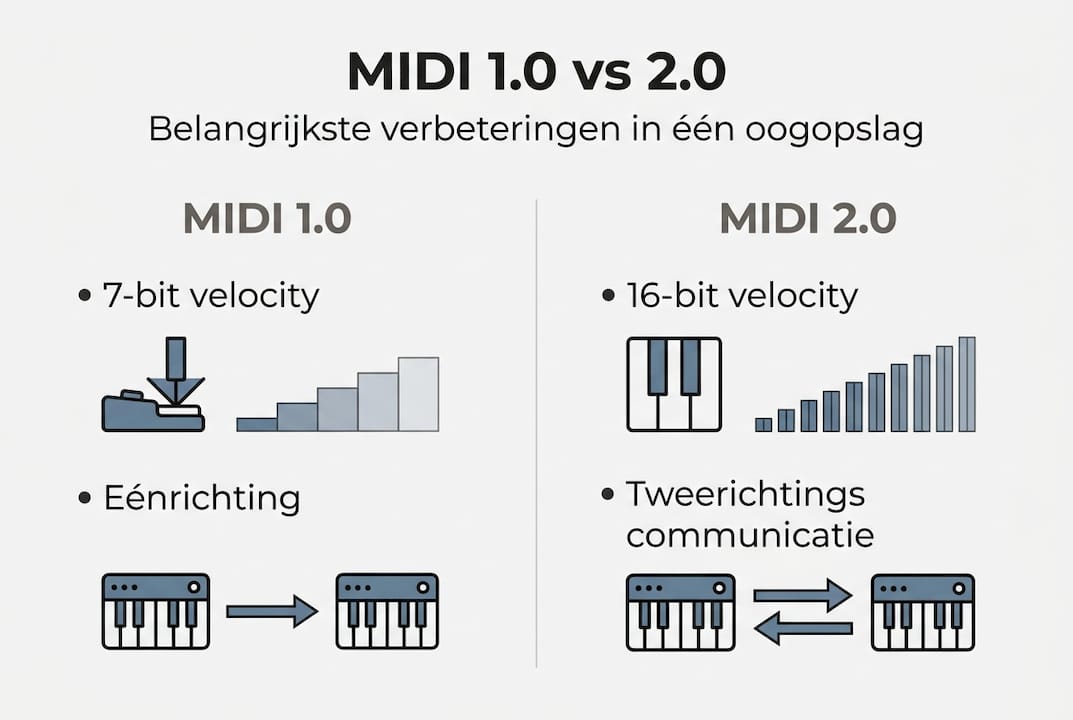
The higher resolution of MIDI 2.0 is especially noticeable in expressive playing. Whereas MIDI 1.0 divides velocity into 128 steps, MIDI 2.0 offers more than 65,000 steps. That means significantly fewer audible “steps” in dynamic transitions.
What are the practical benefits?
- Per-note controllers: Each individual note can have its own modulation, pitch bend or pressure
- Higher expression: subtle dynamic nuances are captured more accurately
- Less manual configuration: Profiles control setup automatically
The adoption rate of MIDI 2.0 is still limited in 2026. Not all DAWs and hardware fully support it, but compatibility is growing steadily.
When does upgrading make sense? If you work with modern hardware synthesizers that support MIDI 2.0, or if you make strong expressive playing central to your productions, then the switch is interesting. For most home studios, however, MIDI 1.0 is still completely adequate.
By the way, a powerful computer for music production and solid DAW hardware are more important to your workflow than the MIDI version. Also, check out the MIDI 2.0 upgrade guide for a detailed comparison.
Common mistakes and how to optimally set up MIDI in your studio
Even experienced producers regularly run into MIDI problems. Most are easy to avoid if you know what to look out for.
Channel mismatches and micro-latency in USB daisy chains are common bottlenecks that can seriously disrupt your workflow. Here are the most common mistakes:
- Channel mismatch: Your DAW track is on channel 1, but your synthesizer is listening on channel 3. Result: no sound, lots of frustration. Always check both settings.
- USB-MIDI chains: Each additional USB hub or daisy-chained device adds micro-latency. With three or more devices in a chain, this can become noticeable.
- Thru-chaining with many synths: More than three devices in a row via Thru attenuates the signal and increases the risk of data loss.
- Missing clock synchronization: If your hardware and DAW do not use the same MIDI clock, timing anomalies occur that are difficult to track.
For virtual MIDI routing in DAWs such as Cubase, you use internal MIDI buses to send signals without additional hardware. This is useful for linking software plug-ins to external controllers.
Pro-tip: Use a MIDI troubleshooting checklist with every new project. Check channel settings, connections and clock settings before you start recording. This takes two minutes but saves you hours of troubleshooting.
When comparing DAW computers, it is also smart to pay attention to USB controller quality and the number of available ports. A system with more direct USB ports reduces the need for chains and directly improves MIDI stability.
Also avoid common MIDI mistakes by planning and documenting your routing in advance in a simple diagram.
The real difference: What average studio users overlook about MIDI integration
Many producers focus on hardware specifications: which synth, which controller, how many channels. But the real gain is not in the hardware, but in how you use MIDI as a creative tool.
The biggest misconception is that MIDI is only for capturing notes. In practice, MIDI is a full-fledged automation system. You can control filter openings, effect parameters and mixer volumes completely via MIDI and adjust them afterwards. That’s not a technical detail, that’s a fundamentally different way of working.
MIDI separates performance from sound, allowing you to defer creative decisions. You record the energy and feeling first, and later decide which instrument or sound fits with it. This completely changes your compositional approach.
Anyone serious about optimizing their studio workflow starts not with better hardware but with smarter MIDI routing and conscious automation. That’s where the real time savings and creative freedom are.
Getting more out of your studio? Discover proven solutions
After all the insights about MIDI integration, connections and optimization, the next step is to choose the right hardware to support it all. A stable, powerful foundation makes the difference between a workflow that runs smoothly and one that constantly works against you.
At i4studio, you’ll find PCs specifically for music production that are tuned for low latency and stable MIDI processing. Check out our DAW PC Power for a system built for intensive production workflows. Unsure between desktop and laptop? Our page on computer choice for music production provides a clear comparison based on your situation.
Frequently Asked Questions
What is the main difference between MIDI and audio in the studio?
MIDI sends performance data such as notes and velocity, while audio contains the actual sound. MIDI does not send audio, which means that you can fully edit MIDI recordings afterwards with no loss of quality.
Should I upgrade to MIDI 2.0 for my studio?
For most producers, MIDI 1.0 still works fine. MIDI 2.0 is backwards compatible and offers higher resolution, but upgrade only if expressive playing or automatic device configuration is essential to your workflow.
How do I avoid channel mismatches between DAW and hardware?
Always check that your DAW track’s MIDI channel matches your hardware’s receive setting. Channel mismatches are a common bottleneck that you can easily avoid by documenting channel settings.
What do I do if my MIDI connection is slow?
Avoid long USB-MIDI chains and connect devices to your computer as directly as possible. Micro-latency stacks up quickly when daisy-chaining, so preferably use a MIDI interface with multiple direct ports.
Recommendation
- Music studio equipment checklist for optimal creativity
- Essential music recording equipment for your home studio
- DAW Setup Tips: Practical Guide For An Efficient Studio – https://i4studio.nl/
- Audio Interface Troubleshooting: Practical Tips For Studios (audio interface troubleshooting) – https://i4studio.nl/
- Converting phone photos to studio quality: step by step | CarStudioPRO