What is MIDI ?
MIDI is the protocol, an agreement once made by the major manufacturers with which electronic (musical) instruments can exchange musical information directly and in real time.
MIDI stands for Musical Instrument Digital Interface.
With midi, note information is passed on in real time, read: which black and white keys you hit.
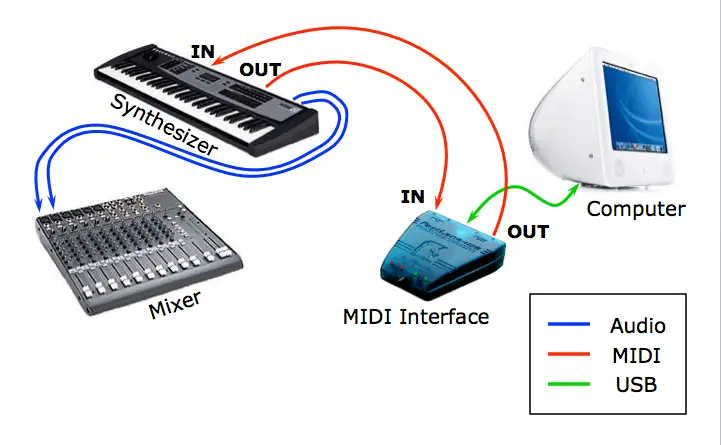
In order to make a MIDI connection with MIDI, all connected devices must comply with the MIDI protocol, you basically need a MIDI cable in addition to the correct connections and if you want to connect your MIDI devices to the computer, you have the computer needs a midi interface (this is often integrated in your sound card audio/interface these days

Many modern devices no longer have a known midi connection, but that does not mean that they do not work with midi, the MIDI information then runs over a USB cable to the computer.
Connect the MIDI out to the MIDI in with a midi cable.
Misconceptions we hear a lot:
- I hear nothing about MIDI : There is no sound about MIDI, only information about played notes and possibly other data such as a clock (tempo) etc
- My midi has delay, Latency : MIDI is realtime, delay is on the audio side and is often due to a slow audio interface or wrong driver
What is audio ? Audio is the “sound” we hear.
If you are involved with music and recording, the word Audio is continuously used, often in combination with other terms: Audio Interface, audio cable, etc.
An audio signal is a signal that contains information for the audible region.
An audio signal in the air is sound.

What is Latency
What is latency ? Latency is delay or waiting time, you often hear the term in combination with music software (DAW) and an audio interface
When do we notice the effect of latency? In a setup of eg Computer, Audio Interface and midi keyboard and we play on a key and the sound comes later we speak of latency. The same can occur if you connect a microphone to your audio interface, you speak and only later, with a delay, the sound comes out of the speaker.
We often hear the view, I have the latency on my midi, but that is unfortunately a wrong view, latency has to do with the audio.
What can we do to reduce latency ?
The most important building block is a correct audio interface, nowadays they advertise with zero latency (note this is technically not possible because there is always a processing time anyway). The latency is largely determined by the driver / driver of the interface. Are you still looking for an audio interface, do not hesitate to contact us for good advice.
Once you have the right interface, you are not there yet, you have to connect the interface to a computer, and if things are not in order there, you still have a chance of a significant latency.
Your computer has to be fast enough, and especially if you optimize it for audio there is still a lot to gain. For heavy computer users, we recommend a computer specially composed for music use. These computers have the right building blocks, but the software (windows with a PC) is also often heavily optimized for audio, and that with your latency settings. You can make the buffers smaller and still have no hitches and stutters in your sound.
So you can see that it is a collaboration of sound card and computer.
Example of such special music computers are our own eye4 computers
Tips to get more out of your windows: optimization tips
Where we used to be happy with a latency of 12ms, now we build setups that work below 3ms even with a lot of data traffic.

What is a DAW
What is DAW ? DAW is an abbreviation that stands for Digital Audio Workstation.
In practice, it means the software you use for recording and producing (creating, mixing, arranging) etc. This software is installed on your studio computer (PC/MAC). This software is the communication between your midi equipment and your audio. Your DAW communicates with the outside world through your computer and Audio interface and can store your midi (note information) your Audio (sound) information and you can edit it later.
Well-known DAWs are: Cubase, Pro Tools, Logic, Studio One, Ableton, FL studio, Reason.
It is difficult to determine which DAW is most suitable for you and it often also depends on the end goal, we also often advise to look at your environment, if you have many friends who work with Cubase, then that might be a handy step. you then have a lot of free knowledge in your environments so that you can start recording and mixing faster.