



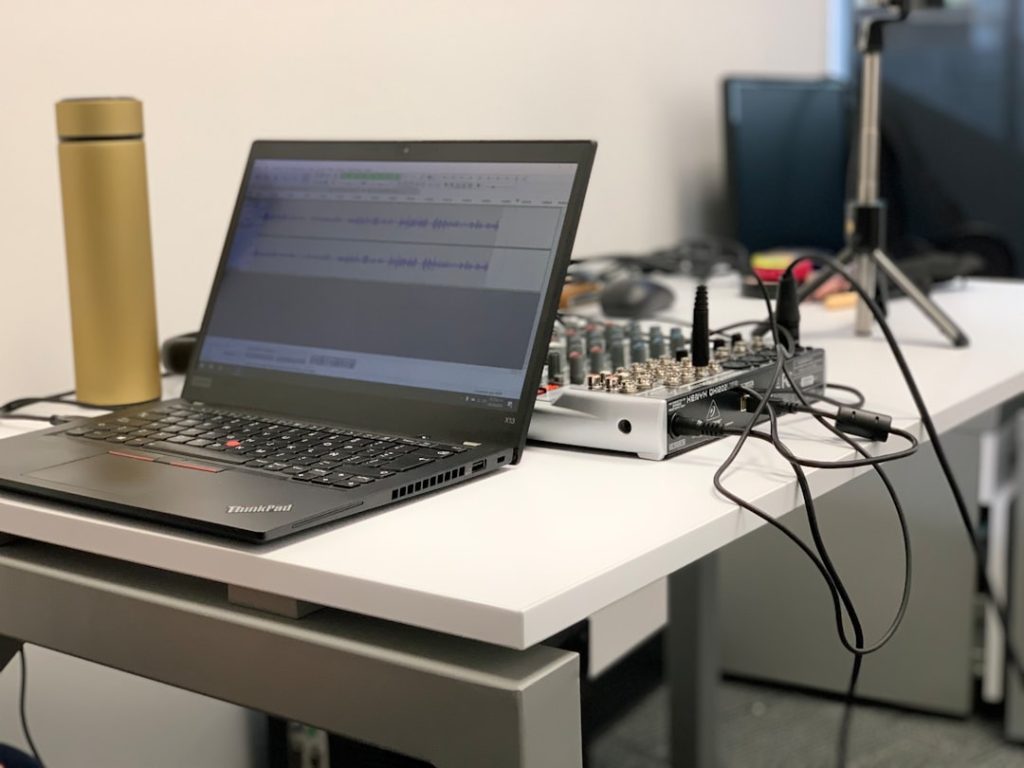
A good computer for music production isn’t just a powerful laptop or desktop: it’s the reliable heart of a studio environment, designed to process real-time audio, load large sample libraries and host countless plug-ins without hiccups. This guide helps producers, sound engineers and content creators understand which components really matter, which choices fit different workflows and how to choose a system that performs both today and into the future.
Why the right computer for music production is so important
In practice, music production is all about precision and continuity. Dry sounds during recording, crackling during mixing or eternal waiting times when loading projects cost creativity and time. A computer specifically tuned for music production minimizes latency, maximizes stability and ensures that all software tools work together smoothly. For professionals, this means fewer technical glitches and more focus on music.
Key components and what they really do
Not all computer components are equally critical to audio. Here is an overview of the components that most affect daily studio work.
CPU (processor): single-core performance versus cores
The CPU is often the first bottleneck when running multiple instruments and plug-ins. DAWs and many plug-ins do both multi-threaded and single-threaded work. Therefore:
- High clock speed (GHz) helps with single-threaded tasks such as some plug-ins and real-time audio processing.
- More cores are useful for running multiple tracks and offline renders in parallel.
- For modern production, a CPU with at least 6-8 cores and high base/turbo clocks is a safe choice; for large sessions or heavy sample-based workflows, 12+ cores make sense.
Practical example: in an orchestral mockup with hundreds of instance of sample instruments, a CPU with many cores and high single-core performance scores better than an old quad-core with low clock speed.
RAM: how much is enough?
RAM determines how much sample data and plug-in instances fit into memory without constantly streaming to disk.
- 40-64 GB: recommended for serious producers working with large sample libraries (Kontakt, EastWest, Spitfire).
- 16-32 GB: sufficient for singer-songwriter setups, electronic music and smaller projects.
- 128 GB+: for highly professional scoring workflows or hosts with on-the-fly multiple virtual machines.
Tip: many sample libraries support RAM mapping so more RAM directly yields faster load times and less disk I/O.
Storage: SSD is not a luxury
Storage has two roles: speed in loading and reliability for projects. Recommendations:
- NVMe SSD (M.2) for OS and DAW – fast boot and low load times.
- SATA SSD or large NVMe for sample libraries and projects – prioritize capacity (1 TB+ for sample-heavy setups).
- Hard disk drives (HDD) can be used for cold storage and backups, but not for active sample libraries.
- Consider RAID or networked solutions (NAS) for redundancy and shared workflows in team environments.
Audio interface and I/O
The audio interface determines the quality of inputs/outputs, AD/DA conversion, and latency. Key points:
- Look for low-latency drivers (ASIO for Windows, Core Audio for macOS).
- Thunderbolt and USB-C interfaces offer high bandwidth and low latencies.
- For broadcast and post-production, additional I/O such as ADAT, Word Clock and MADI may be required.
I4studio supplies and advises on audio interfaces to suit a variety of workflows – from compact USB interfaces for singer-songwriters to elaborate Thunderbolt rigs for studios.
GPU: when is video card important?
For pure audio work, a high-end GPU is less critical. However:
- Video editing, scoring with video and GUI-intensive plug-ins benefit from a powerful GPU.
- If the system will also be used for streaming or live visuals, a solid GPU is recommended.
Conclusion: choose GPU based on audio-plus tasks. For DAW work only, a mid-range card or integrated graphics chip is usually sufficient.
Motherboard, ports and expandability
A future-proof motherboard with enough PCIe slots, fast M.2 socket(s), and multiple USB/Thunderbolt ports makes later updating easier. Producers often choose systems in which more RAM or additional NVMe drives can still be inserted.
Operating system: Windows, macOS or Linux?
Each OS has advantages and disadvantages. The choice depends on DAW compatibility, plug-ins and personal preference.
- macOS: popular in professional studios due to reliable drivers and strong integration with audio hardware; many producers swear by Macs for creative work.
- Windows: flexibility and better price-performance ratio; wide range of hardware options and often more affordable high-core CPUs.
- Linux: niche, but powerful for people who want optimal latencies and are willing to configure more; some DAWs and plug-ins have limited support.
Tip: always check DAW and plug-in compatibility when choosing an OS before buying hardware.
Latency and buffer settings
Latency can create creative blockages during recording. Two things are important:
- Hardware and drivers with low latency (ASIO/Thunderbolt) are essential.
- Buffer size: smaller buffers give lower latency but require more CPU; when mixing, buffer sizes can be increased to relieve CPU.
Real workflow: during recording, producers often use buffer sizes between 32-128 samples, during mixing 256-2048 samples depending on project size and CPU.
Specific workflows and recommended specifications
Not every musician has the same requirements. Below are recommendations by common workflow.
1. Singer-songwriter/home studio (audio focus).
- CPU: 4-6 cores with good single-core speed
- RAM: 16-32 GB
- Storage: 500 GB NVMe + 1 TB SATA SSD
- Audio interface: 2-8 ins/outs with low latency
- Benefit: affordable setups that handle recordings and light mixing effortlessly
2. Electronic producer / beatmaker
- CPU: 6-12 cores
- RAM: 32 GB
- Storage: fast NVMe for samples (1 TB+)
- Additional: MIDI controllers, multiport MIDI interfaces
3. Sample-based scoring/orchestral mockups
- CPU: 8-16+ cores, high single-core clocks
- RAM: 64-128 GB or more
- Storage: multiple NVMe disks for libraries, possibly a dedicated RAID setup
- Audio interface: multiple outputs and digital I/O
4. Mixing and mastering engineer
- CPU: 8-16 cores (offline renders utilize multithreading well)
- RAM: 32-64 GB
- Storage: fast NVMe + backup drives
- Monitoring: precise monitors, controller for hands-on work
Rack, desktop or laptop?
Mobility versus performance. Here is a brief comparison.
- Laptops: ideal for mobile recording and live electronics. Modern laptops offer excellent performance but are often more expensive per core and more difficult to upgrade.
- Desktops: best price-performance ratio and easy to upgrade. Recommended for most studios.
- Rack servers/workstations: useful for broadcast, larger post-production studios or when systems need to be integrated into server racks.
I4studio supplies both compact desktop workstations and rack-mountable systems for broadcast and rendering, including advice on which form factor suits the customer’s workflow.
Cooling, silence and acoustics
A quiet computer is crucial in recording environments. Fans from a powerful desktop can interfere with microphone recordings or be disruptive during sensitive sessions. Two solutions:
- Passive or low-noise cooling: use high-quality CPU coolers, silenced fans and anti-vibration mounts.
- Physical placement: put the computer outside the recording room and use long, high-quality cables for audio I/O.
In addition, room acoustics affect the end result much more than people think. I4studio offers acoustic solutions and advice, from bass traps to personalized panel configurations, so that the monitor environment sounds reliably low reflection and neutral.
Backup, redundancy and workflow security
Projects and sample libraries are vulnerable. Good habits minimize risk:
- Daily project backups to external drives or NAS
- Use of version control for important session files (or at least clear file names and version numbers)
- Off-site backup or cloud archiving for indispensable projects
For broadcast environments or commercial studios, I4studio recommends redundant power supplies (UPS), NAS systems and custom backup routines.
Plug-ins, sample libraries and practical performance tips
Plug-ins and sample libraries often have their own memory and CPU profiles. Practical tips to maximize performance:
- Freeze or bounce traces when possible to save CPU.
- Use RAM caching of sample instruments for faster load times.
- Keep system and audio drivers up-to-date, but test updates first on a copy of the session in critical situations.
- Use separate disks for OS/DAW and sample libraries to reduce I/O contention.
Example: a producer with gigantic orchestral libraries can relieve CPU and RAM significantly by partially streaming instruments from fast NVMe disks, and by turning off unused articulations.
Build or buy: when to choose customization?
There are two paths: build your own or buy a ready-made system. Both have advantages.
- Building it yourself offers maximum control and often better price-per-component. Disadvantage: requires hardware knowledge and time for troubleshooting.
- Off-the-shelf workstations from specialized vendors provide warranty, optimized drivers and professional support. For studios where uptime counts, this is often the best choice.
I4studio specializes in custom-built computers for audio, video, rendering and broadcast. They combine hardware knowledge with studio experience and offer installation, configuration and acoustics support – an attractive option for professionals who do not want to spend hours on compatibility research.
Practical scenarios with specifications
These scenarios help to better match a budget and requirements.
Budget setup (hobbyist)
- CPU: 6-core midrange
- RAM: 16-32 GB
- Storage: 500 GB NVMe + 1 TB external HDD for backups
- Audio interface: 2-in/2-out USB
Project studio (semi-pro)
- CPU: 8-core high-clock
- RAM: 32-64 GB
- Storage: 1 TB NVMe (OS/DAW) + 2 TB NVMe/SATA for samples
- Audio interface: Thunderbolt or USB-C, multiple outputs
High-end scoring/production (pro)
- CPU: 12-24 cores with high single-core clocks
- RAM: 64-128 GB
- Storage: multiple NVMe drives in RAID or high-speed NAS
- Audio interface: extended I/O, Word Clock, ADAT, MADI optional
Maintenance and long-term planning
A computer for music production is an investment. Some maintenance tips:
- Keep temperature readings and clean fans annually.
- Update drivers and DAW software checked and regularly.
- Plan upgrades (more RAM, additional NVMe) rather than complete replacement when possible.
For studios that run continuously, a service contract with a vendor such as I4studio can save a lot of downtime.
Case Study: orchestral mockup that had to run flawlessly
A freelance composer was commissioned for a short film with tight deadlines and used extensive orchestral libraries. The existing system choked at 48 voices. After consulting, a workstation was delivered with a 16-core CPU, 128 GB of RAM and two NVMe drives for library streaming and OS. Result: real-time playback without dropouts and renders completed 3x faster. The composer was able to meet deadlines and spend more time on articulation and dynamics instead of optimization.
How I4studio helps choose the right computer
I4studio combines hardware expertise with hands-on experience in audio and broadcast. Services include:
- Customized advice: one analyzes workflows and puts together a system that fits the requirements.
- Installation and optimization: hardware is configured, drivers set correctly and DAW optimized.
- Acoustic solutions and studio design: not only the machine, but also the listening environment is included.
- Service and support: from warranty to prompt repair and upgrades.
This makes I4studio suitable for independent producers, commercial studios and broadcasters who want reliable systems without diving deeper into hardware details themselves.
Checklist for buying a computer for music production
- What DAW and plug-ins are being used? – Check compatibility and recommended specs.
- How many tracks and sample libraries are expected? – Determine required CPU/ RAM/ storage.
- Is mobility needed? – Choose laptop or desktop based on location and recording tasks.
- What I/O and connectivity are required? – Check Thunderbolt, USB-C, ADAT, etc.
- Budget and upgrade path – choose a system that can be easily expanded later.
- Support and warranty – do people have access to expert support if something falters?
Final Opinion
A carefully chosen computer for music production changes the way a producer works: less technical frustration, faster renders and more creative freedom. Key points to remember: invest in enough RAM and fast NVMe storage for sample-heavy workflows, choose a CPU that delivers both good single-core and multiple-core performance, and don’t forget that audio interface and drivers are just as important as the internal hardware. For professionals who want assurance, customization from a specialist like I4studio offers not only powerful hardware, but also configuration and acoustic advice – the very details that make the difference between a working setup and a flawless workflow.
Frequently Asked Questions
What is the minimum specification for a computer for music production?
For basic recording and production, a quad-core CPU with good single-core speed, 16 GB of RAM and a 500 GB NVMe SSD are a starting point. For serious projects, at least 32 GB of RAM and a faster multi-core CPU is recommended.
How much RAM is required for orchestral sample libraries?
For large orchestral libraries, 64 GB is often the minimum; for professional scoring workflows, 128 GB or more are common to hold many articulations and patches in memory at once.
Is a gaming PC also suitable for music production?
In many cases yes – gaming PCs have strong CPUs and fast SSDs. Pay attention to stable audio drivers, adequate RAM and sufficient I/O. Gaming-oriented cooling can produce noise, however; for recording environments, a quieter or separately placed unit is often desirable.
Should one choose Thunderbolt over USB?
Thunderbolt offers higher bandwidth and lower latencies and is highly recommended for professional audio interfaces and external NVMe storage. USB-C (USB 3.x) is often ample for smaller setups and is more cost-effective.
When is customization the best choice?
Customization is the best choice when uptime, compatibility, or specific I/O or acoustic requirements are critical – for example, in commercial studios, broadcast environments, or for producers with very large sample libraries. Vendors like I4studio can provide consulting, configuration and long-term support in this regard.



