
TL;DR:
- Many music producers think that the CPU with the highest benchmark score is automatically the best choice for their studio.
- Real performance in a DAW, however, depends on the workload, workflow and system configuration, not just benchmarks.
Many music producers assume that the CPU with the highest benchmark score is automatically the best choice for their studio. But with Intel Core Ultra 9 vs. AMD Ryzen 9 music production benchmarks, that reasoning is too simplistic. The actual performance in a DAW depends on your specific workflow, whether you work primarily real-time or render offline, and how your system as a whole is put together. In this article, you’ll learn which benchmarks really matter, what the architecture differences mean for your daily sessions, and how to choose the right CPU for your home studio.
Table of contents
- Differences in architecture and test configurations between Intel and AMD
- Multicore performance and offline rendering in music production workflows
- Single-core performance and real-time music production with low latency
- Which CPU best suits your music production workflow?
- Why benchmarks are not the whole story for music production
- Find the right studio pc and gear at i4studio
- Frequently Asked Questions
Key Insights
| Item | Details |
|---|---|
| Use different benchmarks | View both single-core and multi-core scores for a complete picture of CPU performance in music production. |
| Workload determines choice | Offline rendering scores on multi-core, real-time plugin processing on single-core performance. |
| Architecture differences count | Intel and AMD differ architecturally, so you shouldn’t rely on score alone. |
| Practice tests are essential | Always test CPU performance in your own studio workflow for the best choice. |
| i4studio helps you choose | Find out at i4studio which studio PC and gear best suits your music production needs. |
Differences in architecture and test configurations between Intel and AMD
Before you put Intel Core Ultra 9 vs AMD Ryzen 9 music production benchmarks side by side, it’s crucial to understand why those numbers are not simply comparable one-to-one. The two processors are fundamentally built differently, and those architectural differences determine how they behave in a studio environment.
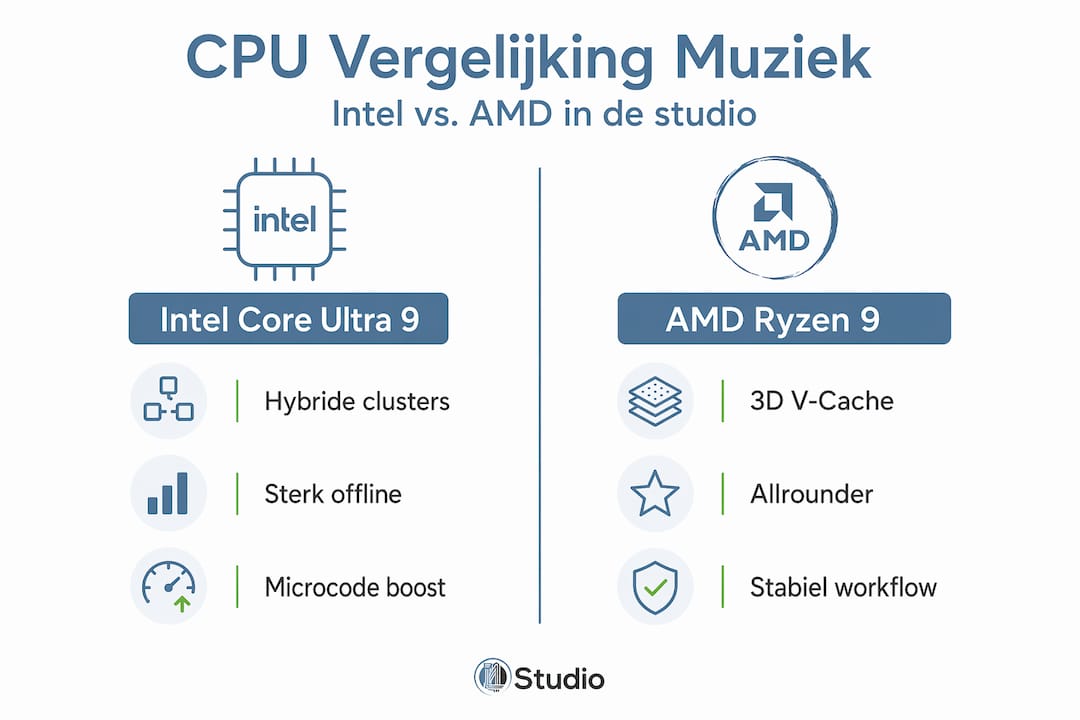
The Intel Core Ultra 9 285K uses a hybrid cluster architecture with a total of 24 cores, divided between performance cores (P-cores) and efficiency cores (E-cores), without hyperthreading. The AMD Ryzen 9 9950X3D has 16 cores with hyperthreading, which means the operating system sees 32 logical processors. That sounds like an advantage for AMD, but the reality is more nuanced.
As architectural differences highlight, Intel hybrid clusters and AMD cores are not compared in an apples-to-apples fashion. The way a DAW such as Ableton Live, Logic Pro or Reaper distributes tasks across cores differs from one software developer to another. Some DAWs benefit more from higher clock speeds on single cores, others from many parallel threads.
In addition, RAM configuration plays a big role. Intel systems on the Z890 platform typically measure 15 to 20% higher memory bandwidth than AMD AM5 systems in equivalent test configurations. That difference directly affects benchmark results, even though it has little to do with the processor itself. Keep this in mind in any Intel vs AMD audio PC comparison you encounter.
Core differences in a row:
- Intel Core Ultra 9 285K: 24 cores (P+E hybrid), no hyperthreading, higher memory bandwidth
- AMD Ryzen 9 9950X3D: 16 cores with hyperthreading (32 logical threads), 3D V-Cache for lower latency
- Test platform differences: Z890 vs AM5, with different standard RAM speeds
- DAW scheduling behavior responds differently to hybrid vs homogeneous core architectures
- Benchmark scores are always configuration dependent, not just processor dependent
With a better understanding of architectural differences, we can now look at concrete benchmark results relevant to music production.
Multicore performance and offline rendering in music production workflows
For tasks such as exporting an entire project, rendering a mix offline, or applying batch processing to dozens of audio clips simultaneously, multicore performance is critical. This is where both CPUs aim to make a difference.
The AMD Ryzen 9 9950X3D scores strong thanks to 16 hyperthreading physical cores. That gives a total of 32 logical threads that can handle DAWs and plugin processing in parallel. Heavy VST instruments such as Kontakt with large sample libraries, or a mix with dozens of instances of CPU-intensive plugins, benefit directly from this parallel capability.
Intel, however, has played a trump card with recent software updates. Intel microcode updates provide a whopping 61% boost in PCMark 10 Productivity, a benchmark that simulates productivity workloads that closely resemble offline music rendering. That’s no small improvement. It shows that hardware performance depends in part on the state of your firmware and drivers, not just the silicon architecture.
Comparison multicore performance for music production:
| Feature | Intel Core Ultra 9 285K | AMD Ryzen 9 9950X3D |
|---|---|---|
| Physical cores | 24 (P+E hybrid) | 16 |
| Logical threads | 24 (no HT) | 32 (with HT) |
| PCMark 10 Productivity | Strong after microcode update | Good, stable |
| Offline rendering speed | Fast, sometimes leading | Fast, balanced |
| Batch processing | Strong by number of P-cores | Strong by HT-threading |
What this means in practice:
- Export times in Cubase, FL Studio or Pro Tools are very fast on both systems
- Intel may have an edge in pure offline productivity tasks
- AMD offers solid throughput through combination of cores and threads
- The 3D V-Cache on the Ryzen 9 9950X3D lowers memory latency, which helps with sample-based instruments
Pro-tip: Always make sure your BIOS and chipset drivers are up to date. The performance gains from Intel microcode updates show that outdated firmware can significantly skew your benchmarks. The same is true for AMD systems.
Delve further into the technical background through our guide computer music production, where we explain how all the PC components work together in a studio environment.
Now that we know the multicore performance, let’s look at the single-core capabilities that are important for real-time plugin processing.
Single-core performance and real-time music production with low latency
This is where things get interesting for producers working with low buffer settings, recording live with monitoring effects, or playing intensive synthesizers in real time. In fact, real-time music production places very different demands on a processor than offline tasks.
When you set a buffer of 64 or 128 samples in your audio interface, your DAW asks the processor to calculate a new audio block every few milliseconds. If one core doesn’t do that fast enough, you get snaps, clicks or dropouts in the sound. Those are the dreaded audio glitches that can ruin any recording session. Single-core speed and latency are decisive then, not overall multicore throughput.
Intel and AMD perform close to each other in single-core benchmarks. Both processors have clock speeds in the neighborhood of 5.5 GHz or higher in boost mode, which in practice means they are both capable of handling demanding real-time sessions. The nuance, however, is in Intel’s hybrid architecture.
With the Intel Core Ultra 9 285K, DAWs have to be smart about the P-cores and E-cores. A poorly configured system can send an audio thread to an E-core, creating a bottleneck exactly when you don’t want it. AMD’s homogeneous architecture completely avoids this risk: all cores are equivalent.
Factors affecting real-time performance:
- Buffer size in your audio interface (lower = higher CPU load per core)
- Number of active plugin instances in series on one audio channel
- CPU-scheduling: how the operating system distributes threads across cores
- Thermal management: at high load, both CPUs can throttle
- System background processes running concurrently
Pro-tip: On an Intel system, always disable “efficiency cores” in your BIOS or use a DAW-specific CPU affinity tool if you experience audio drops at low buffer settings. This forces your DAW to use only the fast P-cores for audio processing.
Find more practical configuration tips in our tips pc music production, including recommendations for BIOS settings and power profiles that make a difference in low-latency work.
Which CPU best suits your music production workflow?
Now that you understand how Intel and AMD compare in both multicore and single-core tasks, it’s time for the practical translation. The music production processor comparison ending in a concrete choice requires you to be honest about your own workflow.
Step 1: Map your own workload
Do you use your DAW primarily for offline tasks, think mixing complex projects, rendering voices, or working with large sample libraries? Or do you work primarily real-time, with live input, soft synthesizers played in real time, and recording with monitoring effects? This distinction determines which CPU feature matters most to you.
Step 2: Consider Intel for offline heavy workflows
The Intel Core Ultra 9 285K is a strong choice if you do a lot of exporting and rendering. After microcode updates, the platform performs very well in productivity workloads. If fast export times are your priority, Intel is attractive.
Step 3: Consider AMD for balanced use.
The AMD Ryzen 9 9950X3D is an excellent all-rounder. The 3D V-Cache lowers memory latency, which measurably helps with sample-based instrumentation. The homogeneous core architecture makes configuration easier and the system more stable for real-time work. As benchmark planning for export as well as real-time shows, blindly relying on one score is never wise.
Step 4: Consider the overall picture
CPU choice is never isolated. RAM speed, cooling, motherboard and power consumption all come into play.
| Factor | Intel Core Ultra 9 285K | AMD Ryzen 9 9950X3D |
|---|---|---|
| Best use | Offline rendering, productivity | Realtime, all-round studio |
| Architecture | Hybrid, more configuration required | Homogeneous, easier stable |
| RAM Recommendation. | DDR5-6400+ for optimal performance | DDR5-6000 sweet spot |
| Energy consumption | Higher under load | More efficient at similar tasks |
| Price/Performance | Strong after updates | Consistent value |
Step 5: Always test in your own situation
Benchmarks are a starting point, not a final judgment. Preferably use demo sessions or buy-back guarantees to confirm that your particular DAW and plugin selection runs optimally on your chosen platform.
Pro-tip: Make a test project with your heaviest plugins and take a screenshot of the CPU meter in your DAW at a buffer of 128 samples. That will tell you more about actual music production performance benchmarks than any synthetic number.
Find out which system fits best through our studio PC configuration guide, where we guide you step by step to the right choice.
Now that you know which CPU may be suitable, we share a unique look you don’t often hear about this competition.
Why benchmarks are not the whole story for music production
After years of building and testing studio PCs for music producers, we always see the same pattern. A customer comes in with a benchmark he found online, convinced that that one score makes the decision. And then he gets frustrated when his new system still doesn’t feel as expected.
The reality is that DAW performance is determined by a system, not a single component. Hardware integration and memory performance determine the true studio experience more than any single benchmark score. An Intel Core Ultra 9 285K in a poorly configured motherboard with slow RAM performs worse than a well-tuned mid-range AMD system.
Intel’s hybrid architecture is also something many buyers underestimate. It sounds good on paper; 24 cores is a lot. But if your DAW doesn’t explicitly know which cores are appropriate for audio tasks, scheduling can cause problems. That’s not Intel’s fault, it’s just a complexity that requires knowledge in configuration. AMD’s equivalent cores work more predictably out of the box.
We see in practice that AMD systems for most manufacturers run more stably without additional tweaking. This is not to say that Intel is bad. For producers who know what they are doing and are willing to fine-tune their system, Intel offers a powerful platform. But for those who just want to produce without diving into the BIOS daily, AMD is the quieter choice.
Also read our explanation of studio PC components to understand how motherboard, memory and cooling affect real-world CPU performance. A good foundation is the key to a studio that just works.
Find the right studio pc and gear at i4studio
At i4studio, we build studio PCs specifically tailored to music production, not generic systems with a sticker on them. Whether you choose Intel or AMD, we make sure the whole system is right: from motherboard and memory speed to cooling and cable management.

Looking for personal advice on which CPU suits your workflow? Via our studio pc choice guide we will guide you through all the choices, tailored to your DAW, budget and way of working. Want to go deeper into the individual components? Then check out our component explanation for studio PCs. Just starting out and don’t know exactly what you need yet? Our starter guide to studio gear will get you started with the basics, so you don’t pay for what you don’t need.
Frequently Asked Questions
What is the biggest difference between Intel Core Ultra 9 and AMD Ryzen 9 for music production?
The biggest difference is their architecture: Intel uses hybrid clusters with 24 cores without hyperthreading, while AMD offers 16 cores with hyperthreading. This affects how DAWs distribute tasks and which workload fits best per platform.
Which CPU performs better in real-time plugin processing?
Both CPUs are close in single-core performance for real-time plugin processing, but overall system configuration and DAW-scheduling behavior ultimately determine which platform works better in your specific situation.
How important are microcode updates for CPU performance in music production?
Very important: Intel microcode updates delivered a PCMark 10 Productivity improvement of 61%, which translates directly to faster offline rendering and export times in music production software.
Should I look purely at benchmarks when choosing a CPU for my home studio?
No, benchmarks are a starting point but actual performance depends heavily on your specific DAW, plugin selection, memory speed and system configuration. Always test in your own environment before making a final choice.