




TL;DR:
- The Intel Core i9-14900K offers higher single-core performance and proven stability, making it ideal for low latency in audio. The Ultra 9 285K has more multi-core power and is better suited for heavy video editing, but is less stable for real-time audio. For a reliable studio setup, the i9-14900K is recommended for its compatibility, platform stability and lower risk of latency issues.
Two top processors, similar price range, but surprisingly different performance in a real studio. The choice between the Intel Core i9-14900K and the Intel Core Ultra 9 285K goes beyond benchmark scores. In a professional production environment, your CPU determines whether you work with stable 64-sample buffers or struggle with dropouts in the middle of a recording. This guide clearly explains the technical differences and translates them directly into practical advice for your audio or video studio.
Table of contents
- Why CPU selection is essential in an audio/video studio
- Technical overview: Intel 14900K versus Ultra 9 285K
- Audio latency and stability: what really counts?
- Concrete advice for your studio setup
- Our look: why specs don’t say everything in the studio
- Getting started yourself: building your ideal studio PC
- Frequently Asked Questions
Key Insights
| Item | Details |
|---|---|
| Single-core speed crucial | For audio latency and stable monitoring, the highest single-core speed is critical. |
| Multi-core especially in video | Ultra 9 285K scores better in multi-core tasks such as video rendering, but beware of latency issues. |
| Platform choice affects flexibility | Intel 14900K is widely deployable, cheaper, and works with more RAM types. |
| Pay attention to cooling | The i9-14900K requires high-quality cooling for optimal performance without throttling. |
| Practical balance is the goal | The best choice matches your workflow, not just benchmarks and specifications. |
Why CPU selection is essential in an audio/video studio
A studio is all about reliability. A single dropout during a recording session or a render that crashes takes time and trust. The processor is one of the most defining components in this, but not always for the reasons you expect.
Single-core speed is the key benchmark in audio. Most DAW plug-ins, such as compressors, EQs and reverbs, are processed serially on a single core. The faster that core operates, the more plugins you can stack without increasing latency. The Intel Core i9-14900K excels here with single-core clock speeds up to 6.0 GHz, ideal for real-time monitoring and tracking with minimal dropouts at 64-sample buffers.
Threads play a different role. For heavy effect chains in Ableton Live or Logic Pro, or when rendering 4K video with color correction, workflows benefit from multiple parallel threads. More threads speed up export, but hardly help with real-time tracking with low latency.
Note that buffer settings in your DAW partly determine the audible latency. With 64 samples at 96 kHz you work with less than 1 ms latency, but that demands a lot from your processor per cycle.
Platform stability is an underrated issue. Some CPU generations struggle with microcode issues after release that aren’t resolved until months later via BIOS updates. For the studio PC components you choose, you want a mature and stable platform, not one that is still in development.
Key points for studio selection:
- Single-core performance defines maximum plugin density at low latency
- Threads accelerate rendering and mixing of complex projects
- Platform stability prevents unexpected problems in critical sessions
- Cooling and TDP directly affect long-term performance
Now that the importance is clear, let’s look at the technical differences between the latest Intel 14900 and Ultra 9 chips.
Technical overview: Intel 14900K versus Ultra 9 285K
The two processors are both top-of-the-line Intel models, but they are built on fundamentally different architectures. That has direct implications for your workflow.
| Specification | Intel Core i9-14900K | Intel Core Ultra 9 285K |
|---|---|---|
| Architecture | Raptor Lake Refresh | Arrow Lake |
| Cores (P+E) | 8P + 16E = 24 cores | 8P + 16E = 24 cores |
| Threads | 32 | 24 |
| Max boost clock | 6.0 GHz | 5.7 GHz |
| TDP (max) | 253W | 250W |
| Memory | DDR4 / DDR5 | DDR5 |
| Platform | LGA1700 | LGA1851 |
| Cinebench multi-core | Reference | +8.7% higher |
The i9-14900K has a higher boost clock (6.0 GHz) and more Hyper-Threading (32 threads) compared to the Ultra 9 285K (5.7 GHz, 24 threads). The Ultra 9 scores higher on Cinebench multi-core with an 8.7% difference, but the 14900K wins on single-core speed.

What does this mean for your workflow? In pure audio with lots of plugins and low buffers, the 14900K wins. In heavy video rendering or hybrid workflows with many parallel tasks, the Ultra 9 has a slight advantage. For more context, also check out this overview for video editing.
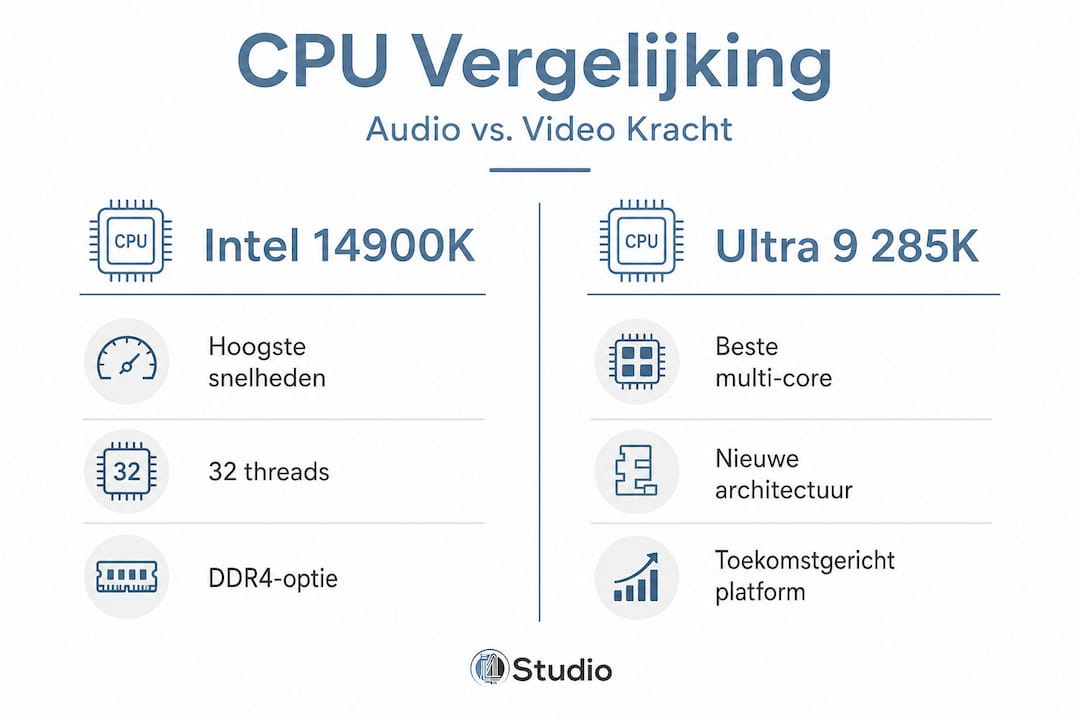
The platform difference is also strategically important. The 14900K runs on LGA1700, a platform that is now at the end of its life cycle but is therefore cheaper and stable. The Ultra 9 285K on LGA1851 is more forward-looking, but the platform is still relatively young. For a comparison with AMD options, it is also useful to see how both Intel chips compare to the Ryzen competition.
Pro-tip: If you choose the 14900K, you can still use DDR4 memory. It’s cheaper and barely noticeable in audio performance compared to DDR5. With the Ultra 9, you are required to buy DDR5.
After this direct comparison, it’s time to dig deeper into what these numbers mean for latency in practice.
Audio latency and stability: what really counts?
Latency is the delay between when a sound enters your interface and when it comes out through your DAW. In real-time monitoring, this is audible as soon as it exceeds 10 ms. Anything below 5 ms feels instantaneous.
| Buffer (samples) | Latency at 48 kHz | Latency at 96 kHz |
|---|---|---|
| 32 | ~0.67 ms | ~0.33 ms |
| 64 | ~1.33 ms | ~0.67 ms |
| 128 | ~2.67 ms | ~1.33 ms |
| 256 | ~5.33 ms | ~2.67 ms |
A faster single-core processor lets you operate at lower buffers without dropouts. That’s exactly where the 14900K takes its advantage in low latency monitoring.
However, there is a specific concern with the Ultra 9 285K. The Arrow Lake platform uses a chiplet design, where the CPU cores are physically separated on the chip. This introduces inter-core latency: the delay in communication between cores. For gaming or rendering, this is hardly noticeable, but for latency-sensitive audio, it can be distracting.
Technical discussions show that the Arrow Lake platform (Ultra 9 285K) has inter-core latency issues due to its chiplet design, while the 14900K’s Raptor Lake architecture performs more reliably after microcode updates.
Concrete real-world implications:
- Irregular interrupts with certain plugin combinations
- Dropouts at low buffers that do not occur with the 14900K
- Higher Deferred Procedure Calls (DPC) latency in Windows on some Arrow Lake systems
- Less predictable behavior with ASIO drivers on the new platform
The 14900K has had its own challenges, most notably the well-known 2024 microcode issues. However, after Intel’s updates, the platform is stable and reliable in production environments. That makes it a safer choice for critical studio sessions today.
In the end, it’s all about ease of use and real-world performance. Here we share applicable advice for your studio.
Concrete advice for your studio setup
Which CPU you choose depends on three factors: your primary workflow, your budget and your expected upgrade path. Here’s a step-by-step approach.
- Define your primary workflow. Are you mainly into audio recording and mixing with many plugins? Choose the i9-14900K. Do you also work intensively with 4K or 6K video, color correction and motion graphics? Then the Ultra 9 285K is a serious option.
- Look at your DAW and software. Pro Tools, Cubase and Studio one are optimized for high single-core speed. DaVinci Resolve and Premiere Pro scale better with multiple threads. Link your CPU choice to your primary software.
- Choose your memory platform consciously. The i9-14900K offers DDR4 and DDR5 support on the LGA1700 platform, which lowers the entry-level cost. With the Ultra 9, you are required to use DDR5, which increases the overall price.
- Plan your cooling seriously. At maximum load, the 14900K has a TDP of 253W. That calls for a high-quality 360mm AIO water cooling system or a powerful tower cooler. Don’t underestimate this: thermal throttling lowers your performance and increases the risk of instability.
- Test your system after setup. Use tools such as LatencyMon to measure DPC latency before you put the studio into production. That way, you’ll discover driver problems early.
Pro-tip: Install Windows in a clean configuration with no unnecessary background processes. Enable power management to “High Performance” and deactivate C-states in the BIOS for the lowest possible audio latency. This applies to both processors.
For those looking for a Pro Tools-optimized computer, the 14900K is currently the more reliable choice. Avid has extensively tested and certified the 14900K for compatibility. The Ultra 9 has not yet been widely certified by the major DAW manufacturers. Also see the complete guide to music production computers for additional advice on RAM, storage and interfaces.
Now that you know what works and why, here’s our unique take on this CPU battle.
Our look: why specs don’t say everything in the studio
Benchmarks are useful as a starting point, but in the studio you soon find that reality is more complex. We see this time and again with customers who upgrade a system based on paper specifications, only to discover afterwards that their bottleneck is elsewhere.
The biggest pitfall? Focusing on CPU performance when the audio interface, the USB controller or an outdated BIOS is the real limiting factor. An i9-14900K with a cheap USB hub and a generic driver performs worse than a well-configured mid-range processor with a quality Thunderbolt interface.
Drivers and OS optimization make a difference that benchmarks don’t show. A Windows installation full of background services, antivirus scans and automatic updates can increase DPC latency tenfold. That’s not a CPU problem, that’s a configuration problem. Read more about studio performance in practice to understand how all the components work together.
What we learned from expensive studio upgrades: the jump from a well-configured mid-range CPU to a top processor yields less profit than expected in most cases. The jump from a poorly configured system to a well-configured system is always dramatic. So invest in knowledge and configuration first, then hardware.
The Ultra 9 285K is an impressive processor with a promising platform. But for a professional studio that wants stable and reliable work today, the i9-14900K is the more pragmatic choice. Not because it is newer, but because it is proven.
Getting started yourself: building your ideal studio PC
Want to build a studio PC that really performs, without spending too much time figuring out which components fit together? At i4studio we’ll help you from specification to working setup.

Check out our overview of studio PC components to understand which parts work together in a professional build. Unsure if a desktop or laptop is a better fit for your workflow? We clearly explain the pros and cons. And if you want a complete DAW machine right away, check out our Audio PCs specifically put together for demanding music and audio production, are more into video check out our video PCsFrom advice to ready-made builds, we think with you.
Frequently Asked Questions
Which CPU is better for low latency in audio: Intel 14900K or Ultra 9?
The Intel 14900K delivers the best results for real-time audio, thanks to single-core speeds up to 6.0 GHz and minimal dropouts at 64-sample buffers.
Does the Ultra 9 285K give higher multi-core benchmarks, and is that important for video?
Yes, the Ultra 9 285K scores 8.7% higher on multi-core benchmarks, which benefits in heavy video rendering, but this sometimes comes at the expense of audio latency.
What are the biggest pitfalls when putting together a studio PC?
Paying too little attention to latency issues, inadequate cooling and wrong platform choice are the most common mistakes. The i9-14900K requires solid cooling even in normal use due to its TDP of up to 253W.
What is inter-core latency and why is this an issue with Ultra 9?
Inter-core latency is the delay in communication between CPU cores. Because of its chiplet design, the Ultra 9 285K potentially suffers more from this, which can be disruptive in latency-sensitive audio environments.
Can I work with DDR4 memory on both CPUs?
Only the Intel 14900K supports DDR4. The Ultra 9 285K requires DDR5 modules, which increases the overall build cost.



