
Short answer: Both TRS and XLR can carry a balanced signal, and in that regard, they sound the same electrically. The difference lies in the connector and its intended use. XLR connectors lock into place, are more robust, and are the only proper connection for microphones with 48V phantom power. TRS connectors are more compact and ideal for line signals, short connections, and patchbays. For studio monitors, both work fine, as long as the entire signal chain is balanced. Below, you’ll find information for each connection on which cable to choose, how to tell TS and TRS apart, and which mistakes cause the most hum.
TL;DR
- Audio: A balanced TRS cable and an XLR cable sound the same. They both use three conductors: positive, negative, and ground.
- Microphones: Always use XLR to XLR. Phantom power is only supplied through the XLR input on your audio interface.
- Studio monitors: Use whatever your interface and monitors provide. TRS to XLR, XLR to XLR, or TRS to TRS all work, as long as both ends are balanced.
- Note on TS: Plugging a guitar cable (TS) into a balanced port makes the connection unbalanced. Count the rings on the plug.
- Still getting hum? Then it’s usually due to grounding or cable routing, not the cable type.
Table of Contents
- What Exactly Are TRS, TS, and XLR?
- Does XLR sound better than TRS?
- The differences at a glance
- Which cable should you choose for which connection?
- How to tell TS and TRS apart in three seconds
- Common Mistakes That Cause Hum and Noise
- Our Perspective
- Setting Up Your Studio
- Frequently Asked Questions
- Sources
What TRS, TS, and XLR Are Exactly
Before you make a choice, it helps to know what you’re dealing with. The names sound technical, but they simply describe the connector’s construction.
TRS: the jack plug with two rings
TRS stands for Tip, Ring, Sleeve. It is a 6.35 mm jack plug (1/4 inch) with three contact points. In a studio, TRS is typically used for a mono-balanced signal: the tip carries the signal, the ring carries an inverted copy, and the sleeve carries ground. According to Focusrite, all 6.35 mm jack inputs and outputs on their interfaces are mono-balanced, and this applies to many modern audio interfaces.
The same TRS plug is also used for stereo, such as with headphones. In that case, the tip carries the left channel and the ring carries the right. So shape isn’t everything: the device determines what the plug carries.
TS: The Classic Instrument Cable
TS stands for Tip, Sleeve. It has one fewer ring, so there are only two contact points: signal and ground. This is the standard guitar cable. TS is always unbalanced.
XLR: the three-pin locking connector
The 3-pin XLR is the standard for microphones and professional line connections. The pin configuration is fixed: pin 1 is ground, pin 2 is hot (+), and pin 3 is cold (−), as standardized in AES14. Electrically, this is exactly the same as the tip, ring, and sleeve on a TRS plug. That is why there are cables that connect TRS to XLR without the signal becoming unbalanced.
Does XLR sound better than TRS?
No, not if both are balanced. The sound is determined by the principle of balanced audio, not by the shape of the plug.
Here’s how it works. A balanced cable transmits the signal twice: once normally and once in reverse phase. Along the way, the cable picks up interference, for example from a power cable or a dimmer. That interference arrives with the same strength on both conductors. At the receiving end, the out-of-phase signal is reversed, and the two signals are added together. The audio signal is amplified, while the interference cancels itself out.
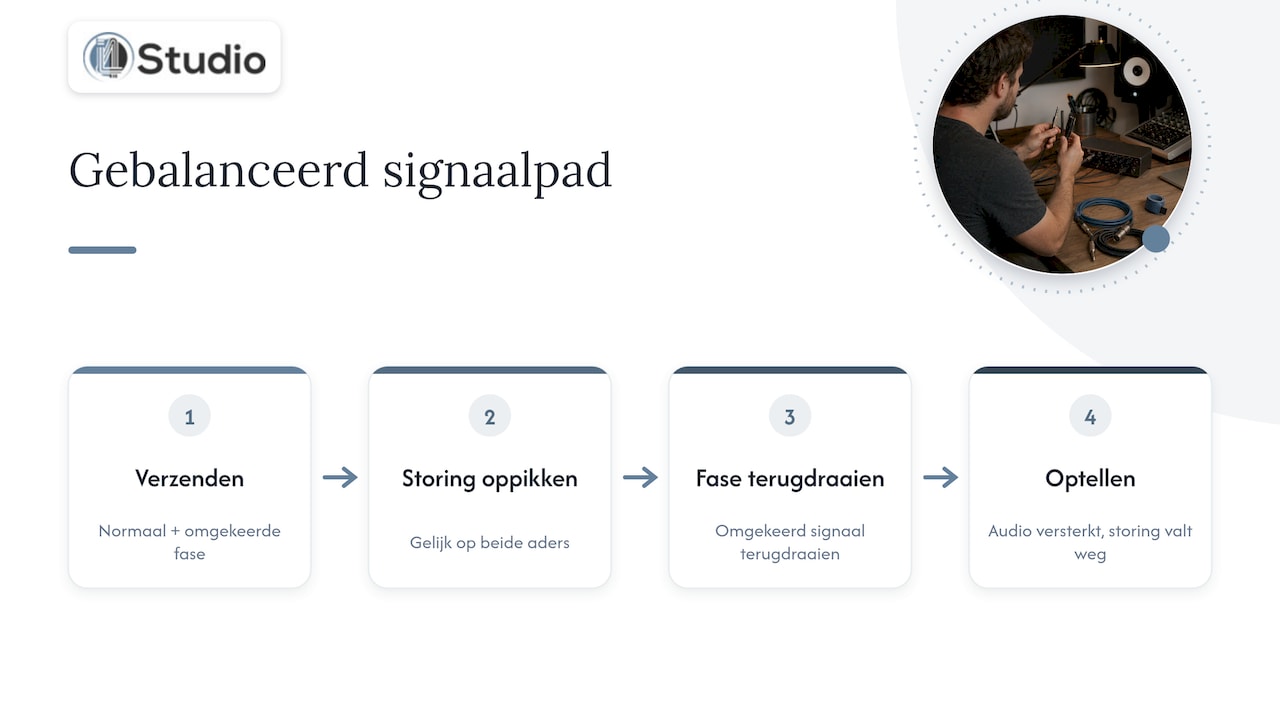
Neumann calls this common-mode rejection: the input subtracts the noise that arrives equally on both conductors. In their FAQ on interfacing, they also explain that a transformer-balanced input can provide even better isolation than an electronically balanced one, but is more expensive to build. For most home studios, a good electronically balanced input is more than sufficient.
Would you like to explore this concept in more depth? In our article, “Why Balanced Audio Enables Noise-Free Operation,” you can read more about the how and why.
The level also matters
Balanced equipment typically operates at professional line level, while consumer equipment operates at a lower level. The professional level is +4 dBu, approximately 1.228 V RMS, and the consumer level is -10 dBV, approximately 0.316 V RMS. If you connect a -10 device to a +4 input, you’ll hear a quieter signal and will need to apply more gain. Many monitors and interfaces therefore have a switch for the input level. This is independent of whether you’re using TRS or XLR, but it explains why two connections sometimes seem to sound different.
A Summary of the Differences
| Specification | TRS (6.35 mm jack) | XLR (3-pin) |
|---|---|---|
| Conductors | 3 (tip, ring, sleeve) | 3 (pins 1, 2, 3) |
| As balanced as possible | Yes | Yes |
| Sound Quality with Balanced Connectors | Unbalanced | Equal |
| Lock | No | Yes, clicks into place |
| Phantom Power (48V) for Microphones | No | Yes, via the XLR input |
| Size | Compact, fits many ports in a small space | Larger and sturdier |
| Typical Uses | Line outputs, synths, outboard gear, patchbays | Microphones, monitors, long runs, live |
| Risk | Confusion with TS or stereo jack | Minimal; the standard is unambiguous |
The conclusion from the table: the difference is practical, not sonic. Professionals often choose XLR for fixed or long connections, such as monitors and microphones, because the locking mechanism prevents a cable from accidentally coming loose. TRS is the logical choice for shorter, flexible connections.
Which cable should you choose for which connection?
This is what most questions are about. We’ll outline the right choice for each situation.
Microphone to audio interface: always XLR
There’s no room for debate here. A microphone should be connected to the XLR input on your interface or preamp using an XLR-to-XLR cable. Neumann is very clear on this: microphone inputs have an XLR connector; TRS is not suitable for microphones.
There are two reasons for this:
- Phantom power. A condenser microphone requires 48V. This voltage is supplied via the audio cable, and on a standard interface, only through the XLR input.
- Level and impedance. The microphone preamp is located after the XLR connector. The TRS input is intended for line or instrument signals and is not designed to handle the weak signal from a microphone.
Many interfaces have a combo jack: the outer part is XLR, and the hole in the middle is TRS. Neumann warns that when using a combo connector, you should always plug your microphone into the XLR part. An XLR-to-jack adapter will, at best, produce a weak, noisy signal and, at worst, no signal at all.
Are you looking for a reliable cable? The 2.5-meter Cordial microphone cable is a sturdy XLR-to-XLR cable for a standard setup at your desk. If you’re still unsure about the microphone itself, read our complete guide to microphones for your home studio or check out our selection of microphones right away.
Audio interface to studio monitors: TRS or XLR—as long as it’s balanced
This is the question Google gets asked most often. The answer: both work equally well. Focusrite recommends balanced connections—TRS or XLR—where your equipment supports them, especially for monitors and line-level equipment.
So check the connections on both sides:
- The interface has TRS outputs, and the monitor has an XLR input: use a balanced cable with a TRS jack on one end and an XLR male connector on the other. This is the most common setup in a home studio.
- Both the interface and monitor have TRS connectors: use a TRS-to-TRS cable. Make sure both plugs have two rings.
- The interface or monitor controller has XLR outputs: use an XLR female to XLR male cable. The locking mechanism is a nice bonus here.
For the first scenario, we carry the Hosa REAN balanced cable (6.35 mm TRS jack to XLR male, 3 m ) in our product line. Three meters is usually enough in most studios to run the cable from your desk to the monitor stand without it being taut. If you’re still looking for the monitors themselves, check out our studio monitors.
A practical note: balanced connections don’t solve everything. Focusrite says balanced cables are a good way to reduce hum in your monitors, but if the hum persists, there’s often a ground loop in your electrical system. More on that later.
Synthesizers and keyboards: check the output
Many synthesizers have unbalanced jack outputs (TS). A TRS cable doesn’t automatically make that connection balanced: the weakest link in the chain determines the result. Over short distances—a few meters on your desk—this is rarely a problem. If the signal needs to travel far or if the cable runs alongside power cables, a DI box is a good solution. It converts the unbalanced signal to a balanced signal via XLR.
If your synth has balanced outputs (you can check the manual), just use a TRS-to-TRS cable to connect to your interface.
Guitar and bass: TS to the instrument input
An electric guitar or bass has an unbalanced output. So you use a TS cable to connect to the instrument input (Hi-Z or INST) on your interface. Focusrite states in the Scarlett 4i4 manual that you should use a 6.35 mm TS mono jack cable for instruments with pickups. In this case, TS is indeed correct.
Outboard gear and patchbays: usually TRS
In a studio equipped with compressors, equalizers, and a patchbay, you’ll mostly see TRS connectors. The format is compact, allowing many connections to fit onto a single 19-inch unit. One word of caution: when swapping cables in a patchbay, a TRS plug can briefly make contact with the wrong pins. Focusrite warns that this can route phantom power to the wrong pin, which can damage ribbon microphones and active electronics in particular. Therefore, always turn off the 48V before re-patching if there are microphones connected to the patchbay.
Recognize TS or TRS in three seconds
In a cable drawer, they’re often all jumbled together. Fortunately, you can tell them apart with the naked eye:
- Pick up the plug and look at the tip. You’ll see black insulation rings between the metal parts.
- Count the rings. One black ring means TS (unbalanced). Two black rings mean TRS (balanced or stereo). This is exactly how Focusrite explains the difference.
- Check the other end. A cable may have TRS on one end and TS on the other. In that case, the connection is unbalanced.
Tip: Label your cables. Use a piece of colored tape for TRS and a different color for TS—it’ll save you a lot of searching later on, especially as your setup grows.
Common Mistakes That Cause Hum and Noise
The cable is just one link in the chain. These are the errors we see most often in practice.
- A TS cable connected to the monitors. It works—you can hear sound—but the connection is unbalanced and picks up interference. Replace it with a true TRS cable or a TRS-to-XLR cable.
- A microphone connected via a jack adapter. No phantom power, the signal level is too low, and there’s a lot of noise. Always use the XLR input.
- Audio cables bundled with power cables. Even balanced cables have a hard time next to a power strip full of adapters. Neumann and Focusrite emphasize that proper grounding, shielding, and distance from power cables are just as important as the type of cable. Route audio and power cables at right angles to each other as much as possible.
- A ground loop. Devices plugged into different outlets or circuits may have a slight voltage difference in the ground. You can hear this as a low hum. Focusrite suggests using a ground loop isolator or checking the grounding of your outlets as a more effective solution than simply using different cables.
- Do not tape over or cut away the grounding wire. Never do this. The grounding wire is there for your safety. If you have any doubts about the electrical installation in your studio, have it inspected by a licensed electrician.
We’ve written two in-depth articles on that last topic: why a grounded outlet is essential in your studio and our step-by-step guide to installing hum-free cables.
Our Perspective
At i4studio, we’re often asked whether a more expensive XLR cable makes the mix sound better than a TRS cable. Our honest answer: if both are balanced and well-made, you won’t hear a difference. Where we do hear a difference is in the rest of the signal chain.
In the studios we set up, we see the same pattern over and over again. Someone replaces all their cables because there’s a humming noise, and the noise is still there. Then it turns out the cause is an ungrounded power strip, a laptop charger plugged into a different circuit, or an audio cable running right next to a power cable. That’s why we always look at the big picture: the cables, the power supply, the computer, and the room.
That’s also why we build our studio PCs with a focus on stability and low latency. A quiet, well-configured computer without disruptive components eliminates one source of noise right off the bat. And a well-treated room ensures that your monitors sound accurate, so you don’t end up compensating for issues that actually stem from the room’s acoustics.
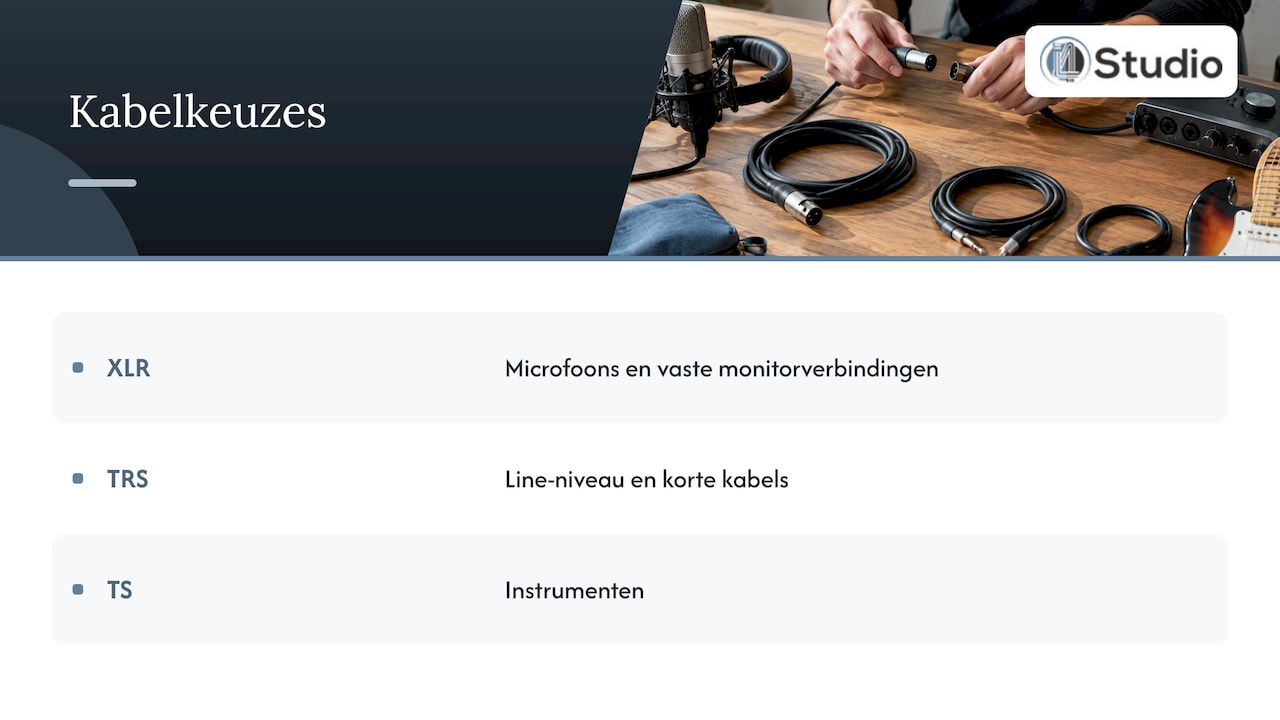
Our rule of thumb for cables is simple: XLR for microphones and fixed connections to your monitors, TRS for anything that’s line-level and short, and TS only for instruments. Buy good cables in the right length once, and run them neatly. Then you won’t have to worry about them anymore.
– harold
Setting Up Your Studio’s Complete Connection System
Are you setting up or upgrading your setup? At i4studio, you’ll find everything you need to ensure your setup—from microphone to monitor—works seamlessly. Choose an audio interface with balanced outputs, pair it with the right cables and studio monitors, and finish it off with acoustic panels—we’re happy to advise you on those, too. If you’re working on demanding sessions or using a lot of plugins, check out our custom-built studio computers, starting at €1,099, designed for stable, low-latency performance. Prefer to get everything at once? Then the Studio Recording Bundle is a great place to start.
Frequently Asked Questions
Should I use XLR or TRS connectors for studio monitors?
Both are fine, as long as the output of your interface and the input of your monitor are balanced. Choose the cable that matches the connectors: usually, that’s a TRS jack to an XLR male. XLR has the advantage of locking into place, which is handy for permanent setups.
Is there an XLR-to-TRS adapter?
Yes, and for line signals, it works fine as long as the adapter is wired in a balanced configuration. A fixed TRS-to-XLR cable is more reliable than a loose adapter, because it has fewer connection points. Never use an adapter to connect a microphone to a TRS input.
How can I tell if a cable is TS or TRS?
Look at the tip of the jack plug. One black insulation ring indicates TS; two rings indicate TRS. Check both ends, because a mixed cable is unbalanced.
Does it matter which XLR cable I buy?
There’s little difference in sound quality among well-made cables. What you should look for: sturdy connectors, good shielding, a flexible jacket, and the right length. A cable that’s too long and lies coiled behind your desk is unnecessary, and a cheap connector that comes loose after a few uses will cost you time later on.
Sources
- Focusrite: Differences Between Balanced and Unbalanced Audio
- Focusrite: Why is there unwanted hum or noise in my monitors?
- Focusrite: What is 48V phantom power?
- Focusrite: Can I damage my equipment with phantom power (48V)?
- Focusrite: Using Your Scarlett 4i4
- Neumann: Monitors FAQ, Interfacing Answers (PDF)
- Neumann: How to Connect Your Microphone to an Audio Interface
- Neumann: What are the basic features and functions of a preamp?
- Biamp: Gain structure, input and output levels
- 3-pin XLR pinout and wiring diagram