Briefly:
- Monitor speakers provide neutral sound reproduction that is suitable for any playback situation. The choice depends on room size, production type, and budget, with room acoustics playing a particularly important role. Proper setup and acoustic treatment improve accuracy and prevent misperceptions during mixing.
Monitor speakers are designed to deliver sound that is as flat and neutral as possible, without any coloration or flattery. That neutrality is exactly what you need to create mixes that sound good on any playback system, from earbuds to car stereos. How do you choose monitor speakers that suit your situation? The choice depends on three factors: the size of your space, the type of production you’re doing, and your budget. I4studio helps musicians and audio enthusiasts every day to put together a complete studio setup, and in this article, you’ll find the information you need to make the right decision on your own.
What factors determine the right choice of monitor for your studio?
Room size is the first and most important factor when choosing monitor speakers. A woofer that’s too large for a small room causes standing waves and excessive bass, which makes your mixes unreliable. The rule of thumb is clear: room size determines woofer diameter, with rooms up to 12 m² requiring a 5-inch woofer, rooms from 12–25 m² requiring a 7- or 8-inch woofer, and rooms larger than 25 m² require an 8- to 10-inch woofer or a three-way system.

Near-field versus mid-field monitors
Near-field monitors are the standard for home studios. You place them 90–150 cm from your ears, which provides direct sound reproduction with minimal influence from room acoustics. Midfield monitors are used at a distance of 150–250 cm and are intended for larger mixing rooms. For most home producers, a nearfield monitor is the practical and acoustically sound choice.
Active versus Passive Monitors
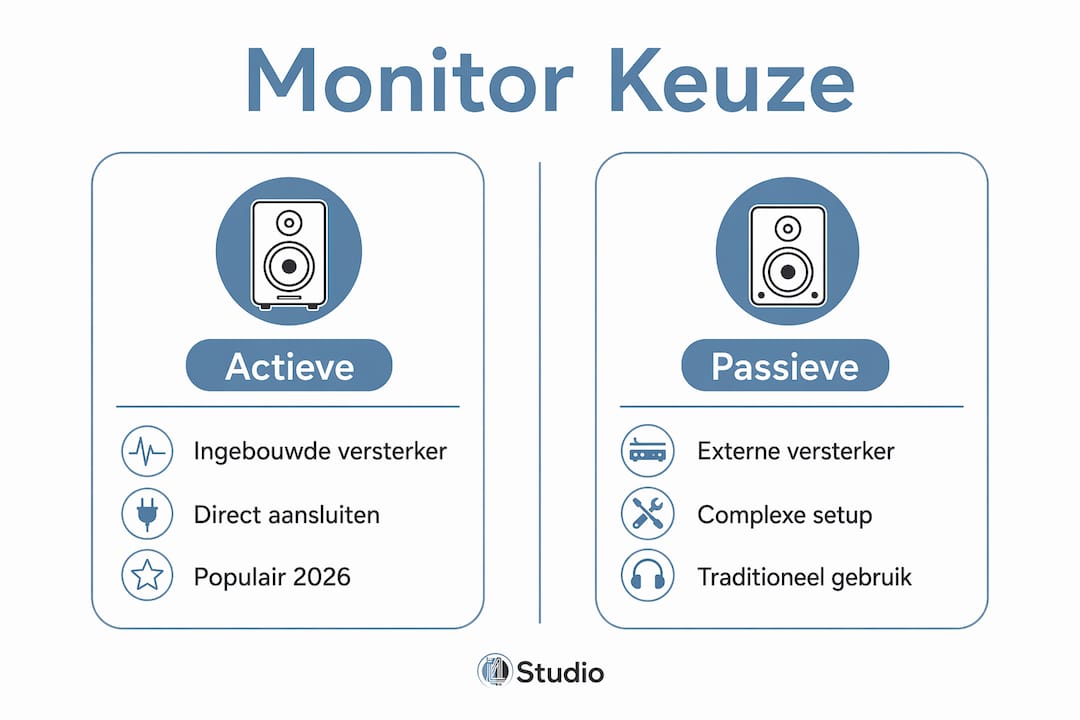
Active monitors have a built-in amplifier and will be the standard for home studios by 2026. You can connect them directly to your audio interface without an additional amplifier. Passive monitors require an external amplifier and are primarily used in larger professional setups. For home use, active monitors offer fewer cables, less noise, and better alignment between the amplifier and the speaker.
Frequency Range and SPL
A flat frequency response is the hallmark of a good studio monitor. You want a monitor that reproduces the full spectrum from 20 Hz to 20 kHz as accurately as possible, so that your EQ decisions are accurate. The maximum sound pressure level (SPL) determines how loud the monitor can play without distortion. For home studios, a maximum SPL of 100 dB or more is more than sufficient.
| Room Size | Recommended woofer | Listening distance | Type |
|---|---|---|---|
| Up to 12 m² | 5 inches | 90–120 cm | Near-field |
| 12–25 m² | 7–8 inches | 100–150 cm | Nearfield |
25 m² | 8–10 inches or 3-way | 150–250 cm | Midfield |
Pro-tip: Never buy a monitor based solely on woofer size. An 8-inch monitor in a 10 m² room will sound worse than a 5-inch monitor in the same space, because the bass cannot be controlled.
Would you like to learn more about the different types of studio monitors available and which ones are best suited to your workflow? I4studio has a comprehensive guide on this topic.
How do you adjust your monitor speakers to your listening environment?
The listening environment has a greater impact on your sound than the monitor itself. A room with hard walls, a wooden floor, and no acoustic treatment colors the sound so much that even the most expensive monitors can mislead you. Better room acoustics have a greater impact on the accuracy of your low frequencies than a larger woofer. That’s a realization many producers discover too late.
Proper Setup in Four Steps
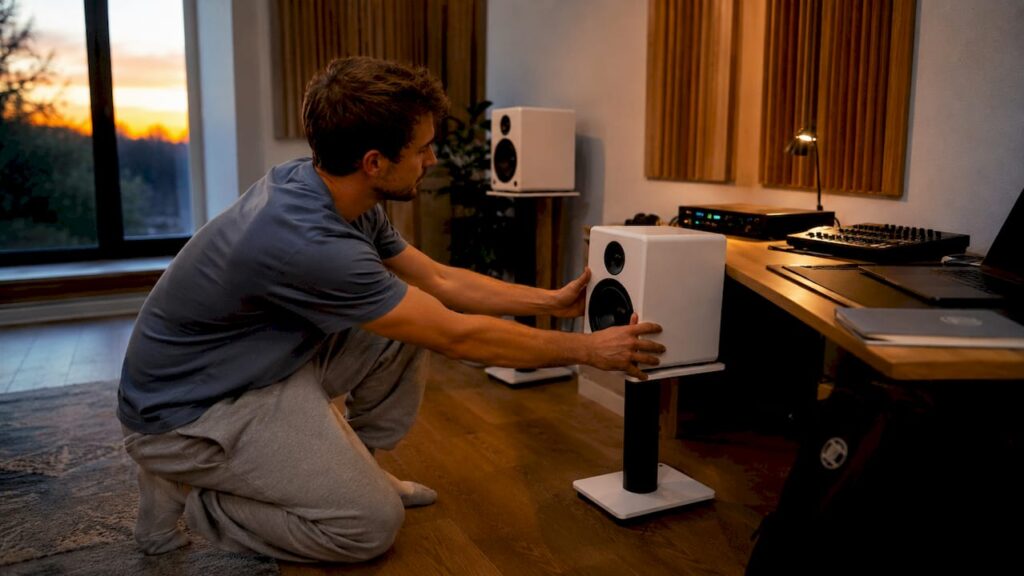
- Equilateral triangle: Place your left and right monitors at the same distance from each other as the distance to your ears. This forms an equilateral triangle and provides accurate stereo sound.
- Ear Height: Position the high-frequency speaker (tweeter) at ear level. Placing it too high or too low will noticeably alter the frequency balance.
- Stay away from corners: Corners significantly amplify low frequencies. Keep a minimum distance of 50 cm from walls and corners to avoid unwanted bass buildup.
- Symmetry in the room: Make sure both monitors are the same distance from the side walls. Asymmetry causes a skewed stereo image.
Pro-tip: Use a measurement microphone and free software such as REW (Room EQ Wizard) to measure your room’s frequency response. This will help you pinpoint exactly where your acoustic problems lie before you spend money on treatment.
Acoustic treatment and software correction
Physical diffusers and absorption panels significantly improve the accuracy of your monitors. Absorption panels dampen reflections at the first reflection points to the side and above your listening position. Diffusers disperse sound in larger rooms and prevent a sound that’s too dry or lifeless. Many active monitors also have built-in EQ switches that allow you to adjust the sound to suit the placement, such as a bass cut for wall mounting.
Software-based correction using tools such as Sonarworks SoundID Reference or IK Multimedia ARC System digitally compensates for any remaining room irregularities. These tools measure the room acoustics and adjust the output of your monitors via a plug-in in your DAW. They do not replace physical treatments, but they do complement them well.
| Acoustic problem | Solution | Effect |
|---|---|---|
| Bass Setup in Corners | Bass drop or keeping distance | Flatter low frequencies |
| Early Reflections | Absorption panels at reflection points | Clearer stereo image |
| Loud sounds, echo | Diffusers on the back wall | A more natural sense of space |
| Room Acoustic Irregularities | Software EQ correction | Flatter overall response |
Check out I4studio’s guide to studio monitor setup for detailed instructions on precise placement.
What are some practical considerations when buying monitor speakers?
Your budget determines what you get, but not always in the way you expect. Entry-level models cost around €110 each and offer decent quality for beginners. Professional models range from €400 to €600 each and offer better build quality, more accurate reproduction, and a wider dynamic range. The difference lies not only in the sound but also in durability and consistency over the years.
Connectivity Options: What Works and What Doesn’t
The connection between your audio interface and your monitors determines how noise-free your signal transmission is. Always choose the right connection:
- XLR: The best choice for professional connections. Balanced signal, maximum noise reduction, suitable for longer cable runs.
- TRS (6.35 mm jack): Also balanced and excellent for home studios. Almost as good as XLR over short cable runs.
- RCA (tulip): Unbalanced and prone to noise. Use this only if you have no other option.
- Bluetooth: Not suitable for critical monitoring due to audio compression and latency. Acceptable for reference listening on a consumer device, but never for mixing or recording.
Ear training: the most underrated skill
Familiarity with a single set of monitors is just as important as the technical specifications of those monitors. Producers who spend thousands of hours listening to the same system learn exactly how their room and monitors sound. As a result, they recognize problems in a mix more quickly and correct them more accurately. Don’t constantly switch monitors. Choose one set, get to know it, and use reference material to calibrate your ear.
Common Mistakes When Buying
Many beginners buy monitors that are too large for their space, listen at too high a volume while mixing, or place monitors right up against the wall. Each of these mistakes results in mixes that sound bad outside the studio. Another common mistake is investing in expensive monitors while the room remains untreated. That money is better spent on acoustic wall panels or diffusers.
Which monitor speakers are right for your music style?
Not every music style places the same demands on your monitors. The choice of woofer size and frequency range is directly related to the genre and production approach.
- Electronic music and hip-hop: Low frequencies dominate. An 8-inch woofer or a combination of 5-inch monitors and a subwoofer gives you more control over the bass. Without sufficient low-frequency response, you’re mixing the kick and bass blindly.
- Vocal production and singer-songwriter: Midrange and clarity in the high frequencies are crucial. A 5- or 7-inch monitor with a good tweeter is sufficient. The emphasis is on the presence of the voice in the mix.
- Live recordings and acoustic music: Dynamic range and a natural reproduction of instruments are key. Choose monitors with a flat response across the entire spectrum and avoid monitors that emphasize the high frequencies.
- Film and game audio: You’ll be working with a wide frequency range, including low-frequency effects. A subwoofer isn’t a luxury here—it’s a necessity for accurate reproduction of LFE channels.
When should you add a subwoofer?
A subwoofer improves the accuracy of low frequencies and reduces the strain on your monitors’ woofers. This is useful for bass-heavy genres and in larger rooms where the monitors cannot fully reproduce the low frequencies. In small rooms, however, a subwoofer can cause more problems than it solves by introducing extra bass buildup. Measure your room first before adding a subwoofer.
Neutrality versus Biased Reporting
Studio monitors are designed for neutrality. Consumer speakers intentionally color the sound to make music sound more pleasant, with more bass and bright highs. That coloration is pleasant to listen to, but disastrous for mixing. A mix that sounds good on colored speakers often sounds dull or unbalanced on neutral systems. Always choose a monitor with a flat frequency response if you want to mix seriously. Use colored speakers or earbuds as a reference, not as your primary monitoring system.
Want to learn more about frequency response in your studio? I4studio explains how to understand and improve it.
Key insights
Choosing the right monitor speakers requires balancing your room size, woofer diameter, setup, and acoustics, because without that balance, even an expensive monitor will mislead you when mixing.
| Item | Details |
|---|---|
| Room size determines woofer size | Use a 5-inch woofer for rooms up to 12 m², and a 7–8-inch woofer for rooms between 12 and 25 m². |
| Active monitors are the standard | They have a built-in amplifier and connect directly to your audio interface. |
| Acoustics Come Before Hardware | Invest in panels and diffusers first before buying more expensive monitors. |
| XLR or TRS for connection | Balanced connections provide the least noise and the best signal quality. |
| Ear training is irreplaceable | Get to know a single set of monitors by working with them for thousands of hours. |
What I’ve Learned After Years of Working with Monitors
The biggest mistake I see musicians make is that they spend their entire budget on the monitors themselves and forget about the room. I’ve worked in rooms with monitors costing €1,200 each that sounded like average consumer speakers, simply because the room was untreated. And I’ve heard mixes made on €150 monitors in a well-treated room that sounded great on any system.
My advice is always the same: start by buying a decent entry-level model, treat your room with at least a few absorption panels at the primary reflection points, and get to know those monitors. Only when you feel like you can hear the limitations of your monitors is it time to upgrade.
A second point I want to emphasize: don’t listen at too high a volume. Many producers turn their monitors up too loud because it sounds impressive. But your ears get tired quickly, and you lose the ability to hear subtle balances. Work at a comfortable volume, around 75–85 dB, and take regular breaks.
Finally: use reference material. Load a mix you know well into your DAW and compare it to your own work. That’s the fastest way to learn how your monitors sound and what they tell you about your mix.
– harold
Monitor Speakers and Studio Acoustics at I4studio
A good monitor setup starts with the speakers, but ends with the entire environment. I4studio not only supplies studio equipment, but also the acoustic solutions that really make your monitors work.
Check out the acoustic diffusers and absorption panels in the I4studio lineup for an acoustically treated listening room. Combine them with a custom-built DAW computer for a complete, no-compromise production setup. Do you work in the audiovisual industry and are you looking for flexible job opportunities? Through NOWJOBS’ audiovisual sector, you can find professional assignments in post-production and audio mixing. I4studio helps you with every step of your studio setup.
Frequently Asked Questions
What is the difference between monitor speakers and regular speakers?
Monitor speakers reproduce sound as neutrally as possible, without any coloration. Regular speakers deliberately boost bass and treble to make music sound more pleasant.
What size woofer do I need for my home studio?
For rooms up to 12 m², a 5-inch woofer is sufficient. Rooms measuring 12–25 m² require a 7- or 8-inch woofer for balanced sound reproduction.
Are active or passive monitor speakers better for home use?
Active monitors are the better choice for home studios. They have a built-in amplifier, connect directly to an audio interface, and produce less noise.
How far away from the wall should monitor speakers be placed?
Keep a minimum distance of 50 cm from walls and corners. Placing the speaker close to a wall amplifies low frequencies and distorts the bass response.
When do I need a subwoofer with my monitors?
A subwoofer is useful for bass-heavy genres such as electronic music or movie soundtracks, and in rooms larger than 25 m² where the monitors cannot fully reproduce the low frequencies.