TL;DR:
- For music production, a minimum of 32 GB of RAM is recommended for large sample libraries. RAM consumption varies greatly depending on articulations, microphone positions and production style, with purging and streaming optimizations effectively saving RAM. Complex orchestral templates and film scoring require 64 GB of RAM or more, depending on workflow and hardware.
RAM usage for large sample libraries ranges from less than 500 MB for a simple instrument to more than 64 GB for a full orchestral template. That difference determines whether your session runs smoothly or crashes at the most inopportune moment. For music producers and studio owners working with how much RAM for large sample libraries in 2026 to make the right choice, this article offers concrete guidelines, comparison tables and optimization tips. Not vague advice, but practical tools for any production style.
Table of contents
- Key insights
- RAM usage by sample library type
- How production style determines RAM requirements
- Optimizing RAM efficiency with large libraries
- Smart hardware choices for optimal RAM performance
- Misconceptions about RAM in sample libraries
- My vision after years in the studio
- I4studio helps you choose the right studio hardware
- FAQ
Key insights
| Item | Details |
|---|---|
| Minimum RAM for serious production | 32 GB is the recommended starting position for producers working with sample libraries. |
| RAM usage per orchestral section | Each orchestral section uses an average of 2 to 4 GB of RAM, depending on articulations. |
| Purging saves up to 70% RAM | Removing unused samples dramatically reduces RAM usage without losing quality. |
| NVMe SSD doesn’t replace RAM, but helps | Fast storage reduces streaming bottlenecks and enables better utilization of available RAM. |
| Production style determines need | Electronic music fundamentally requires less RAM than film scoring or orchestral arrangements. |
RAM usage by sample library type
Not every sample library weighs equally on your memory. A standard Kontakt instrument, such as a single piano or a basic drum kit, typically consumes between 500 MB and 5 GB of RAM. Once you move to large orchestral sections, that consumption rises to 2 to 4 GB per section.
What most producers underestimate is the effect of articulations and microphone positions. Multiple microphone positions can double or even triple the RAM usage of a single library. So a string library with four microphone positions and ten articulations quickly uses three to four times as much memory as the basic version.
Below is a comparison table of typical RAM load by library type:
| Library type | Average RAM usage | Examples |
|---|---|---|
| Synthesizers and basic keys | 100 MB to 500 MB | Simple leads, pads |
| Acoustic piano (single mic) | 500 MB to 1.5 GB | Studio piano with single position |
| Orchestral section (basic) | 2 to 4 GB | Strings, brass or wood |
| Orchestral section (multi-mic) | 5 to 12 GB | Strings with 4 microphone positions |
| Full orchestral template | 30 to 64 GB | Movie scoring templates |
Pro-tip: At the start of a session, load only the mic positions you actually use. Keeping close mic and room mic active at the same time while mixing only the close mic will unnecessarily cost you 30 to 60 percent extra RAM.
Popular libraries like Spitfire Audio’s BBCSO or Orchestral Tools’ Berlin Series are great examples of libraries that without multi-mic setup already consume 6 to 10 GB per loading session. If you work with a full orchestral template including all sections and multiple mic positions, your RAM requirements quickly shoot past 40 GB. Sizing your computer for music production is then not a luxury but a necessity.
How production style determines RAM requirements
The amount of RAM you need depends more on what you make than on which DAW you use. MIDI synths typically require 16 GB, while sample-intensive orchestral productions quickly require 32 to 64 GB.
Looking at concrete production scenarios in 2026:
- Electronic music and hip-hop: Software synthesizers and sample-based beats, where libraries are smaller. 16 GB of RAM is sufficient, 32 GB gives additional space for plugins.
- Pop and singer-songwriter production: Mix of software instruments and some sample libraries for drums or strings. 32 GB is the optimal RAM amount here 2026.
- Film music and orchestral arrangements: Large templates with multiple sections at once. 64 GB is the realistic lower limit here. Professionals regularly work with 128 GB.
- Game audio and sound design: Depends on the approach. Complex ambience layers and layered samples require 32 to 64 GB.
Plugins and effect chains also play a role. Any heavy memory-using plugins, such as convolution reverb or complex multiband compression, take RAM away from your sample libraries. In a large orchestral session, this quickly adds up to an additional 4 to 8 GB in addition to the RAM your libraries already use.
Pro-tip: Combine 64 GB of RAM with an NVMe SSD of at least 2 TB for your sample libraries. Fast NVMe storage reduces reliance on full memory loading and lets you run larger templates than your RAM capacity will allow on paper.
A common mistake is prioritizing only RAM, when in fact storage is the bottleneck. A slow-loading library causes the same problems as insufficient RAM, namely audio dropouts, staggered voices and crashes during playback.
Optimizing RAM efficiency with large libraries
Buying more RAM is not the only solution. There are techniques that can drastically reduce your RAM usage without sacrificing sound quality. Here’s what really works:
- Use purging actively. Removing unused samples from memory via the purge function in Kontakt or similar samplers reduces your RAM usage by 50 to 70 percent. Load a template completely, mix and arrange, then purge anything you no longer need.
- Load only required articulations. Large libraries contain dozens of articulations per instrument. In practice, you rarely use more than five or six per session. Disable the rest manually before initializing the library.
- Optimize your Kontakt settings. Kontakt 8 significantly improves RAM stability and efficiency with large templates compared to previous versions. Set the prerelease control to a lower value and lower the memory server setting if you run many instances at once.
- Work with a streaming-first approach. Set the sample preload buffer as low as possible so that Kontakt streams samples from your SSD instead of loading everything into RAM. An NVMe SSD avoids disk streaming bottlenecks that you would then expect with a slower disk.
- Split your template into loading profiles. Create separate template versions for sketching (low RAM usage, fewer articulations) and for final mix and production (full load). This will save you much of your available memory during the creative phase.
Pro-tip: Use a second fast SSD exclusively for sample libraries. The OS disk and the library disk otherwise compete for the same read/write bandwidths, which can lead to latency problems even with an NVMe disk for large orchestral sessions.
Also check out I4studio’s DAW performance optimization guide for a complete list of settings that speed up your workflow without additional hardware.
Smart hardware choices for optimal RAM performance
Once you know how much RAM you need, the next step is to choose the right hardware to support it. Here are the key considerations:
- Determine your production style first. If you make mostly electronic music, then a system with 32 GB will suffice. If you work on film music or large orchestral arrangements, don’t go below 64 GB. Balancing RAM and NVMe SSD is more efficient in this regard than just adding more RAM.
- Choose a motherboard that is scalable. Don’t buy the maximum amount of RAM right away, but make sure your motherboard supports expansion to 128 or 256 GB. RAM needs grow with the complexity of your projects.
- Note the memory speed. DDR5 memory will be the standard in new systems by 2026. Higher clock speeds improve data transfer between processor and memory, which is noticeable when loading large sample libraries.
- Always pair RAM with fast storage. A system with 64 GB of RAM but a slow HDD performs worse than a system with 32 GB of RAM and two fast NVMe SSDs. Storage is as decisive as RAM itself.
Below is a list of recommended configurations by production style:
| Production Style | Recommended RAM | Storage |
|---|---|---|
| Electronic music / hip hop | 32 GB DDR5 | 1 TB NVMe SSD |
| Pop / singer-songwriter | 32 to 64 GB DDR5 | 2 TB NVMe SSD |
| Film music / orchestral production | 64 to 128 GB DDR5 | 2 x 2 TB NVMe SSD |
| Game audio / sound design | 64 GB DDR5 | 2 TB NVMe SSD |
Future RAM recommendations for 2026 and 2027 point to further growth in library sizes, particularly with the emergence of 32-bit float sample formats and AI-driven library expansion. Those who choose a scalable system now will save themselves a full upgrade in two years.
Misconceptions about RAM in sample libraries
There are a few persistent misconceptions that make producers make expensive or wrong choices. The most common:
- “More RAM is always better.” Not true. After a certain point, extra RAM makes no audible difference if your workflow and SSD are the bottleneck. Efficient workflows and fast SSDs are at least as decisive as the amount of memory.
- “The size of a library determines its RAM usage.” Wrong. A 300 GB library may consume less RAM than a 50 GB library if the latter loads many more articulations and microphone positions simultaneously. RAM usage is determined by loaded articulations, not by installation size on disk.
- “SSD replaces RAM.” That’s not quite right. A fast SSD reduces the amount of RAM you need for streaming, but does not completely replace memory. Samples being actively played should always be in RAM.
- “RAM brand makes little difference.” Stable memory with low latency makes a difference in intensive multitasking. Cheap memory without an XMP profile can cause instability in long sessions.
Understanding the balance between RAM, CPU and storage will help you make better buying decisions and build a system that actually fits your production practices.
My vision after years in the studio
After years of working with music producers and studio owners, one pattern strikes me. Most people first buy too little RAM, get frustrated, and then buy too much. Both choices cost money that could have been better spent.
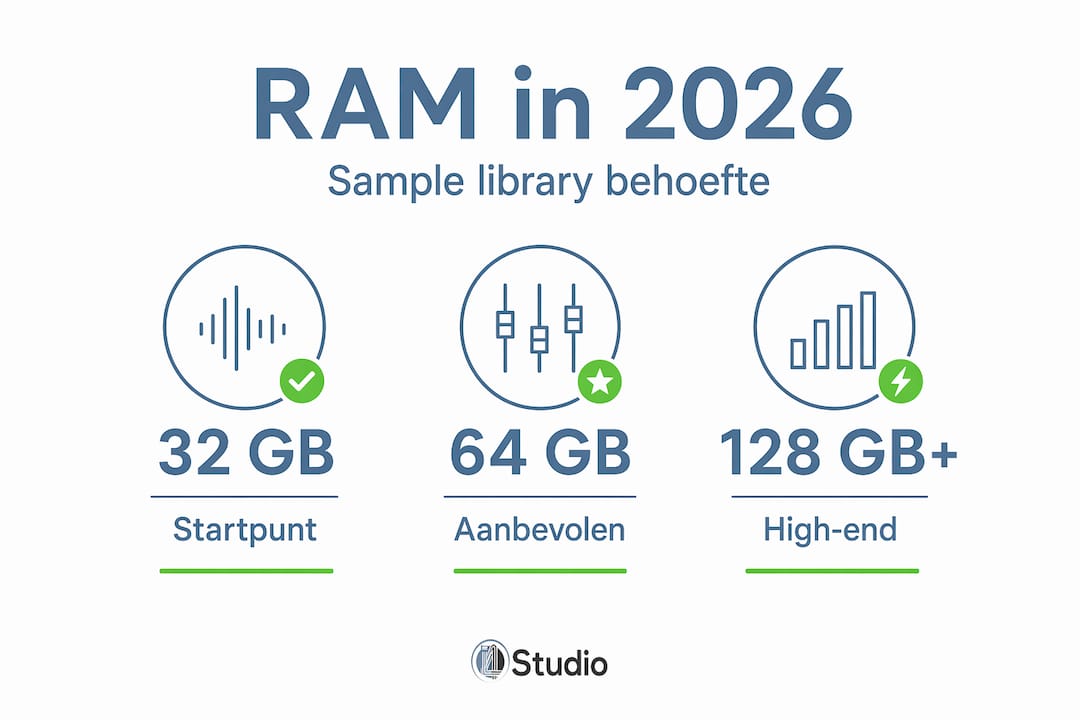
What I see in practice is that 64 GB is the ideal midpoint for the vast majority of producers in 2026. Enough for large orchestral templates, enough for demanding plugins, and still scalable. Those making purely electronic music will be fine with 32 GB and two fast NVMe SSDs.
What I’m also learning is that workflow optimization delivers more than hardware upgrades. Purging, smart template construction and selectively loading needed articulations sometimes give you more latitude than doubling your RAM.
My advice to any producer purchasing hardware: buy RAM that fits your current workflow, choose a motherboard that is expandable, and invest in a fast NVMe SSD before considering more RAM. A good DAW setup is the sum of all its parts, not just memory capacity.
– harold
I4studio helps you choose the right studio hardware
Know how much RAM you need, but want to be sure the rest of your system will last? I4studio specializes in custom-built studio PCs tailored precisely to the performance requirements of music producers and studio owners.

Whether you’re looking for a system for orchestral film scoring with 128 GB of RAM or a solid workhorse for pop and electronic production with 32 GB, I4studio configures each component based on your production style. No standard consumer PCs, but systems built for stable, long sessions with large sample libraries. See the full range and compare configurations on the studio pc choice page and find out which system suits your workflow. Personal advice is always available.
FAQ
What is the minimum amount of RAM I need for sample libraries?
16 GB is the bare minimum for serious music production, but 32 GB is the recommended starting position once you are working with multiple sample libraries simultaneously.
Does it matter which NVMe SSD I choose for sample streaming?
Yes. An SSD with high read bandwidths, at least 3,500 MB/s, prevents dropouts and latency when streaming large libraries. Cheaper NVMe SSDs without that speed are still a bottleneck.
Can I run a full orchestral template with 32 GB of RAM?
With active use of purging and optimal streaming settings, it is possible, but limiting. For comfortable work with large orchestral templates, 64 GB of RAM is the realistic lower limit in 2026.
What is purging and why is it so important?
Purging removes unused samples from working memory during a session. That lowers RAM usage by 50 to 70 percent and makes it possible to run larger templates on a system with less memory.
What really determines the RAM usage of a sample library?
Not the installation size on disk, but the number of loaded articulations and active microphone positions. A library with four microphone positions uses up to four times more RAM than the same library with one microphone position.