The market for audio interfaces is vast. From affordable USB models to professional Thunderbolt systems, the selection is overwhelming and the specifications sometimes seem more like a mathematical formula than practical advice. Yet choosing your interface is one of the most defining decisions for your recording and production quality. A bad match will cost you time, money and frustration. In this guide, we explain step by step what to look for, what connection types are available, and which interface fits your specific situation. Whether you’re just starting out or looking to expand your setup, you’ll find concrete answers here.
Table of contents
- How to choose the right audio interface?
- USB audio interfaces: Affordable powerhouses for any studio
- Thunderbolt and PCIe: Ultimate performance for demanding studios
- Which audio interface suits your situation? Comparison and recommendations
- Our vision: what really matters in audio interfaces in 2026
- Make your studio sound like a pro: Discover our selected interfaces
- Frequently asked questions about audio interfaces
Key Insights
| Item | Details |
|---|---|
| USB is the most chosen | For home studios, USB delivers excellent performance, is affordable and future-proof. |
| Thunderbolt and PCIe are high-end | You choose these types mainly for very extensive recording sets and when ultra-low latency is required. |
| Pay attention to preamps and converters | The interface determines the basis of your sound, especially with vocals and sensitive sources. |
| Checklist prevents mis-selling | Go through selection criteria and choose an interface that suits your current and future needs. |
How to choose the right audio interface?
Before you buy an interface, it’s smart to know what features really make a difference. Not every spec on the box is equally relevant to your workflow. Here are the criteria that matter most:
- Connection type: USB, Thunderbolt, PCIe or FireWire (obsolete). USB is most common, Thunderbolt and PCIe offer lower latency.
- Number of inputs and outputs: How many microphones, instruments or outboard gear do you want to connect at the same time?
- Preamps and converters: The quality of these determines how clean your signal comes in. More channels does not automatically mean better quality.
- Sample rate and bit depth: 24-bit/96kHz is the standard for professional work. Higher values are rarely necessary for most productions.
- Latency: The delay between input and output. Crucial when singing in live or playing in while listening back through the interface.
- Compatibility: Will the interface work with your DAW and operating system? Always check this beforehand.
- Budget: More money doesn’t always mean better results. The best interface is the one that fits your workflow.
Want to know how to best use an interface for audio interface recording? Then it’s also wise to thoroughly understand the audio interface features before making your choice.
Pro-tip: Don’t buy more channels than you need right now. Two good preamps sound better than eight mediocre ones. Grow out of your setup later, then upgrade.
USB audio interfaces: Affordable powerhouses for any studio
USB is by far the most popular connection type for home studios, and for good reason. USB offers 5-7ms latency and supports up to 24 channels, which is more than enough for most productions. Plus, USB works on virtually any system without additional hardware or drivers.
Advantages of USB interfaces:
- Broad compatibility: Works on Mac, Windows and, increasingly, Linux.
- Plug and play: Many models work immediately without additional installation.
- Affordable: Good entry-level models start as low as around 100 euros.
- Compact: Ideal for small studios or mobile use.
Disadvantages:
- Slightly higher latency than Thunderbolt or PCIe.
- Bandwidth more limited for very large sessions with many channels.
Popular models include the Focusrite Scarlett and RME Babyface, two of the most widely used USB interfaces in the world. The Scarlett 2i2 is a classic for beginners and advanced producers. The RME Babyface Pro FS is a step up: better converters, lower latency and exceptional driver stability.
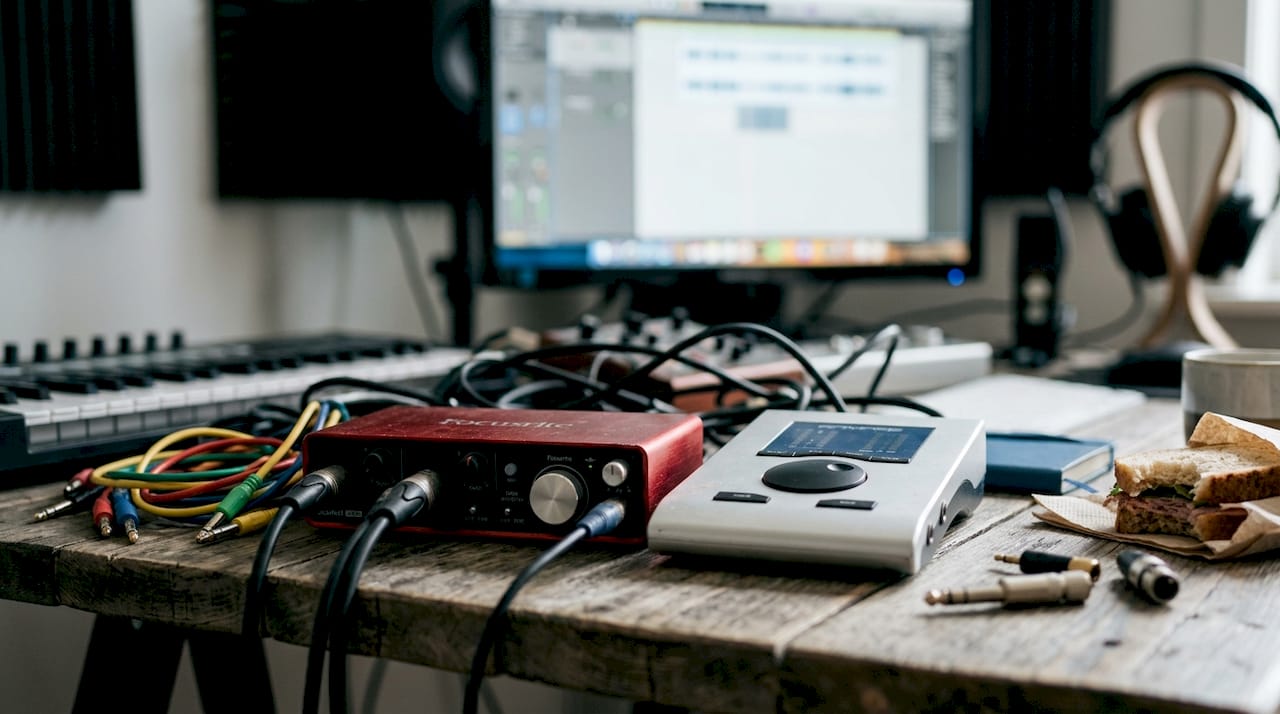
View a list of popular audio interfaces or best interfaces comparison to quickly see which models are most often recommended.
Pro-tip: With USB interfaces, always use a short, direct cable connection to your computer. Hubs and extension cables increase the chances of dropouts and latency problems.
USB interfaces are suitable for producers, singer-songwriters, podcasters and musicians recording at home. They offer excellent value for money and are more than adequate for most situations.
Thunderbolt and PCIe: Ultimate performance for demanding studios
Besides USB, there are faster connection types that take your workflow to the highest level. Thunderbolt and PCIe are the choice for professionals working with large sessions, many channels and outboard gear.
Thunderbolt offers less than 4ms latency and a bandwidth of 40Gbps, with support for up to 256 channels. That makes it ideal for complex recording sessions where every millisecond counts. The Universal Audio Apollo series is the best-known example: excellent converters, built-in DSP processing and a professional workflow.
PCIe goes one step further. Because the card plugs directly into your desktop PC, there is virtually no latency and the connection is extremely stable. RME offers excellent PCIe cards that have been the standard in professional studios for years. PCIe and Thunderbolt deliver benefits in large projects with ultra-low latency requirements.
| Connection Type | Latency | Max. channels | Suitable for |
|---|---|---|---|
| USB | 5-7ms | Up to 24 | Home studio, starters |
| Thunderbolt | <4ms | Up to 256 | Professional studio |
| PCIe | <2ms | 256+ | High-end desktop studio |
| FireWire | 6-10ms | Up to 18 | Obsolete, not recommended |
Thunderbolt and PCIe are not necessarily better for everyone. They really shine when your workflow demands it: large orchestral recordings, live monitoring with many channels or intensive DSP processing.
Want to know more about reducing latency in your setup? Or are you curious about detailed audio interface reviews of specific models? Then those resources will help you further in your choice.
Which audio interface suits your situation? Comparison and recommendations
Now that you know what each connection offers, here is a brief comparison as well as concrete advice for each situation. Performance, price and application vary greatly by model and connection type.
| Model | Type | Price (approx.) | Channels | Best for |
|---|---|---|---|---|
| Focusrite Scarlett 2i2 | USB | €150 | 2 in / 2 out | Starters, singer-songwriters |
| RME Babyface Pro FS | USB | €750 | 12 in / 12 out | Advanced producers |
| Universal Audio Apollo Twin X | Thunderbolt | €900 | 2 in / 6 out | Professional home studio |
| RME HDSPe AIO Pro | PCIe | €600 | 30+ channels | High-end desktop studio |
Which type suits whom?
- Starter or hobbyist: Choose a USB interface such as the Focusrite Scarlett 2i2. Affordable, reliable and easy to use.
- Advanced producer: The RME Babyface Pro FS gives you professional converters and low latency without requiring Thunderbolt.
- Professional studio with outboard gear: The Universal Audio Apollo via Thunderbolt offers DSP processing and many expansion options.
- High-end desktop setup: RME’s PCIe cards are the most stable and fast choice for demanding sessions.
For home use, USB is fine in most cases. PCIe and Thunderbolt only make sense for heavy requirements.
Checklist for upgrading your setup:
- Do you regularly run into latency problems during insertion or playback?
- Are you working with more than 8 channels at a time?
- Do you use outboard gear or hardware synthesizers that you want to integrate?
- Is your current interface the bottleneck in your production process?
If you answer yes to three or more questions, an upgrade probably makes sense. Also, check out the interface features comparison page for a detailed overview.
Pro-tip: Always test your interface with your own DAW and project format before buying definitively. What is fast on paper may turn out differently in practice due to driver compatibility or system settings.
Our vision: what really matters in audio interfaces in 2026
We see it time and again: producers who hesitate for months about which interface to buy, while their recordings suffer mostly from poor acoustics or an inconsistent monitoring setup. The interface is important, but it’s rarely the weakest link.
USB interfaces are so mature by 2026 that they are more than adequate for 90% of producers. The jump to Thunderbolt or PCIe only makes sense if your workflow really requires it: think 32+ channels, intensive DSP processing or ultra-low latency when live monitoring with a full orchestra.
Don’t let extreme specs fool you. An interface with 192kHz sample rate won’t sound better if you end up mixing everything to 44.1kHz for streaming. Rather, focus on preamp quality, driver stability and compatibility with your system.
Start with what you need now. Review best choices for studio and build from there. You can always upgrade later as your requirements grow.
Make your studio sound like a pro: Discover our selected interfaces
Are you ready to upgrade your setup? At i4studio you’ll find a carefully curated selection of audio interfaces for every situation and budget.
Whether you’re looking for a reliable USB/Thunderbolt interface for everyday use, or a complete studio recording bundle to get started right away, we’ll help. Do you have specific requirements or expansion plans? Our team is ready for personal advice. Check out our full studio offering and find the solution that fits your workflow, budget and ambitions. Fast delivery and immediate support are standard.
Frequently asked questions about audio interfaces
What is the difference between USB, Thunderbolt and PCIe audio interfaces?
USB, Thunderbolt and PCIe differ in speed and latency. USB is affordable and universally applicable, while Thunderbolt and PCIe offer lower latency and higher bandwidth for large professional productions.
Do I really need Thunderbolt or PCIe for my home studio?
For most home users, a good USB interface will suffice just fine. Thunderbolt and PCIe are only really useful for sessions with many channels or when ultra-low latency is a hard requirement.
Does the quality of the preamps and converters really make such a difference?
Absolutely. Preamps and converters determine how clean and natural your recordings sound, which is especially audible with vocals, acoustic guitar or other sensitive sources.
Are FireWire audio interfaces still recommended?
FireWire is considered obsolete and not recommended for new setups. Modern computers often no longer have FireWire ports, and support from manufacturers is declining rapidly.
Which well-known USB audio interfaces are suitable for beginners?
The Focusrite Scarlett and MOTU M-series are popular and reliable choices for starters. They combine good sound quality with easy operation and an attractive price.
Recommendation
- Audio Interface For Recording: The Complete Guide For Studio, Podcast And Live Production – https://i4studio.nl/
- Popular Audio Interfaces: The Best Choices For Studios, Musicians And Content Makers – https://i4studio.nl/
- Audio Interface Reviews: Complete Guide For Studios And Makers – https://i4studio.nl/
- Best Audio Interfaces Compare: A Comprehensive Guide For Producers And Musicians – https://i4studio.nl/