A Threadripper system is the right choice for 8K or RAW workflows, multi-GPU setups, heavy batch rendering, or tight deadlines where multiple tasks are running simultaneously. For the majority of 4K editing projects, an AMD Ryzen 9 or Intel Core i9 is still more affordable and practical. The technical criteria and a specific checklist later in this article will help you determine which category you fall into.
In short:
- A Threadripper is the best choice for 8K and RAW workflows, multi-GPU setups, and long-duration batch rendering with many concurrent tasks.
- For 4K editing, light workflows, or higher clock speeds, an AMD Ryzen 9 or Intel Core i9 is usually more efficient and cost-effective.
- The platform advantage lies in the number of PCIe lanes, memory channels, and ECC support—all essential for heavy I/O requirements and stability during extended sessions.
- For workflows involving a lot of RAW or 8K footage, multiple concurrent tasks, and critical deadlines, a high-performance setup pays for itself more quickly.
- For less intensive tasks, a high clock speed per core on a desktop CPU often delivers better real-world results than a higher number of cores.
Table of contents
- For which workflows is a Threadripper system a good investment in video production?
- What makes Threadripper platform technology different from consumer CPUs?
- How much CPU power do Premiere Pro and DaVinci Resolve require?
- What does a Threadripper system really cost, including cooling and a power supply?
- Checklist: Should You Go with Threadripper or Not?
- i4studio’s take on Threadripper for video
- Custom studio PC from i4studio: no unnecessary specs, just the right ones
- Sources
- Frequently Asked Questions
For which workflows is a Threadripper system worth it in video production?
Not every editing project requires extra cores. Threadripper’s added value lies in specific, recognizable situations, not in the notion that “more power is always better.”
8K RAW and high frame rates. With 8K footage or RAW formats such as RED R3D or ARRIRAW, the CPU must process enormous amounts of uncompressed data. The higher the resolution and frame rate, the more memory bandwidth and processing power are needed to keep scrubbing and playback smooth. Puget Systems demonstrates that the Threadripper 9000 series makes a real difference here, provided the workflow actually benefits from additional RAM capacity and I/O bandwidth.
Multi-cam and simultaneous batch exports. If you’re working on a series with multiple episodes that need to be rendered in parallel, extra cores directly reduce the turnaround time. A four-hour render on an eight-core system can be reduced to a fraction of that time with enough cores, simply because more threads can process frames simultaneously.
On-set ingest and multi-GPU monitoring. Studios that generate proxies during recording, use multiple capture cards simultaneously, or combine live monitoring with different GPUs simply need more PCIe lanes than a consumer-grade platform can provide.
Stacked CPU tasks. Combining rendering, encoding, and transcoding into a single workflow—all at the same time—is where an 18- or 24-core processor really shines. For example:
- An editor who transcodes proxy files for a second editor while the final cut is being exported.
- A colorist who sends a preview render to the client while grading is still in progress.
- A post-production house that runs a batch of ten projects overnight without supervision.
If none of these situations apply to your project, there’s a good chance that a Ryzen 9 or Core i9 will feel faster in practice, simply because those chips have a higher clock speed per core for lighter tasks.
What makes Threadripper platform technology different from consumer CPUs?
The real difference between Threadripper and a Ryzen 9 isn’t just the number of cores. It’s in the platform surrounding it: how much data can flow in and out of the chip at the same time, and how stable that remains under sustained load.
Cores versus speed per core. More cores only speed up tasks that lend themselves well to parallel processing, such as rendering and decoding RAW footage. For light timeline scrubbing or applying a single color correction, you actually benefit more from a higher clock speed per core. Those who primarily work solo on relatively short projects will notice little to no difference based on core count alone.
PCIe lanes: the underrated bottleneck. A Threadripper platform offers significantly more PCIe lanes than a consumer motherboard. This becomes relevant as soon as you deploy multiple GPUs, set up an NVMe RAID array for lightning-fast scratch disks, or use multiple capture cards simultaneously. On a standard Ryzen platform, you’ll quickly hit a limit here.
Memory channels and ECC. Threadripper systems run on multiple memory channels simultaneously, rather than the two channels found in a standard desktop. This provides measurably more bandwidth for large timelines with many layers and 8K proxies. Furthermore, for long, unattended render jobs, ECC memory (error-correcting memory) is no luxury: a single bit error that causes a ten-hour overnight render to crash costs more time than the extra cost of ECC could ever justify.
- More cores are particularly helpful for rendering, encoding, and decoding RAW footage.
- More PCIe lanes resolve bottlenecks in multi-GPU and NVMe RAID setups.
- Additional memory channels increase bandwidth for heavy timelines.
- ECC memory prevents crashes during long, unattended jobs.
TRX50 vs. WRX90: The Difference That’s Often Overlooked. TRX50 is the entry-level platform for Threadripper, while WRX90 is the PRO platform. Builders and reviewers at Root-Nation point out that WRX90 unlocks more memory channels and more PCIe lanes—exactly the features that high-workload studios need. Threadripper PRO adds up to 128 PCIe 5.0 lanes and full ECC support on top of that. For a single-machine editing suite, that’s overkill. For a studio that combines multiple GPUs, multiple capture cards, and large NVMe arrays into a single system, PRO is often the only way to connect everything at once without compromises.
Pro tip: If you’re going with a non-PRO Threadripper, check in advance how many PCIe lanes your motherboard actually allocates to the slots you want to use. Not every motherboard utilizes the chip’s full lane budget.
How much CPU power do Premiere Pro and DaVinci Resolve consume?
The software you use plays a major role in determining whether Threadripper is worth the investment. Not every editor benefits equally from additional cores, and that depends heavily on the codec you’re working with.
LongGOP codecs such as H.264 and H.265 rely heavily on hardware acceleration. Consumer CPUs often have built-in media cores that efficiently decode this type of content, which is why a Ryzen 9 remains surprisingly competitive here. RAW formats and intra-frame codecs such as ProRes work differently: each frame stands on its own, without compression that relies on previous frames, and that requires pure processing power from the CPU itself. Puget Systems notes that Threadripper therefore performs particularly well with intraframe and RAW workloads, while the advantage is smaller with LongGOP material because consumer chips already handle that task well using hardware.
In Premiere Pro, Adobe deliberately distributes tasks between the CPU and GPU. Effects, color correction, and most export encoding benefit from GPU acceleration, while decoding certain RAW formats and complex multicam sequences place a heavier load on the CPU. Consumer CPUs with media cores significantly speed up H.264/H.265 exports, narrowing the gap with Threadripper for that specific task.
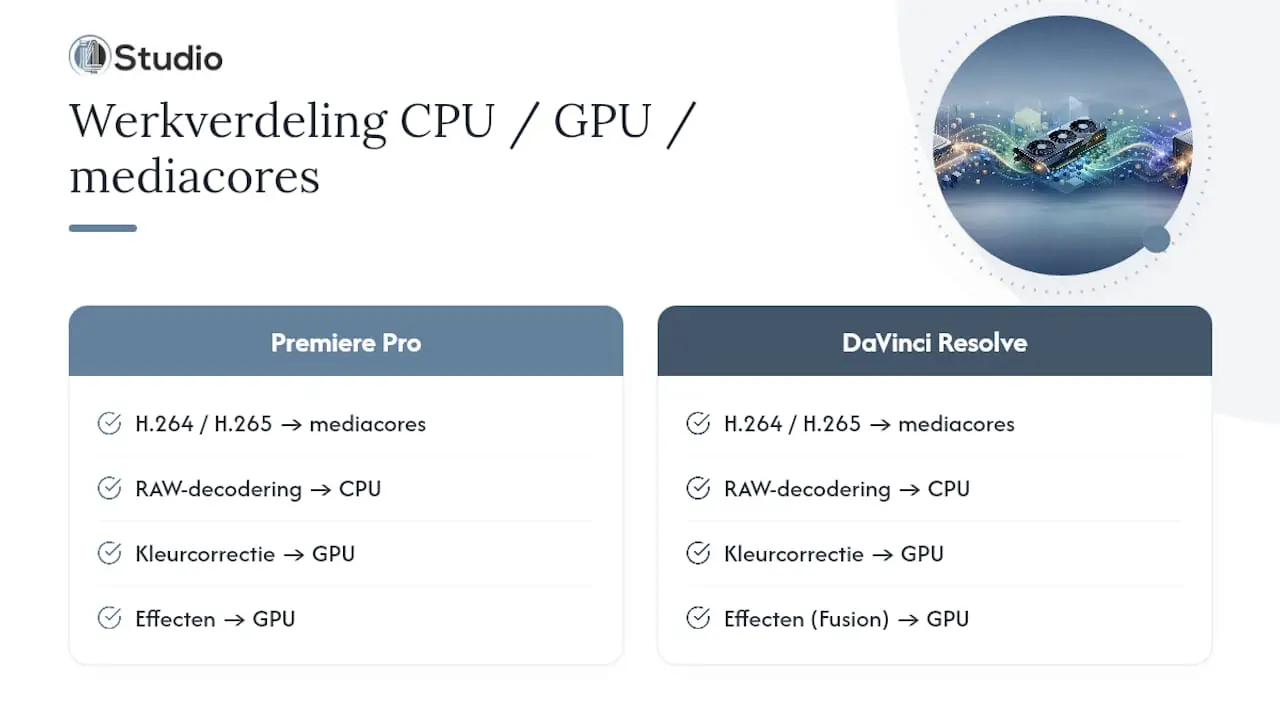
DaVinci Resolve is even more heavily GPU-dependent: color correction, Fusion effects, and most render passes run primarily on the graphics card. However, you’ll definitely notice the CPU cores at work when decoding RAW sources, during Fairlight audio editing with many plugins, and when simultaneously playing back multiple 8K streams in a multicam timeline.
To be specific: if you mainly edit H.264 vlogs, you’ll see little difference between a Ryzen 9 and a Threadripper. However, if you’re working with RED RAW footage in 8K, playing back multiple camera angles simultaneously, and exporting a second project in the background at the same time, you’ll notice the difference in actual hours saved.
How much does a Threadripper system really cost, including cooling and a power supply?
The starting price of the processor itself is only part of the story. A complete Threadripper platform—including the motherboard, memory, power supply, and cooling—is significantly more expensive than a comparable Ryzen 9 or Core i9 build.
- Threadripper motherboards are more expensive than consumer-grade motherboards due to their more extensive PCIe design and the VRM capacity required for high TDPs.
- Memory often needs to be purchased in larger quantities per channel to take full advantage of the bandwidth.
- According to ComputerTotaal, top-of-the-line models in the PRO series, with dozens of cores, are primarily relevant for niche high-end studios, not for the average post-production business.
- Power consumption—and thus the electricity bill—is structurally higher during long rendering sessions.
Cooling is no trivial matter. AMD strongly recommends professional cooling solutions for Threadripper due to its high TDP and the long duration of typical video workloads. Even an expensive water-cooling system won’t be enough without sufficient radiator surface area and airflow: a case that’s too small or an incorrectly sized radiator will cause throttling, preventing you from fully utilizing the extra cores you paid for.
In multi-GPU setups, the power supply is a separate concern. Root-Nation recommends more powerful power supplies, such as the Pro WS Platinum series, for these types of systems, combined with spacious cases that provide enough airflow to keep both the CPU and multiple graphics cards cool.
Threadripper by the Numbers: The platform can offer up to 128 PCIe 5.0 lanes and full ECC support in the PRO segment—well above what a consumer platform allows—and it is precisely this combination of lanes, memory channels, and reliability that justifies the higher purchase price for demanding studio environments.
Checklist: Should you go with Threadripper or not?
Before you request a quote, it helps to ask yourself a few straightforward questions. The answers will largely determine whether Threadripper is worth the investment or whether you’ll be wasting money on capacity you’ll never use.
- What resolution and codec do you use in your daily workflow? If you regularly work with 8K, RAW, or ProRes, Threadripper is the better choice. If you mainly stick to 4K H.264/H.265, a Ryzen 9 or Core i9 is often sufficient, as Icttoday also concludes for mainstream 4K editing.
- How many tasks are running simultaneously? If you’re rendering while also transcoding and preparing a second project, then multitasking is your main reason for needing extra cores.
- How tight are your deadlines? When you’re under time pressure, every minute saved on rendering counts. With more flexible schedules, slow turnaround time is less of an issue, and the additional cost carries more weight.
- What is the total investment versus the time saved? Don’t just factor in the CPU—consider the entire platform: motherboard, memory, power supply, and cooling. Compare that to the hours you’ll consistently save each month.
- What I/O do you need? Multiple capture cards, NVMe RAID, or multi-GPU setups require the PCIe lanes that only Threadripper (and certainly the PRO variant) offers in abundance.
- Do you need ECC and a warranty? For unattended, long-running batch jobs, ECC memory is a wise requirement, and always ask your builder or integrator about the motherboard’s upgrade path for future CPU generations.
As a rule of thumb: plan on at least 24 cores for serious 8K or RAW workflows involving multiple concurrent tasks. Below that level, you’re often paying for a platform whose full benefits you won’t be able to take advantage of.
Pro tip: Always ask your developer for a concrete example of rendering performance with your specific codec, not just general benchmark numbers. The difference between H.265 and RAW performance can be significant on the same platform.
If you’re still unsure about the right specifications for your editing setup, the “Ideal Computer for Video Editing ” guide provides a practical overview of the requirements for each workflow.
i4studio’s take on Threadripper for video
We only use Threadripper when a client truly benefits from the extra I/O and memory bandwidth: 8K post-production, multi-GPU color grading, or studios that run unattended batch renders overnight. For most freelance editors and smaller studios, we honestly recommend a Ryzen 9 or Core i9 build, simply because the extra cost doesn’t pay off in those cases. Every custom system we build is tailored to the codecs and software you actually use, not to the most powerful specs that happen to be available.
– harold
Custom studio PCs from i4studio: no unnecessary specs, just the right ones
i4studio doesn’t build off-the-shelf standard configurations. We build each system based on your codec, resolution, and deadlines, so you never pay for processing power you don’t use and never run short when it counts.

If you’re torn between a Ryzen 9 build and a full-fledged Threadripper platform, our specialists will work with you every step of the way—from the initial specifications to the final cooling solution. Check out sample configurations on the Studio PC Examples page or request a quote directly via the Custom PCs for Video Editing page. Our Studio PCs are available; you can find current prices on our website. Contact us and request a customized technical specification before investing in hardware that might not be suitable for your actual editing work.
Sources
For those who want to delve deeper into the technical details: AMD’s product pages provide the official platform specifications, while Puget Systems publishes comprehensive benchmarks for Premiere Pro and Resolve. For information on availability and practical platform differences, ComputerTotaal and Root-Nation are valuable resources, while AMD’s own cooling recommendations help you build a stable system.
- Icttoday
- New AMD Ryzen Threadripper 9000 Series Now Available | ComputerTotaal
- Threadripper cooling solutions | AMD
Frequently Asked Questions
Is Threadripper necessary for 4K video editing?
For most 4K editing, a Ryzen 9 or Core i9 with 16 to 24 cores is sufficient. Threadripper only becomes relevant for 8K, RAW footage, or workflows involving multiple simultaneous heavy-duty tasks.
What is the difference between the TRX50 and the WRX90?
TRX50 is the entry-level platform for Threadripper, while WRX90 is the PRO platform with more memory channels and more PCIe lanes, suitable for studios with heavy I/O demands.
When is Threadripper PRO with ECC necessary?
ECC is useful for long, unattended render jobs where a memory error could cause a session lasting hours to crash, and for studios that require maximum stability.
Does DaVinci Resolve perform better with Threadripper than Premiere Pro?
Resolve is more GPU-intensive, but extra CPU cores do help with RAW decoding and playing back multiple 8K streams simultaneously. Premiere Pro distributes tasks more evenly between the CPU and GPU.
How much does a custom Threadripper system cost through i4studio?
Studio PCs, including those with Threadripper configurations, are available; for prices and specifications, please visit the website.