Local radio and television stations need a custom rack-mounted or desktop server with SSD RAID, dual 10GbE network connections, redundant power supplies, and a hardened OS. Only this combination offers the stability and compliance required for MediaHub delivery. Also consider Dante/AES67 support and PTP synchronization for audio over IP. If in doubt, request a specification quote or test plan from a specialist before placing your order.
In short:
- A playout server requires at least a server-class processor with 8 to 16 cores and 16 to 128 GB of memory, depending on the workload.
- For reliable media streams, SSD-RAID storage and at least two redundant 10GbE network connections are essential.
- Security in accordance with European directives requires a hardened OS, centralized logging, two-factor authentication, and separate network environments for management and production.
- Compliance with MediaHub requires a storage capacity that allows for 14 days of retention of compliance recordings, with video and audio in specific codecs and bitrates.
- When ordering a custom studio computer, it is important to clearly define the scope, redundancy, security requirements, and testing criteria in advance.
Table of contents
- What hardware specifications does a studio PC need for playout?
- How do you set up storage and networking for reliable media streams?
- What security measures and operational procedures are required for 24/7 broadcasting?
- How do you deliver content to NLPO MediaHub without any hassle?
- How do you order a custom build without any surprises later on?
- Why Future-Proof Choices Are More Important Than Maximum Specs
- How i4studio helps you with a custom playout setup
- Sources
- Frequently Asked Questions
What hardware specifications does a studio PC for playout require?
A playout server runs around the clock, which requires different choices than a standard editing workstation. The foundation is a recent server- or workstation-class processor with enough cores to handle multiple streams, encoders, and monitoring simultaneously.
In its hardware guidelines for MediaCentral, Avid distinguishes between three scale levels: small, medium, and large, each with its own recommendations for cores, clock speed, and network capacity. For a local broadcaster with one or two broadcast channels, a medium configuration is generally sufficient, while larger production houses with multiple parallel feeds tend to require large-scale specifications.
- Processor: At least a modern 8- to 16-core server- or workstation-class CPU, depending on the number of concurrent streams.
- Working memory: 16 to 32 GB for small installations; 64 to 128 GB for medium and large workflows with multiple encoders. ECC memory is recommended for stability during long-duration broadcasts.
- Storage: the operating system on an SSD in RAID 1 (at least 240 to 500 GB), and a separate data volume in RAID 5, RAID 6, or an NVMe pool for media files.
- Power supply and motherboard: Redundant power supplies and a server-grade motherboard are not a luxury but a necessity for continuous operations.
- GPU: Not always required for pure playout, but it is useful for hardware-based transcoding or intensive GUI rendering in production software.
This configuration aligns with Avid’s MediaCentral Cloud UX guidelines, which recommend SSD storage for both the operating system and data, with a strict separation between the two volumes. If you’re unsure whether to choose a ready-made workstation or a fully customized studio computer, you should first assess your expected workload: number of channels, simultaneous recordings, and future growth.
How do you set up storage and networking for reliable media streams?
Media files are large and require constant read and write speeds. A standard hard drive can’t handle that in a 24/7 environment, so SSD-RAID is, in practice, a must for any serious playout setup. The separation between the OS volume and the data volume recommended by Avid prevents a crashed operating system from immediately compromising the entire media library.
The network is just as important as the storage itself:
- Plan on at least two 10GbE ports per server for media transfers; a single Gigabit connection becomes a bottleneck as soon as you start working with uncompressed or lightly compressed material.
- Use dual NICs with LACP bundling where the workload requires it, so that a single cable failure does not bring down the entire broadcast.
- For audio over IP using Dante or AES67, Audinate’s network guidelines recommend managed gigabit switches with QoS via DSCP marking and PTPv2 synchronization. If multiple subnets are involved, Dante Domain Manager is required to maintain consistent clock distribution.
- Build redundancy at multiple levels: locally mirrored engines, network-based parallel streams, and an offsite copy for disaster recovery.
Pro tip: Schedule a real failover test at least twice a year, including a full restore drill. A backup that you’ve never tested by restoring it isn’t really a backup.
Network-based redundancy using AoIP, PTP, and parallel servers has proven to be more flexible in practice than pure hardware mirroring, as described in broadcast industry publications regarding PTP redundancy in media-driven networks.
What security and operational procedures are required for 24/7 broadcasting?
A playout server that is online day in and day out is also an attractive target for disruptions and intruders. The EBU cybersecurity guidelines (r143) set the European standard for vendor acceptance and are now regarded as a practical checklist for any broadcaster purchasing equipment.
- Work with a hardened OS image: disable unnecessary services, restrict local administrator accounts, and run playout software in a non-administrator context.
- Always test updates on a standby unit first before rolling them out to production.
- Set up centralized logging via Syslog and SNMPv3, and perform regular vulnerability scans.
- Use centralized authentication (LDAP or Active Directory) with two-factor authentication for every internet-accessible interface, and encrypt transport with TLS.
- Isolate maintenance access in a separate network zone or DMZ, separate from the production network.
By the numbers: MediaHub requires compliance recording with a 14-day retention period, and radio audio is delivered in MPEG-1/Layer 2, 192 kbps, 48 kHz. Be sure to factor this retention period into your storage capacity before specifying a system.
How to Submit Content to NLPO MediaHub Without Any Hassle
MediaHub 2.0 sets clear technical requirements for what a local broadcaster submits, and those requirements directly determine which encoder and storage options you choose.
- Video SD: MPEG-2, constant bitrate between 4,500 and 5,500 kbps.
- Video via H.264: High Profile 4.2, approximately 2,750 kbps for video and audio combined.
- Radio audio: MPEG-1 Layer 2, stereo, 192 kbps at 48 kHz.
- Compliance recording: mandatory 14-day retention in accordance with the requirements of the Media Authority; therefore, structurally incorporate this retention period into your storage design.
You are free to choose between using your own encoder that sends content directly to the MediaGateway, or an external content delivery service that handles this for you. The NLPO service page on MediaHub confirms that broadcasters may choose their own provider, as long as the delivery meets the gateway specifications. Schedule a test delivery with the MediaGateway in advance and document which encoder settings and profiles you use—this will significantly speed up the acceptance process. For technical questions, contact techniek@nlpo.nl, and when comparing costs, it’s worth considering both the one-time hardware costs and the ongoing management overhead of a content delivery service.
How to Order a Custom Build Without Any Surprises Later On
A good RFP starts with a clearly defined scope: the number of channels, the level of redundancy, the service contract, and the acceptance criteria are non-negotiable.
- Define the following in advance: scale (small, medium, large), desired level of redundancy, security requirements, and the desired level of monitoring.
- Ask the vendor explicitly about the patch policy, the duration of support, remote support options, and how SNMP and PTP are configured.
- Require concrete test cases before signing: a trial delivery in the correct format, a full failover test, a restore exercise, and a measurement of network throughput and latency.
- Ask about warranty periods and the on-site repair SLA, especially for equipment that must run 24/7.
Pro tip: Always ask for a written SLA with specific response times—don’t just settle for a verbal promise. When there’s a technical issue during a broadcast, every minute counts.
Specialized builders who understand both broadcast requirements and the underlying hardware bring real value to the table. Anyone who tries to find the best computer for radio and broadcast on their own will quickly realize that generic office PCs simply aren’t built to handle this workload.
Why Future-Proof Choices Are More Important Than Maximum Specs
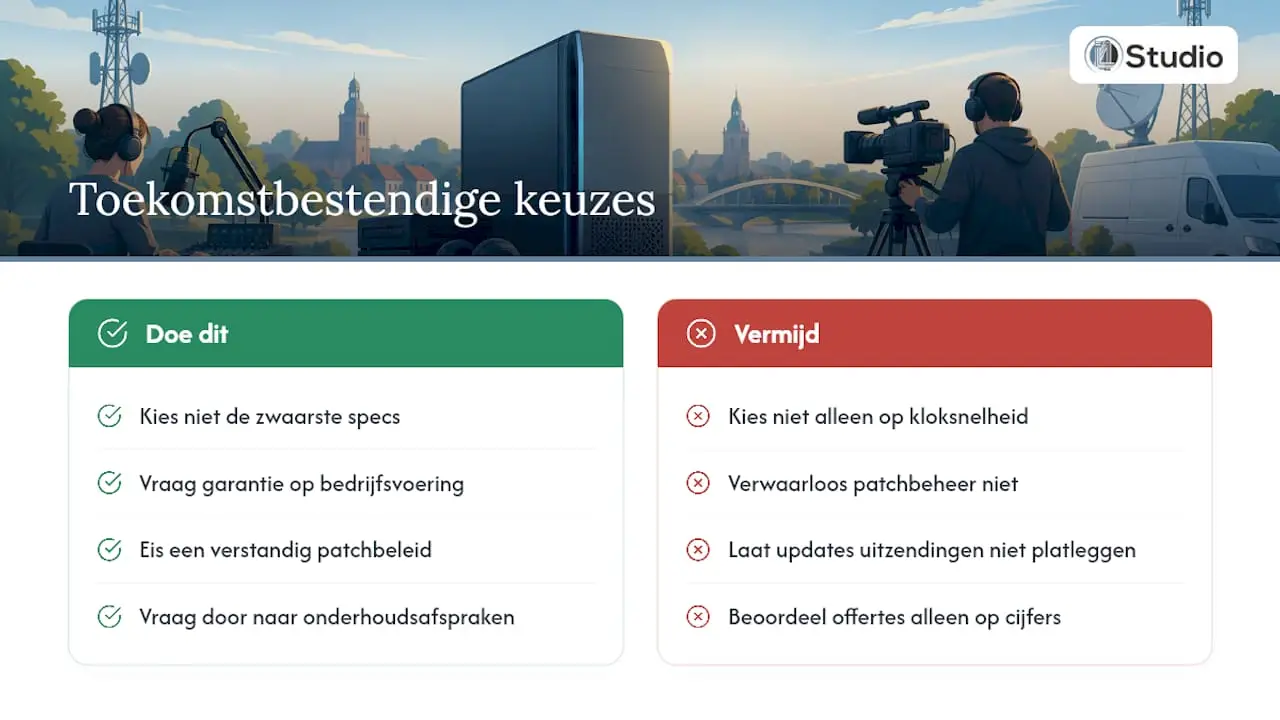
The industry is moving toward IP-based studios, software-driven workflows, and microservices, as illustrated by the EBU’s Dynamic Media Facility reference model. That doesn’t mean you have to buy the highest-end equipment available right now.
More important is a guarantee of uninterrupted operations and a sensible patching policy that prevents an update from bringing your broadcast to a halt. When choosing between two similar quotes, you should always ask about maintenance agreements and not just focus on clock speeds.
– harold
How i4studio Can Help You Set Up a Custom Playout System
I4studio is the alternative to a generic computer supplier when you’re building systems specifically for radio or television: not an off-the-shelf office PC, but a custom-built studio computer tailored to your channels, redundancy requirements, and MediaHub delivery.
Custom-built studio PCs are available starting at a certain price, including installation guidance and configuration for SNMP, PTP, and MediaHub delivery. Support remains available even after the system is built, ranging from patch policies to questions about network setup. It’s always wise to compare quotes; i4studio provides references and test reports upon request, so you can make that comparison based on hard facts rather than sales pitches. If you’re unsure whether to choose a purely audio-focused or video-focused configuration, be sure to explore the options for PCs designed for video editing. Request an initial consultation or a detailed quote today via the i4studio website, and define the scope, scale, and level of redundancy right away.
Sources
Download and save these documents for your acceptance testing: the MediaHub 2.0 service description, Avid’s hardware guidelines, the EBU security recommendations, and Dante’s network recommendations. Together, these four documents form the framework against which every proposal must be evaluated.
- MediaHub 2.0 Service Package (NLPO)
- Avid StreamIO / MediaCentral Hardware Guidance
- EBU Cybersecurity Recommendation (r143)
- Dante: Networks and Switches Guidance
Frequently Asked Questions
What is the minimum storage configuration for a playout server?
The operating system should be installed on an SSD in a RAID 1 array with a capacity of at least 240 to 500 GB, separate from a data volume in a RAID 5 or RAID 6 array or an NVMe pool for media files. This separation follows the recommendations in Avid’s hardware guidelines and prevents a system failure from immediately affecting your entire media library.
How long do you need to retain broadcasts for MediaHub compliance?
MediaHub 2.0 requires compliance recording with a retention period of 14 days. Factor this period into your storage capacity.
Is a separate GPU required for local radio or television?
For pure playout, a GPU is usually not strictly necessary. However, a GPU is definitely useful for hardware-based transcoding, intensive GUI rendering, or video editing alongside the broadcast.
How much does a custom studio PC cost at i4studio?
Custom studio PCs are available starting at a certain price. The exact price depends on the configuration you choose, so request a quote with specifications for your specific setup.
Can a local broadcaster choose its own supplier for MediaHub delivery?
Yes, the NLPO allows broadcasters to choose their own provider, as long as the content submitted meets the MediaGateway specifications. This is evident from the NLPO’s MediaHub service page, which permits both in-house encoders and external content providers.