Learn more about a suitable computer, contact ( info@i4studio.nl) us and check out our Video Computers
- Introduction
- Overview of Grass Valley EDIUS
- Importance of proper PC configuration
- Minimum System Requirements for EDIUS.
- Processor
- Memory (RAM)
- Storage
- Graphic card
- Recommended System Requirements for EDIUS
- Processor
- Memory (RAM)
- Storage
- Graphic card
- Processor (CPU) Choice
- Why the CPU matters
- Recommended CPUs for EDIUS
- Memory (RAM) Requirements.
- Why RAM is crucial
- How much RAM is sufficient?
- Storage Solutions
- SSD vs HDD
- Recommended storage capacity
- Graphics Cards (GPU)
- The importance of a good GPU
- Recommended GPUs for EDIUS
- Motherboard
- Compatibility and expandability
- Recommended motherboards
- Cooling
- Importance of good cooling
- Recommended cooling systems
- Power Supply (PSU)
- How much power do you need?
- Recommended PSUs
- Housing
- Importance of good housing
- Recommended enclosures
- Peripherals
- Monitors
- Keyboards and mice
- Operating system and Software
- Compatibility with EDIUS
- Recommended operating systems
- Optional Accessories
- Sound Cards
- Extra storage
- Conclusion
- Summary of the best PC configuration
- Latest tips
- FAQ
- What is the minimum RAM I need for EDIUS?
- Should I use an SSD or HDD?
- Which GPU is best for EDIUS?
- Can I use EDIUS on a laptop?
- Is a separate sound card necessary for video editing?
Best PC configuration for Grass Valley EDIUS Software
Introduction
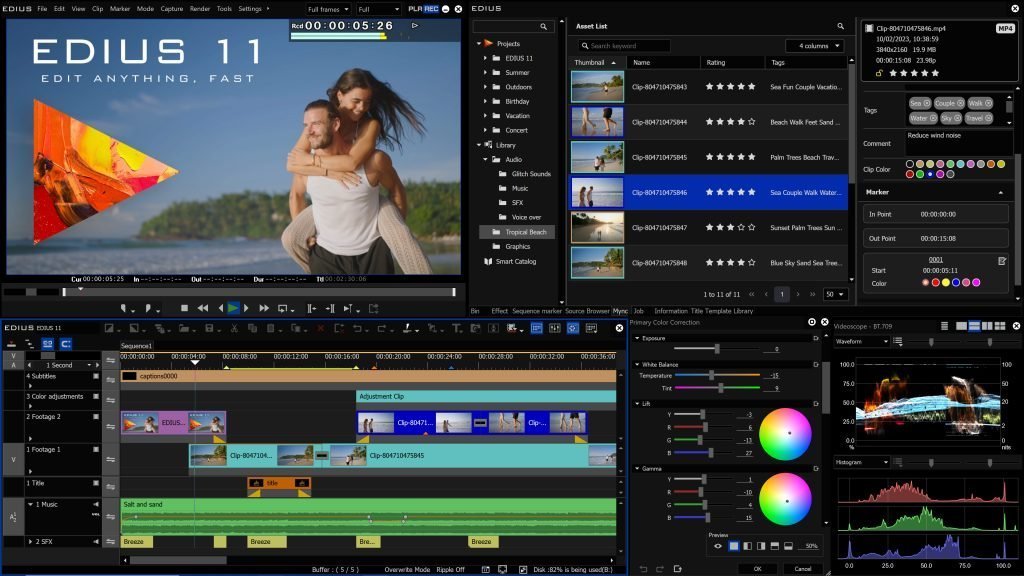
Video editing is a demanding task that requires powerful hardware. Grass Valley EDIUS is a popular choice among professional video editors because of its speed and versatility. But to get the most out of EDIUS, you need an appropriate PC configuration. In this article we discuss the ideal Computer -configuration for Grass Valley EDIUS software. We have years of experience in putting together powerful computers ourselves, for help and advice info@i4studio.nl
Minimum System Requirements for the video computer
To run EDIUS at all, your PC must meet certain minimum requirements. These are the basic components you need:
- Processor: Intel Core i3
- Memory (RAM): 4 GB
- Storage: 500GB HDD
- Graphics card: Integrated GPU
However, these minimum requirements are often not sufficient for smooth and efficient video editing. !!
Recommended System Requirements
For an optimal experience, we recommend the following configuration:
- Processor: Intel Core i7 or higher
- Memory (RAM): 16 GB or more
- Storage: 1 TB SSD + 2 TB HDD
- Graphics Card: NVIDIA GeForce GTX 1660 or Higher
Processor (CPU) Choice
The CPU is the heart of your EDius PC and has a major impact on softare performance . For video editing, a powerful CPU is essential. Recommended CPUs include the Intel Core i7 and I9, which offer multiple cores and high clock speeds.
Memory (RAM) Requirements.
RAM is crucial for video editing, especially when working with large files and multiple layers. We recommend at least 16 GB of RAM, but 32 GB or more may be desirable for larger projects.
Storage Solutions
Video files can be huge, so adequate and fast storage is important. A combination of an SSD for your operating system and EDIUS software, and an HDD for video file storage is ideal. A 1 TB SSD and a 2 TB HDD offer plenty of space and speed.
Graphics Cards (GPU)
A powerful GPU can significantly improve the performance of EDIUS, especially when rendering and playing high-resolution videos. Recommended GPUs are the NVIDIA GeForce GTX 1650 or the 4060 or higher , both of which provide excellent performance at a reasonable price.
Motherboard
Choose a motherboard that is compatible with your chosen CPU and offers sufficient expansion options. Motherboards from brands such as ASUS and asrock are known for their reliability and performance.
Cooling
Good cooling is essential to keep your PC stable during intensive editing tasks. Therefore we use solid and large coollers for a perfect air flow
Power Supply (PSU)
A reliable power supply is crucial. Make sure your PSU provides enough power for all your components. A 650W PSU from a reputable brand is usually sufficient. We therefore use quiet PSUs of at least 650 and with the heavier video interface even an 850Watt
Housing
A good enclosure provides adequate space and cooling for your components. Choose an enclosure with good ventilation and room for future expansion. Enclosures from brands such as BE quite and Cooler Master are popular for their quality and functionality.
Peripherals
Quality monitors and input devices can enhance your editing experience. Consider a monitor with accurate colors and high resolution, as well as an ergonomic keyboard and mouse.
Operating system and Software
EDIUS is compatible with Windows operating systems. Be sure to use the latest version of Windows for best performance and compatibility.
Optional Accessories
For additional functionality, consider purchasing a separate sound card and additional storage. This can be especially useful for audio-intensive projects.
Conclusion
The best PC configuration for Grass Valley includes a powerful CPU, sufficient RAM, fast and ample storage, and a strong GPU. With the right components, you can enjoy a smooth and efficient video editing experience.
FAQ
What is the minimum RAM I need for EDIUS computer? Minimum 4 GB, but 16 GB is strongly recommended for better performance.
Should I use an SSD or HDD? A combination of both is ideal: an SSD for your OS and seb for your storage, for very large storage we recommend a SATA
Which GPU is best for a video computer? Recommended GPUs are the NVIDIA GeForce GTX 3050 or higher
Can I use EDIUS on a laptop? Yes, but make sure the laptop meets the recommended system requirements.
Is a separate sound card necessary for video editing? Not necessary, but a separate sound card can improve audio processing.
Learn more about a suitable computer, contact us and check out our Video Computers