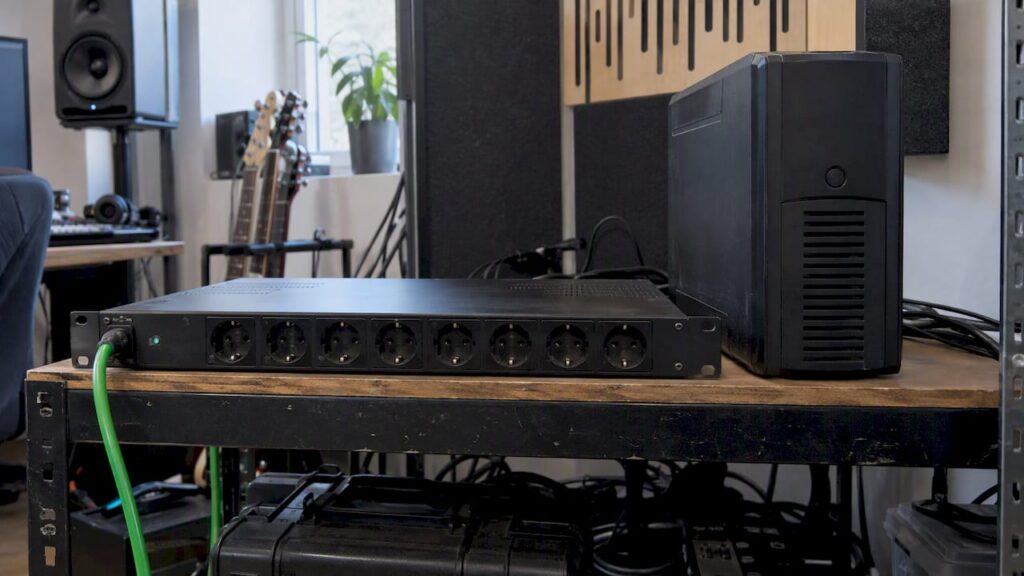
A line conditioner cleans up your power. A UPS keeps your equipment running if the power goes out. That’s the difference. A line conditioner (also called a power conditioner) filters out noise, absorbs power surges, and divides your outlets between digital and analog equipment. A UPS has a battery. In the event of a power outage, this gives you time to save your session and shut down your studio PC properly. For most studios, the question isn’t which of the two to choose. The question is which equipment you connect to which device. Below, you’ll learn how both work and what the difference is between a line-interactive and an online UPS. You’ll also find out which setup is right for your home studio, project studio, or editing space.
In a nutshell
- Line conditioner: filters out mains noise, protects against power surges, and isolates digital and analog circuits. It does not have a battery, so it does not provide backup power in the event of a power outage.
- UPS: Provides battery power during power outages or voltage dips. Ideal for your studio PC, NAS, and external drives. However, a UPS doesn’t always filter out the noise you hear in your audio.
- Line-interactive or online: Line-interactive is energy-efficient and sufficient for most studio PCs. An online UPS (double conversion) switches over without interruption and is better suited for truly unstable mains voltage.
- Pure sine wave is required: When choosing a studio PC, always opt for a UPS with a pure sine wave output, especially for power supplies with active PFC.
- Best approach: a power conditioner for your audio equipment and a pure sine wave UPS for your computer. The two complement each other.
Table of contents
- What exactly does a line conditioner do?
- What does a UPS do?
- Line-interactive vs. online UPS: the differences at a glance
- Why a pure sine wave is essential for your studio PC
- Line conditioner and UPS side by side
- Which solution is right for your studio?
- How to Build a Two-Tier Power Setup
- Our take: Stability starts with the power supply
- Put together your complete studio setup
- Frequently Asked Questions
- Sources
What exactly does a line conditioner do?
A line conditioner connects between the outlet and your equipment. It does three things:
- Filtering. The power grid contains high-frequency interference from dimmers, chargers, refrigerators, and switching power supplies. A good conditioner attenuates that noise across a wide frequency range. This reduces the amount of interference entering your signal chain.
- Surge protection. Short voltage spikes—such as those caused by turning heavy-duty appliances on and off—are smoothed out before they reach your interface or monitors.
- Distribution. Higher-end studio models feature separate groups of outlets for digital equipment, analog equipment, and high-current devices, such as power amplifiers. This helps prevent interference from your computer from leaking into your preamps.
What a conditioner doesn’t do: provide power when the grid goes down. If the power goes out, everything connected to it shuts down. A conditioner is therefore a device for power quality, not for power continuity.
Differential noise and common-mode noise
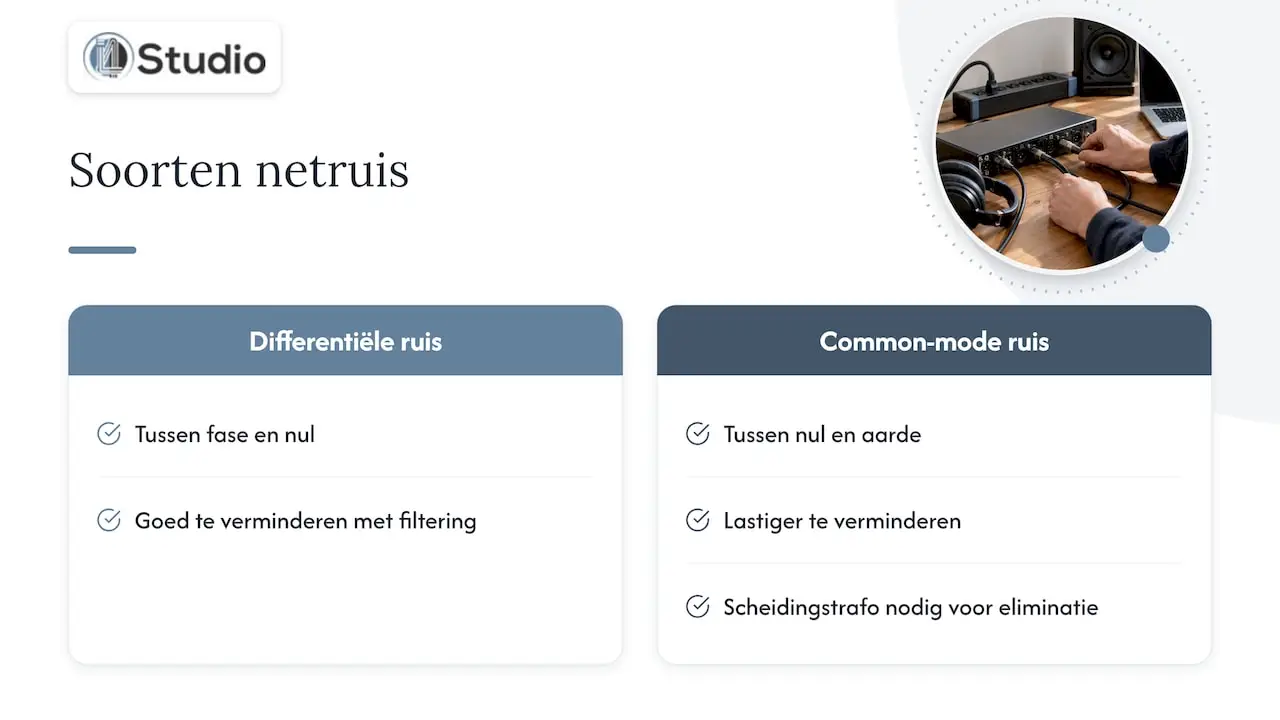
For a studio, two types of power line noise are important. Differential noise occurs between phase and neutral and can be effectively reduced with good filtering. Common-mode noise occurs between neutral and ground and is more difficult to deal with. A white paper by PowerVar on the difference between a UPS and a power conditioner states that you need an isolation transformer to truly eliminate common-mode noise. Most standard UPSs do not have one. According to the same white paper, effective surge protection should preferably not discharge interference to ground. This is because a contaminated ground is a well-known source of hum and ground loops.
The latter is important for studios. Many hum problems don’t stem from the power quality itself, but from grounding and cabling. That’s why you should also read about why a grounded outlet is essential in your studio and check out our step-by-step guide to hum-free cables in your studio. A ground loop caused by poorly installed cables cannot be fixed by a conditioner.
What does a UPS do?
A UPS (uninterruptible power supply) has a battery and an inverter. If the mains power fails or drops too low, the battery takes over. Depending on the power rating and battery capacity, you’ll have a few minutes or longer to save and close your project. Are you in the middle of a mixing session or running a long export? Then that’s the difference between a brief interruption and a corrupted project file.
Most UPSs also have surge protection on their outputs. But a UPS is primarily designed for IT equipment, not for achieving a low noise floor in your audio system. That’s precisely where the misunderstanding lies: a UPS is no substitute for a line conditioner.
There are three main types:
Offline (standby) UPS
The simplest option. Your equipment runs on mains power, and the UPS switches to the battery only in the event of a power outage. There is little or no voltage regulation. This is usually too limited for a studio PC, and inexpensive models often do not provide a pure sine wave.
Line-Interactive UPS
A line-interactive UPS compensates for minor voltage fluctuations on its own, without switching to the battery. According to Sikich, this is done using an autotransformer that increases or decreases the voltage. This is also known as AVR (automatic voltage regulation). Only in the event of a genuine power failure or a significant voltage deviation does the battery kick in, after a short switchover time.
Online UPS (double conversion)
An online UPS continuously converts mains power to direct current and back to alternating current. This means your equipment is always running on the inverter. If the mains power fails, there is no need to switch over: the switchover time is zero, because the power is already flowing through the inverter. As a result, the output is independent of what happens on the utility grid.
Line-Interactive vs. Online UPS: A Comparison of the Differences
This is the question that stumps most studio owners. Both are viable options. Which one you choose depends on your power situation and your equipment.
| Feature | Line-interactive UPS | Online UPS (double conversion) |
|---|---|---|
| Switchover time to battery | Short, a few milliseconds | None |
| Voltage Control | Via AVR, in steps | Continuous, output fully rebuilt |
| Energy Consumption | Lower, higher efficiency | Higher due to continuous conversion |
| Heat and Fan Noise | Less | More—pay attention in your control room |
| Battery Load During Power Fluctuations | Switches to battery power more often | The battery is conserved |
| Price | Lower | Higher |
| Suitable for | Virtually any modern studio PC | Sensitive or critical equipment, unstable power supply |
A few points to consider:
- Efficiency and heat. According to Eaton, line-interactive is an efficient topology that generates less heat. Online models consume more power due to the double conversion. A modern computer power supply typically handles a brief switchover without any problems, because the capacitors in the power supply temporarily store energy.
- The power grid is unstable. A technical comparison by APC shows that an online UPS performs better in areas where the mains voltage frequently fluctuates. In such situations, a line-interactive model often switches to battery power, which shortens the battery’s lifespan.
- Noise. An online UPS runs continuously on the inverter and often requires active cooling. It’s best to place such a device in a machine room or a cabinet, not next to your recording microphone.
In most homes and studios, the mains voltage is stable enough for a good line-interactive UPS. Do you work in a commercial building with heavy machinery on the same circuit? Or do you regularly see lights flickering and devices restarting? If so, an online model is worth considering.
Why Pure Sine Wave Is Essential for Your Studio PC
Mains power is a smooth sine wave. Inexpensive UPS units mimic this—except when running on battery power—with a stepped waveform, often called a “simulated” or “modified sine” wave. Sikich explains that a pure sine wave accurately mimics mains power. A simulated waveform, on the other hand, can actually cause problems with sensitive equipment.
For a studio PC, this is no minor detail. High-performance computer power supplies use active PFC (power factor correction). When connected to a simulated sine wave, such a power supply may start to hum, shut down unexpectedly, or wear out over time. Then your backup won’t work when you need it most: during a power outage. So be sure to check the specifications:
- Battery output: “pure sine wave.”
- Compatibility: explicitly stated as “Active PFC compatible.”
- Power: in watts, not just in VA. Add up the power consumption of your PC, monitors, and any external storage devices, and allow for a generous margin.
- Outlets: the number of outlets powered by the battery. Not every outlet on a UPS is battery-powered.
Line conditioner and UPS side by side
If you place the two devices side by side, you’ll see that they solve different problems.
| Function | Line conditioner | UPS |
|---|---|---|
| Backup in Case of a Power Outage | No | Yes |
| Surge Protection | Yes | Usually yes |
| Noise Filtering for Audio | Yes, the main purpose | Limited; varies by model |
| Separate digital/analog groups | For studio models | Rarely |
| Voltage Control | On some models | Line-interactive and online: yes |
| Fan Noise | Usually quiet | Often has a fan |
| Typical location | Rack, near your audio equipment | Under the desk, near the computer |
In short: the power conditioner protects your audio equipment, and the UPS protects your work.
Which solution is right for your studio?
Home studio with a laptop or a compact setup
Do you work with a laptop, an audio interface, and a pair of powered monitors? If so, your laptop already has its own battery, so a UPS won’t add much value. The logical first step here is to use a good power conditioner or a filtered power strip with surge protection, along with a properly grounded electrical system.
Producer with a desktop studio PC
This is where a UPS comes in handy. A power outage while saving a large project can corrupt files. The best balance between price and protection for most producers: a line-interactive UPS with a pure sine wave for your PC and monitors, and a power conditioner for your interface, monitors, and outboard gear.
Video editor with long render times
Long exports and renders are vulnerable. Even a brief power outage can set you back hours of work. Choose a UPS with enough power to support your workstation at full load, including the GPU. Connect the UPS to your computer via USB so that it shuts down automatically in the event of a prolonged power outage.
Professional studio or a studio with a lot of analog equipment
When using preamps, compressors, an analog console, or synthesizers, you want the lowest possible noise floor. A rack-mount conditioner with separate groups for digital, analog, and high-current loads is standard here. For the computer, storage, and any network equipment, add a pure sine wave UPS. If the power grid is unstable, opt for an online model.
Here’s how to set up a two-tier power system
- Start with the installation. Check the grounding and, if possible, connect your audio equipment to its own circuit. Our guide to a reliable and safe power supply in your studio will help you with this.
- Take inventory of your equipment. Make two lists: what needs to keep running in the event of a failure (PC, monitors, storage) and what needs to sound especially clean (interface, monitors, outboard gear, synths).
- Plug the power conditioner into the wall outlet. Distribute your audio equipment across the appropriate circuits. Connect amplifiers and active monitors to the high-power circuit, if available.
- Plug the UPS directly into the wall outlet. Connect your studio PC, monitors, and external drives to the battery-powered outlets.
- Connect the UPS to your computer. Install the manufacturer’s software and configure the computer to shut down automatically after a set number of minutes on battery power.
- Use a single ground point. Connect the conditioner and UPS to the same circuit, or at least to the same ground point. This will prevent a new ground loop between the PC and the interface.
- Test the setup. Unplug the UPS from the wall while everything is still on. Does your PC keep running without humming, and do you hear no extra noise coming from your monitors? If so, everything is fine.
If you still hear hum after following these steps, check your signal cabling. Balanced connections result in significantly less noise. You’ll find more practical tips in our article on optimizing your power supply for pristine studio quality.
Our take: stability starts with the power supply
At I4studio, we build custom studio PCs with one goal in mind: a system that runs stably with low latency, session after session. Power is an often-overlooked factor in this process. A carefully configured DAW machine loses its advantage if it’s connected to a cheap UPS with a simulated sine wave. The same applies if the power supply shares a contaminated circuit with a refrigerator and a dimmer switch.
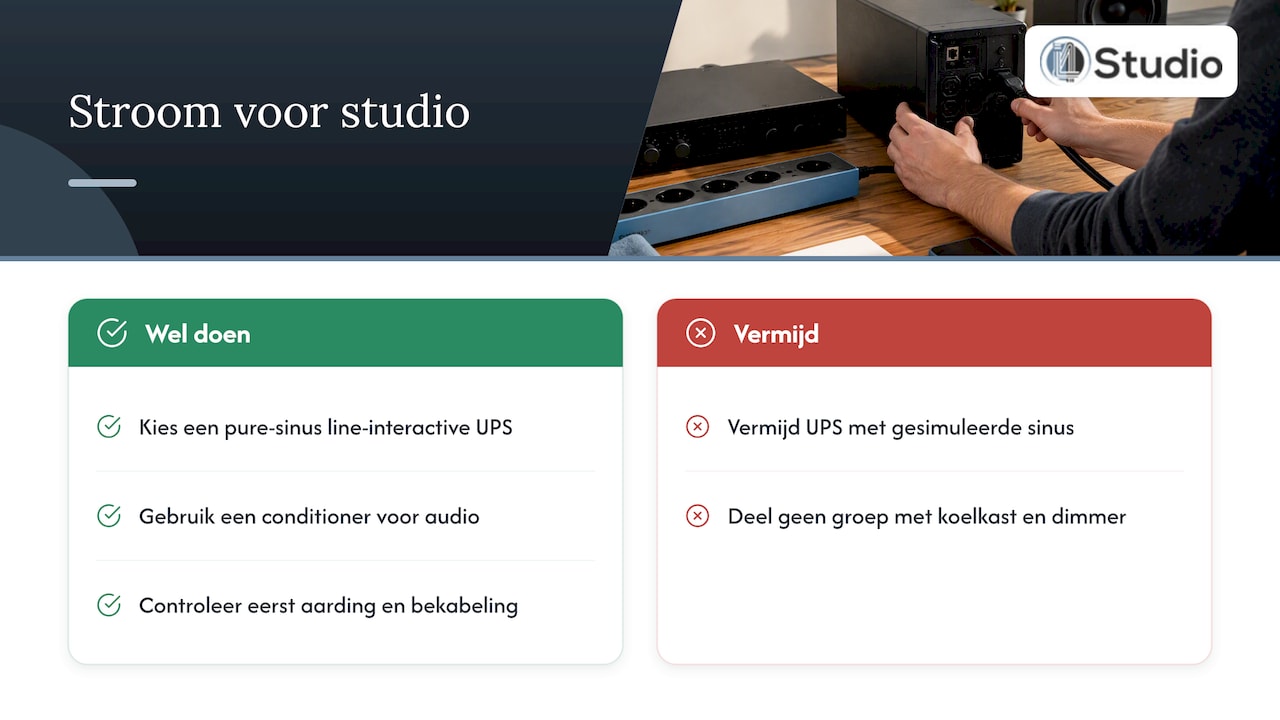
Our experience: Most customers don’t need an expensive online system. You can solve the vast majority of problems with three things: a good line-interactive UPS with pure sine wave for the computer, a conditioner for the audio chain, and proper grounding. We only recommend an online UPS if the power grid is demonstrably unstable, or if the studio operates commercially and downtime actually costs money. And we always check the grounding and cabling first, because that’s where the hum is more often found than in the outlet.
Not sure what your setup needs? Tell us what equipment you’re using, and we’ll help you figure out the best hardware and power solutions as a whole.
– harold
Put together your complete studio setup
Ready for a new workspace? It all starts with a computer built for audio and video. Our custom-built studio PCs start at €1,099 and are tailored to your DAW, plug-ins, or editing software. We also carry audio interfaces, such as the Universal Audio Volt 876 USB Recording Studio, studio monitors, and microphones. In addition, we offer a wide selection of studio equipment, from studio furniture to accessories. Does your space not sound quite the way you want it to? We can help you with acoustic panels and expert advice.
Frequently Asked Questions
Do I still need surge protection if I have a UPS?
Most high-quality UPS units have built-in surge protection on their outputs. That’s usually sufficient for your computer. For your audio equipment, however, a separate power conditioner with filtering and isolated circuits is advisable, since a UPS isn’t designed for that purpose.
Can I connect a line conditioner to a UPS?
That’s possible, but it’s rarely the best approach. You’ll be putting the load of all your audio equipment on the UPS, which leaves less runtime for your computer. In practice, two parallel circuits work better: the power conditioner and the UPS each plugged into a wall outlet, both connected to the same ground point.
Is an online UPS quieter for my recordings?
Not necessarily. An online UPS provides a very stable output, but often has an audible fan due to the continuous conversion. Place it outside your recording room, or choose a line-interactive model if noise is a bigger concern for you.
Does a power conditioner eliminate hum?
Sometimes. A power conditioner reduces mains noise and can limit interference between digital and analog equipment. It won’t fix hum caused by a ground loop or unbalanced cables. For that, you’ll need to address your grounding and cabling.
How much power should my UPS have?
Add up the actual power consumption in watts of everything that needs to run on the battery: PC, monitors, and storage. Choose a UPS with a generous margin above that total. That way, it won’t run at its limit, and you’ll have enough time to shut everything down properly.
Sources
- PowerVar: The Difference Between a UPS and a Power Conditioner
- Eaton: Choosing the Optimal UPS Topology
- APC: Technical Comparison of Online vs. Line-Interactive UPS Designs
- Sikich: Understanding Line-Interactive and Online UPS Devices